A sales pipeline can disappear from the main board while parts of the business keep running on its old definition. Open deals may have moved, yet historical opportunities still carry the old pipeline and stage IDs. A workflow can branch on an internal stage name. An integration can write a retired value. A report, forecast export, saved view, form, or warehouse model can still expect the old process. The board looks cleaner while the dependency survives elsewhere.
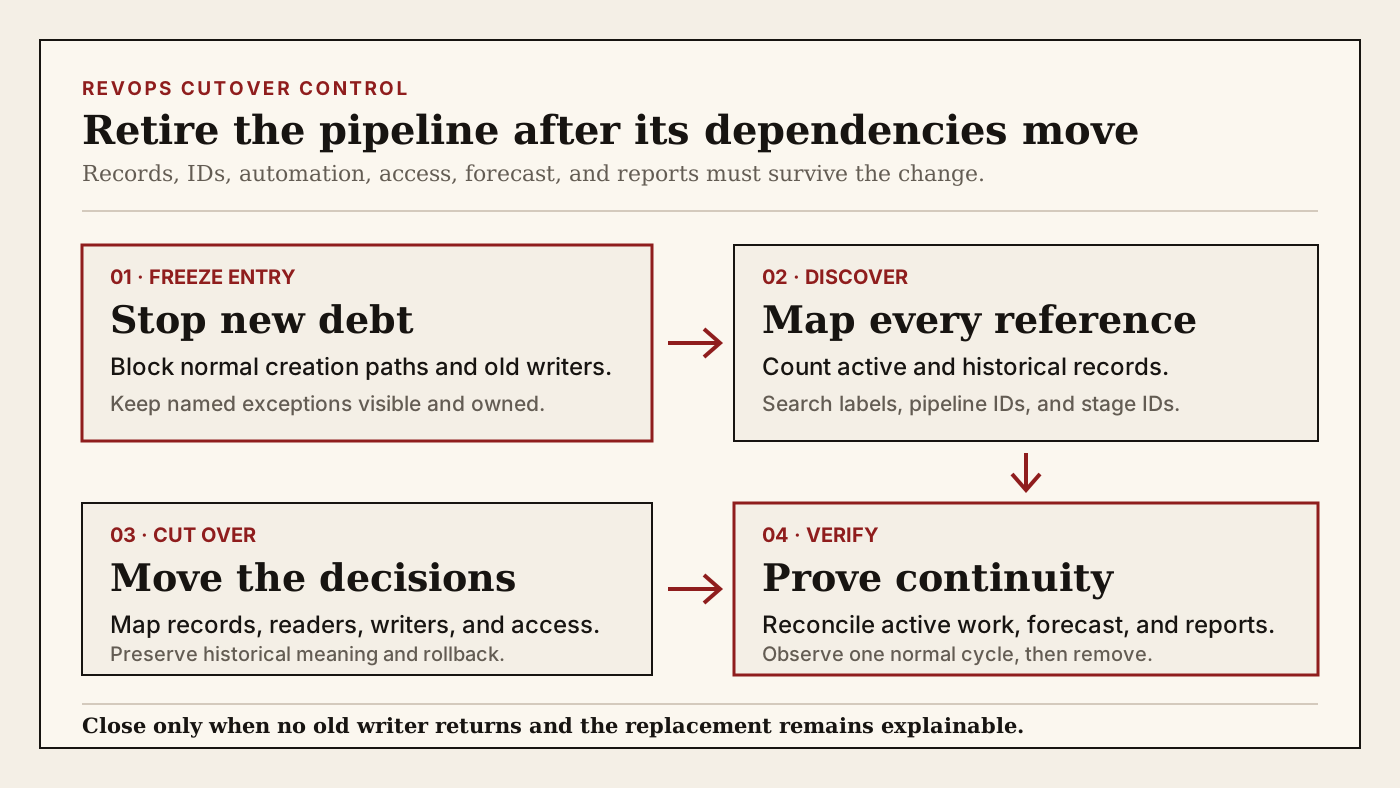
RevOps should treat pipeline retirement as a controlled cutover, not a delete action. Freeze new entry, inventory records and technical references, map every continuing business decision to a replacement, move or preserve records deliberately, and observe one normal operating cycle before removal. The goal is not to preserve unused pipelines forever. It is to stop a cleanup from breaking routing, forecast continuity, historical reporting, or customer work after the visible board has changed.
What to watch today
Watch for pipelines described as legacy, old motion, migration, pilot, former region, former product, prior sales process, duplicate, or do not use. Prioritize a pipeline when operators have already shifted to a replacement but records, reports, workflows, or integrations still mention the old name. A quiet board is a reason to inspect. It is not proof that the pipeline has no operating dependency.
The first warning is a difference between open-record count and total-record count. A pipeline may have no active deals while closed-won, closed-lost, cancelled, historical renewal, or migrated records still use its stages. Those records can support conversion analysis, cohort reporting, compensation evidence, forecasting history, customer handoffs, and audit questions. Moving them all into the newest pipeline can rewrite historical meaning even when no current seller sees the old board.
The second warning is a label-only search. HubSpot exposes an internal pipeline name for integrations and APIs, and its developer documentation treats pipeline and stage IDs as addressable values. A renamed pipeline can therefore keep the same technical reference. Search the visible label, internal name, pipeline ID, every stage ID, prior labels, and any mapped warehouse or integration value.
The third warning is a successful deletion test that checks only CRM records. HubSpot's Pipelines API documents a reference-validation parameter that reports existing records and prevents deletion until those records are deleted or moved. That is an important record-level control. It does not prove that a workflow condition, private integration, report filter, forecast workbook, form, saved view, warehouse query, or operating document has been migrated.
Why RevOps should care
A pipeline defines more than a place to display opportunities. Its stages can carry probability, forecast treatment, required or conditional fields, rules, automation, access, reporting cohorts, and process meaning. The same stage label can mean something different in the replacement process. Deleting or remapping the old structure without an evidence plan can make historical and current records look comparable when they are not.
The risk arrives on different clocks. A workflow can fail on the next enrollment. A form or integration can reject the next write. A manager can notice a missing view at the next pipeline review. Finance can find a broken cohort at month end. A warehouse transformation may fail only after its next full refresh. One clean save or one quiet day cannot verify a dependency class that runs weekly, monthly, or only at renewal time.
HubSpot documents pipelines, stages, internal names, rules, automations, access, conditional properties, probabilities, and a deletion path. Its API separately documents IDs, retrieval, replacement, audit information, and record-reference validation. Its report builder uses selected data sources, fields, filters, and breakdowns. These official controls support technical discovery. They do not decide which historical definitions the business must preserve or whether a replacement stage means the same thing.
Salesforce organizes opportunity work through opportunities, stages, record types, sales processes, activities, products, and account context. The configuration model differs from HubSpot, but the retirement question remains stable: which records, users, automations, integrations, forecasts, reports, and customer workflows still depend on the old process, and what approved definition replaces each dependency?
CRM and workflow signals to inspect
- CRM object, visible pipeline name, internal or API name, pipeline ID, stage labels, stage IDs, probabilities, display order, rules, conditional fields, access, and last configuration change
- Open, closed-won, closed-lost, historical, archived, migrated, test, duplicate, and exception record counts by stage, owner, team, currency, fiscal period, created date, and close date
- Record ID, account, owner, amount, stage, forecast category, close date, products, quote, next customer action, source pipeline-stage pair, and intended replacement treatment
- Workflow enrollment criteria, branches, reenrollment, suppression, delays, notifications, tasks, assignments, approvals, calculations, and downstream field writes that read the old pipeline or stage
- Forms, imports, APIs, webhooks, integration mappings, connected apps, scripts, spreadsheets, reverse ETL, warehouse models, BI extracts, and external IDs that read or write old values
- Saved views, lists, dashboards, custom reports, forecast views, pipeline snapshots, conversion cohorts, territory reports, commission inputs, board links, bookmarks, and recurring exports
- Replacement pipeline and stage IDs, evidence mapping, field translation, owner rule, access rule, forecast treatment, historical-record policy, cutover time, and allowed exceptions
- Business owner, CRM owner, integration owner, report owner, forecast owner, reviewer, rollback owner, monitoring window, and explicit close condition
15-minute operator action
Choose one pipeline already marked old or no longer intended for new records. Capture its visible name, internal name, pipeline ID, stage IDs, record counts by open and closed status, most recent record entry, and proposed replacement. Do not rename, move, archive, or delete anything during this first pass.
Search the old pipeline label, internal name, pipeline ID, and stage IDs in the CRM's workflows, lists, reports, forms, views, integrations, and available audit surfaces. Then search the same values in approved scripts, warehouse models, BI definitions, exports, and operating documentation. Open five records: one open, one recently closed, one older closed record, one integration-written record, and one reporting exception where available.
Classify each dependency as active record, historical evidence, workflow reader, external writer, report or forecast reader, access or view dependency, replacement incomplete, or evidence unclear. Pick one high-impact dependency and name its replacement, owner, next test, and rollback condition. The output is one pipeline dependency card and one verified cutover decision, not a bulk portal cleanup.
Freeze entry before moving records
Stop creating new debt before trying to clear old debt. Remove the pipeline from normal creation paths where the platform and permissions allow it, update operator guidance, and identify every form, import, workflow, integration, or API client that can still place a record into it. Do not delete the destination option from an external writer until its replacement value and failure behavior are tested.
Use a controlled exception for records that cannot move yet. A live deal may need its current commercial process until a manager maps the buyer evidence into the replacement pipeline. A historical record may need to stay unchanged for reporting. A migration exception may need a linked source record and due date. Record why the exception exists, who owns it, and what event closes it.
Monitor new entries after the freeze. Any new record is dependency evidence. Capture the writer, timestamp, source request, chosen stage, owner, and downstream effects. Repair the source path instead of repeatedly moving the record by hand. A pipeline with zero visible users can still be active because an integration retains a valid old ID.
Map records without rewriting history
Separate active cutover from historical preservation. For open records, choose the destination stage from current customer evidence and the replacement process's entry criteria. Preserve the old pipeline-stage pair, move reason, change time, writer, prior probability, prior forecast state, and relevant commercial snapshot. Then verify ownership, required fields, automation, quote and product context, forecast inclusion, and reporting.
For closed and historical records, decide what the reports need to answer. Moving all old closed-won deals into the newest process can inflate the replacement pipeline's historical conversion or erase the old motion's stage path. Leaving them in place can preserve history but requires reports and integrations to tolerate a retired definition. A mapped warehouse dimension or an immutable historical classification may be safer than rewriting CRM records. Document the chosen rule and apply it consistently.
Do not map stages by display order or similar labels alone. Discovery, proposal, renewal review, or closed won can have different evidence requirements across motions. Create an explicit old-to-new mapping with allowed record populations, customer evidence, forecast effect, report effect, and exception rule. Mark no equivalent when the old stage should remain historical or needs a reviewed decision.
Cut over automation, integrations, and access
List every reader and writer separately. A workflow can read the old pipeline to create a task. An integration can write an old stage ID. A report can group records by the old label. A permission or saved view can expose only that pipeline to a team. Retiring one dependency does not retire the others.
For workflows, inspect enrollment, reenrollment, branches, suppression, timing, delayed actions, calculated fields, notifications, ownership, approvals, and actions already waiting. A definition updated today may not change records already enrolled or delayed. Decide whether those records should finish the old path, exit, or restart in the replacement under controlled rules.
For integrations and APIs, replace internal names and IDs in a testable release. Confirm authentication, object type, accepted destination values, null and error behavior, retries, duplicate protection, and rollback. Keep the old configuration snapshot until one normal write and one error path have passed. A successful API response is not enough if the resulting stage, owner, task, and report are wrong.
For access and operator surfaces, update navigation, saved views, queues, board links, training material, and bookmarks. Confirm that the receiving teams can see and edit the replacement records before removing the old path. Pipeline retirement should not turn valid customer work into records that exist but no accountable owner can find.
Verify forecast and reporting continuity
Reconcile one pipeline view, one forecast view, one conversion report, one closed historical cohort, and one downstream extract before removal. Record expected counts and amounts before cutover, then explain every difference after the change. Separate a process migration from actual buyer movement, pipeline creation, loss, expansion, contraction, or forecast change.
Check report definitions, not only dashboard screenshots. HubSpot's custom report builder uses selected sources, fields, filters, and breakdowns. A report can render successfully while a filter excludes newly mapped records or a breakdown merges unlike stages. Review the source fields and definitions, then sample the underlying records.
Keep a retirement register with the old IDs, replacement IDs, record policy, dependencies checked, owners, cutover time, test evidence, monitoring window, and recovery decision. Close only after no unauthorized new records enter, active records follow the approved process, historical reporting remains explainable, external writes use valid replacement values, and the next normal forecast plus reporting cycle passes.
Risks and limits
Do not delete records to satisfy a technical pipeline-deletion check. Records can carry customer, commercial, contractual, forecast, support, and historical evidence. Move, retain, archive, or remove them only under the approved data, retention, and business policy. The API's reference validation is a safety signal, not a business retention rule.
Do not force a permanent parallel process when only one dependency is slow to migrate. Keep the old pipeline read-only or exception-only where possible, with a named owner and expiry condition. At the same time, do not set an arbitrary retirement date that ignores monthly, quarterly, annual, or renewal workflows that have not completed a normal cycle.
Do not assume vendor documentation covers private code, warehouse logic, spreadsheets, manually copied forecast packs, or human routines. Search technical references and ask the owners of the decisions the pipeline supports. A dependency is resolved when its business decision works through the replacement, not merely when its old string disappears from a configuration screen.
Finally, CRM editions, objects, APIs, permissions, automation, forecasting, and deletion behavior change. Verify current documentation and the target account before acting. The useful result is not one fewer pipeline. It is one retired process whose active work, history, automation, integrations, access, forecast, and reporting remain inspectable after the old board is gone.
Related reading
Which stage survives when a deal changes pipelines? · Who still reads this CRM field? · A forward stage jump can hide an unfinished buyer step · Before a closed deal re-enters the pipeline · Will your CRM correction survive the next sync? · Revenue forecasting workflows · CRM data quality workflows · CRM workflows · HubSpot profile · Salesforce profile · Clari profile
Source notes
These official sources support the workflow model and product concepts. They do not prove a specific retention outcome, benchmark, or vendor claim.
- HubSpot set up and manage object pipelines: Official reference for pipeline stages, internal names used by integrations and APIs, access, rules, automation, conditional stage properties, probabilities, and pipeline deletion.
- HubSpot Pipelines API: Official developer reference for pipeline and stage IDs, retrieval, replacement, audit information, and the reference-validation option that blocks deletion while records still use pipeline stages.
- HubSpot custom report builder: Official reference for report data sources, fields, filters, breakdowns, saved reports, and exports that should be checked before an old pipeline definition disappears.
- HubSpot record property history: Official reference for reviewing prior CRM values, change dates, and the user or process recorded as the source of a change.
- HubSpot workflow settings: Official reference for workflow enrollment, timing, suppression, execution, and related behavior that can remain tied to an old pipeline or stage condition.
- Salesforce opportunity management: Official Salesforce learning reference for opportunity stages, record types, sales processes, products, activities, account context, and the wider process that a pipeline retirement can affect.
Last updated: 2026-08-07