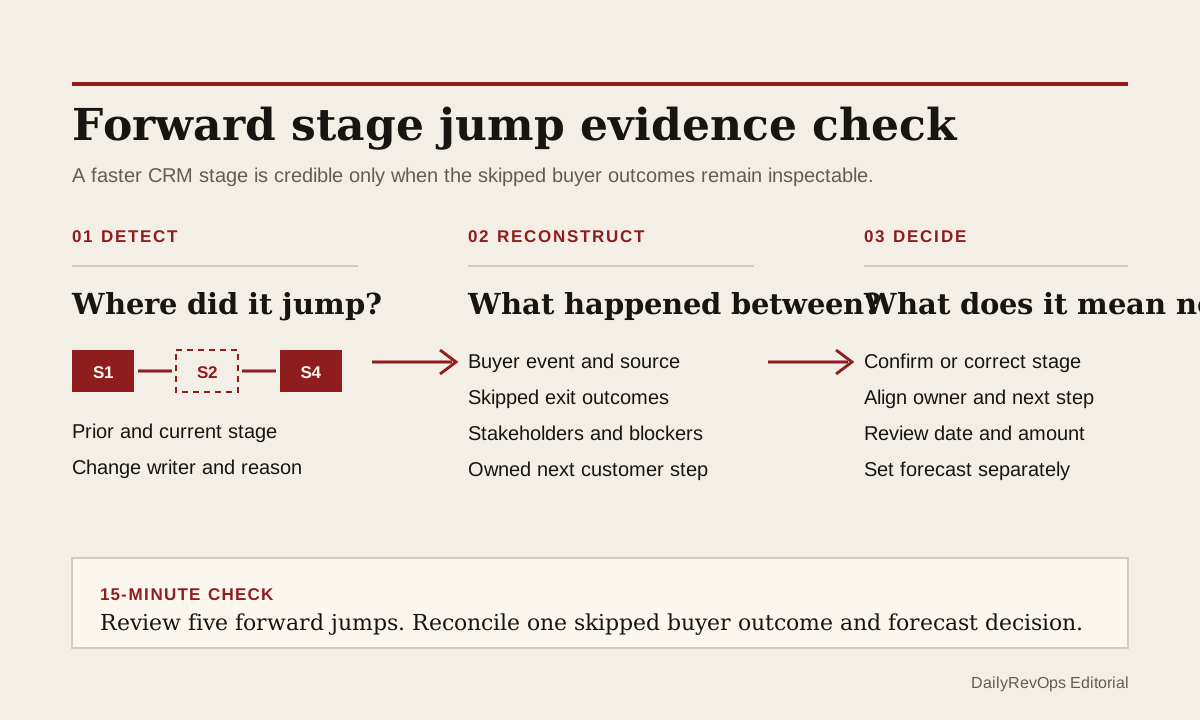
A deal can move forward quickly because the buyer really accelerated. Security may have finished early, an executive sponsor may have created urgency, or procurement may already know the path. The same CRM movement can also come from a seller cleaning up stages, an automation updating the record, or a manager pulling a deal into the current forecast. The visible jump does not explain which story is true.
The control is not to slow every fast deal down. It is to inspect what the skipped stages were meant to prove. When an opportunity jumps two or more stages, RevOps should check whether the buyer evidence, stakeholder work, owner actions, and commercial decisions behind those stages are present somewhere else in the record. A fast path is valid when the evidence is current and traceable, not when the stage label simply moved faster than the buying process.
What to watch today
Watch for open opportunities that advanced by two or more stages since the last pipeline or forecast review. Prioritize deals that entered proposal, negotiation, contract, procurement, or another late stage without a recorded customer event between the prior and current stage. A stage jump after a held meeting can be reasonable. A jump after an internal note, bulk edit, import, or workflow run deserves a different review.
Also watch for deals where the stage changed but the close date, forecast category, amount, next step, blocker, or stakeholder coverage stayed exactly the same. Unchanged fields are not automatically wrong. They are a sign that the commercial consequences of the jump may not have been reviewed. A deal can appear closer to close while still carrying the assumptions from discovery or evaluation.
A third signal is missing intermediate history. If the CRM shows discovery followed immediately by negotiation, determine whether the buyer completed the skipped work outside the normal sequence or whether the team bypassed its own process. The operator question is not whether every opportunity touched every label. It is whether the evidence expected from those stages can still be inspected.
Why RevOps should care
Stage movement can affect pipeline value, probability assumptions, stage-conversion reporting, workflow enrollment, required fields, manager queues, and forecast discussion. A forward jump can make current pipeline look stronger while leaving the underlying buyer path unchanged. It can also make historical conversion and stage-duration analysis hard to interpret because the CRM records a process shortcut without its reason.
HubSpot documents configurable deal stages, conditional stage properties, pipeline rules, and record property history. Salesforce documents opportunity stages, close dates, activity history, selected field history, and forecast categories. These sources show that stage progression, change history, and forecast state can be structured and reviewed. They do not prove that a particular buyer completed an exit criterion or that every skipped stage is risky.
RevOps should therefore treat a stage jump as a small evidence exception, not as automatic seller error. The useful outcome is a deal whose current stage, customer evidence, next action, close date, and forecast position tell one coherent story before the next operating review.
CRM and workflow signals to inspect
- Opportunity or deal ID, account, pipeline, segment, amount, currency, owner, and manager
- Prior stage, current stage, number of stages skipped, change time, and changed-by user or process
- Stage-jump reason: buyer acceleration, process correction, pipeline change, import, automation, manager decision, or reason missing
- Expected exit evidence for each skipped stage and the source activity or record that supports it
- Last meaningful customer meeting, reply, decision, stakeholder action, and evidence date
- Current decision group, champion, economic buyer, procurement, legal, security, or implementation context where relevant
- Next customer step, next-step owner, due date, blocker, and blocker owner
- Prior and current close date, amount, forecast category, manager judgment, and any active override
- Review status, reviewer, due date, decision, correction owner, and exception close condition
15-minute operator action
Open the five most recent opportunities that advanced by two or more stages. For each record, write down the prior stage, current stage, change source, and the customer event closest to the jump. Then list the one or two exit conditions that the skipped stages normally protect, such as confirmed problem, stakeholder access, technical fit, commercial scope, security review, or a buyer-owned next step.
Mark each sample as buyer acceleration confirmed, stage cleanup, manager judgment, automation or import, pipeline redesign, evidence partial, evidence missing, or duplicate-process issue. For one unresolved deal, ask the owner to link the current customer evidence, confirm which skipped checks are complete, set a dated next step, and make an explicit close-date and forecast decision.
The output is five classified jumps and one reconciled opportunity. It is not a full sales-process redesign. If all five records require detective work, create a temporary forward-jump view with old stage, new stage, change source, skipped checks, evidence status, owner, next step, close date, forecast category, and review due date.
Check outcomes, not stage attendance
A team does not need to force every opportunity through every stage in sequence. Some buyers arrive with a defined requirement, an approved budget, existing security context, or a procurement path already in motion. Requiring the seller to click through unused stages can create false history and empty field completion without improving the deal record.
Instead, define the outcome each stage is meant to protect. Discovery may protect a clear problem and buyer context. Evaluation may protect solution fit and stakeholder involvement. Proposal may protect scope and commercial assumptions. Procurement may protect an owned path through legal, security, finance, or purchasing. A fast deal can skip the label when those outcomes are already supported by current evidence.
Keep the exception small. For material jumps, record the skipped-stage outcomes, their evidence sources, who reviewed them, and any remaining gap. Close the exception when the current stage is supported, the stage is corrected, or the deal moves into a separate review state with an owner. A note that says fast-moving deal is not a close condition.
Keep stage and forecast decisions separate
A valid stage jump does not automatically justify a stronger forecast category or an unchanged close date. Stage describes the team's current sales-process position. Forecast category describes a related commercial judgment. The buyer may have accelerated technical review while procurement timing remains uncertain, or the stage may be correct while the close date still needs to move.
Ask for two explicit decisions. First, does the available evidence support the current stage? Second, what does that evidence mean for the close date, amount, forecast category, next step, and blocker ownership? Keeping the decisions separate prevents a stage update from silently becoming a forecast claim.
If an automation changes probability, tasks, required fields, or workflow enrollment when the stage jumps, inspect those effects too. The opportunity should not receive late-stage treatment from downstream systems before the team knows whether the skipped operating checks are complete.
Risks and limits
Do not punish legitimate buyer speed. A rigid no-skip rule can make the CRM less truthful when a customer completed work outside the standard sequence. It can also encourage sellers to click through stages without recording useful evidence. The target is inspectable progression, not perfect stage attendance.
Do not assume a completed field proves the skipped work happened. Required properties can improve consistency, but copied notes, default values, and vague next steps can still satisfy a form without supporting a buyer decision. Sample the linked source activity and review evidence quality, not only field presence.
Finally, change history may be incomplete after imports, integration writes, permission changes, or pipeline redesigns. If the prior sequence cannot be reconstructed, classify the record as a data-quality exception rather than inventing a buyer story. The goal is a fast-moving deal whose stage, evidence, owner action, close date, and forecast meaning another operator can defend.
Related reading
When a deal moves backward, the forecast should move too · Can the CRM defend the commit? · Revenue forecasting workflows · CRM workflows · How to run a weekly forecast review with CRM evidence · Why pipeline coverage is deceiving · Gong vs Clari for revenue intelligence · Salesforce profile · HubSpot profile
Source notes
These official sources support the workflow model and product concepts. They do not prove a specific retention outcome, benchmark, or vendor claim.
- HubSpot set up deal pipelines and stages: Official reference for defining deal stages, stage order, stage probabilities, conditional stage properties, and pipeline rules in HubSpot.
- HubSpot record property history: Official reference for reviewing historical property values, change times, and change sources on a CRM record.
- Salesforce opportunity management: Official learning reference for opportunity stages, close dates, activity history, and related deal information.
- Salesforce field history tracking: Official reference for tracking changes to selected Salesforce fields and reviewing field history.
- Salesforce forecast categories: Official reference for forecast categories as a separate forecast view of opportunity status.
Last updated: 2026-07-24