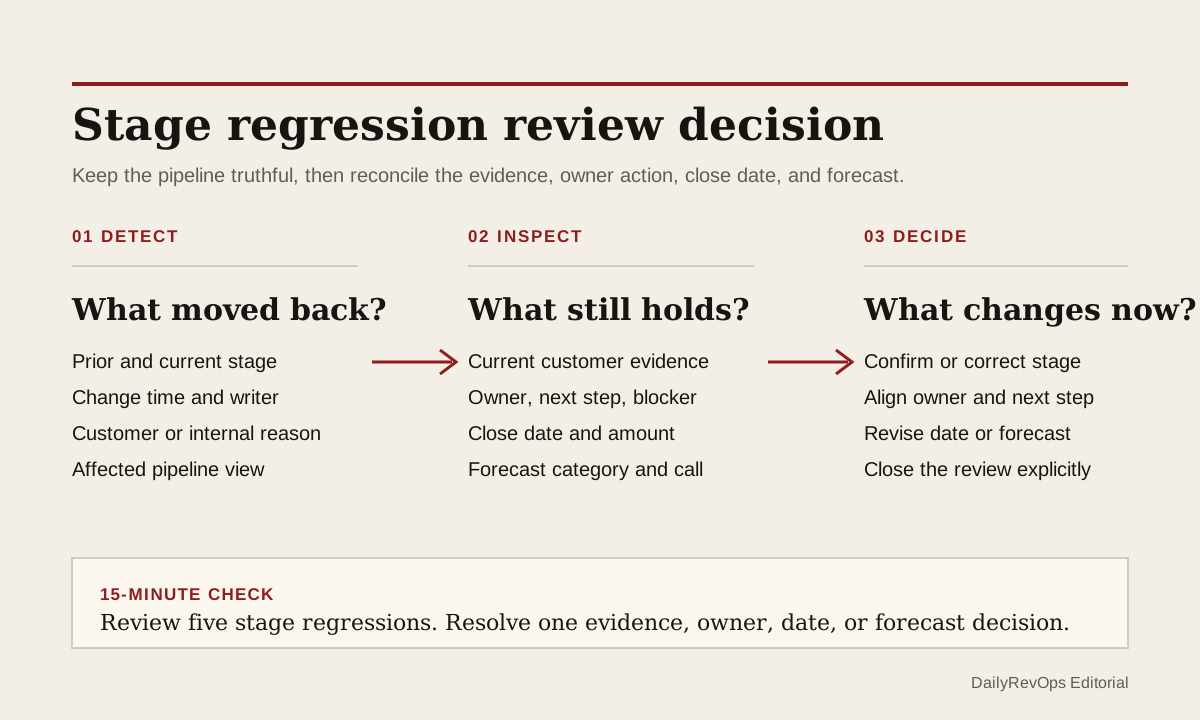
An open opportunity can move backward for a valid reason. A buyer may reopen discovery, legal may expose a new requirement, the decision group may change, or a late-stage assumption may fail. The operating risk is not the backward move itself. It is a stage regression that changes pipeline and forecast meaning without a reviewable customer event, a current owner, and a new next action.
This brief is different from a re-entry gate for a closed or recycled deal. The opportunity remains open, but its commercial path has weakened or become less certain. RevOps should preserve that truth in the CRM while requiring a short review decision that explains what changed and how the team will operate the deal now.
What to watch today
Watch for open opportunities whose stage moved backward since the last pipeline or forecast review. Prioritize late-stage deals, commit or best-case deals, high-value opportunities, and records whose close date or forecast category did not change with the stage. A deal that moved from negotiation to evaluation but kept the same close date and commit call may now contain two conflicting operating stories.
Also watch for backward moves made by automation, imports, integration users, bulk edits, or managers rather than the current deal owner. The change may be correct, but the owner may not know that the stage, probability, dashboard position, or forecast view changed. Property history is useful here because it can show the prior value, new value, change time, and change source where the platform retains that history.
A third warning is a stage regression with no new customer evidence. An internal meeting, manager concern, or CRM cleanup can justify review. It should not be presented as a buyer event. Keep the reason classified so the next operator knows whether the move came from the customer, the seller, a manager judgment, or a data correction.
Why RevOps should care
Stage is used for more than a board view. It can influence pipeline value, stage conversion, sales process reporting, probability assumptions, workflow enrollment, manager queues, and forecast inspection. A backward move can be the most honest update in the record, but downstream systems need to know whether the close date, amount, forecast category, next step, and owner action still hold.
If that review does not happen, managers can discuss a deal from the old narrative while the CRM shows a weaker stage. Finance may receive a forecast category that no longer matches the customer path. Sales Ops may later count the regression as process friction without knowing whether it was a buyer reset, an internal correction, a changed deal model, or simple stage misuse.
HubSpot documents configurable deal stages and record property history. Salesforce documents opportunity stages, close dates, activity history, field history, and forecast categories. These sources show that stage movement, history, and forecast state can be structured and inspected. They do not define the correct stage for a specific buyer or prove that every backward move represents lower win probability.
CRM and workflow signals to inspect
- Opportunity or deal ID, account, pipeline, segment, amount, currency, owner, and manager
- Prior stage, new stage, stage-change time, changed-by user or process, and controlled regression reason
- Stage-entry history, time in prior stage, earlier regressions, and any concurrent pipeline change
- Last meaningful customer event, event date, source activity, stakeholder, outcome, and evidence link
- Current next customer step, next-step owner, due date, blocker, and blocker owner
- Prior and current close date, close-date reason, amount review, and expected decision timing
- Prior and current forecast category, seller submission, manager judgment, and manual adjustment where used
- Review status, reviewer, review due date, decision, correction owner, and exception close condition
15-minute operator action
Open the five most recent open opportunities that moved backward in stage. For each record, compare the last meaningful customer event before the change with the first evidence recorded after it. Then check whether the owner, next step, close date, forecast category, amount, and blocker still describe the same commercial path.
Mark each sample as customer reset confirmed, seller correction, manager judgment, automation or import change, data cleanup, reason missing, evidence missing, or duplicate process issue. For one unresolved deal, ask the owner or manager to record the reason, link the current evidence, set a dated next customer step, and make an explicit forecast decision before the next review.
The output is five classified regressions and one resolved operating decision. It is not a full pipeline-stage redesign. If all five need detective work, create a temporary regression review view with the old and new stage, change source, owner, evidence status, next step, close date, forecast category, and review due date.
Separate pipeline truth from review status
Do not force a deal to stay in a later stage while the team waits for review. That preserves a cleaner dashboard at the cost of a less truthful pipeline. Move the stage when the current process state requires it, then use a separate review status or exception queue to show that the operating fields still need confirmation.
The stage answers where the opportunity sits in the defined sales process. The review status answers whether RevOps and the owner have reconciled the consequences of the change. Those are different questions. A deal can be correctly moved backward and still need a close-date change, a forecast-category change, a new blocker owner, or a decision to remove it from the active call until evidence improves.
Keep the prior stage and change source in history. If a workflow automatically updates probability, tasks, or required fields when the stage changes, inspect those effects as part of the review. The team should know whether the backward move only corrected the process label or also changed a real customer commitment and operating deadline.
Require a small regression packet
A useful packet does not need a long note. It needs the old stage, new stage, reason type, current customer evidence, next customer action, owner, close-date decision, and forecast action. For a material deal, add the manager review and any active override. This gives the next forecast call enough context to decide rather than reconstructing the full history.
Close the exception with one of a few explicit outcomes: regression confirmed and fields aligned, stage corrected back with evidence, close date revised, forecast category revised, owner action assigned, moved to a separate review state, or data issue sent to the system owner. A comment without a decision should not close the review.
Risks and limits
Do not treat every backward stage move as poor seller behavior. A regression can show better pipeline hygiene because the team corrected an optimistic stage. It can also reflect a changed buying process that deserves more discovery. Measure the quality of the review and the resulting decision, not a target of zero regressions.
Do not automatically lower the forecast category or move the close date from stage alone. Stage and forecast describe related but different judgments. Current customer evidence may support the same close date after a short process reset, while another deal may need to leave commit immediately. Require the explicit decision rather than encoding one universal rule.
Finally, history may be incomplete. Imports, integrations, permission settings, pipeline redesigns, and field-retention limits can make the change source hard to interpret. If the evidence is unclear, classify it as a data-quality exception instead of inventing a buyer story. The goal is a truthful pipeline change with an owner, evidence, next action, and forecast consequence that another operator can inspect.
Related reading
Forecast commit needs CRM evidence · Reopened pipeline needs a re-entry gate · Forecast ownership changes need an acceptance check · Revenue forecasting workflows · CRM workflows · Why pipeline coverage is deceiving · Salesforce profile · HubSpot profile · Clari profile · Gong profile
Source notes
These official sources support the workflow model and product concepts. They do not prove a specific retention outcome, benchmark, or vendor claim.
- HubSpot set up deal pipelines and stages: Official reference for defining deal stages, stage order, stage probabilities, and pipeline rules in HubSpot.
- HubSpot record property history: Official reference for reviewing historical property values, change times, and change sources on a CRM record.
- Salesforce opportunity management: Official learning reference for using opportunity stages, close dates, activity history, and related deal information.
- Salesforce field history tracking: Official reference for tracking changes to selected Salesforce fields and reviewing field history.
- Salesforce forecast categories: Official reference for forecast categories as a separate forecast view of opportunity status.
Last updated: 2026-07-23