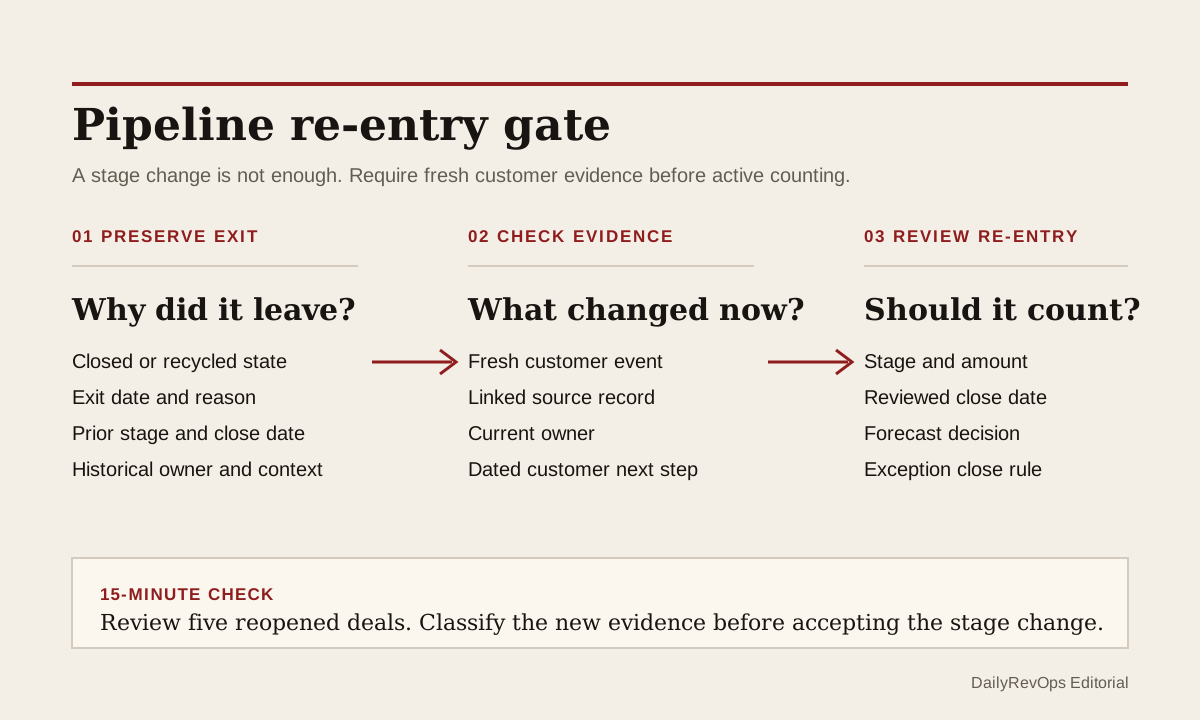
A closed or recycled deal should not return to active pipeline because someone changed its stage. Re-entry needs a new operating reason. The record should show what changed with the customer, which evidence supports renewed work, who owns the next step, why the close date is credible, and how the deal should affect the forecast now.
This is different from checking whether the original closed-lost reason was good enough. A lost reason explains why a deal left active pipeline. A re-entry gate asks whether fresh evidence is strong enough for the deal to count again. Without that gate, old pipeline can become new pipeline on screen without a new buying event behind it.
What to watch today
Watch for opportunities that moved from closed-lost, disqualified, dormant, or recycled directly into an active stage after an email open, a marketing response, a calendar task, a new quarter, or a seller request. Those events may justify review. They do not by themselves prove that the buyer restarted a commercial process.
Also watch for reopened deals that keep the old amount, close date, forecast category, next step, owner, or stage context. A record can look active while still carrying the assumptions that were present before it closed. If the customer situation changed, the operating record should show which assumptions were reviewed and which remain valid.
Why RevOps should care
Weak re-entry rules can inflate active pipeline, distort stage age and conversion analysis, and place stale deals back into forecast meetings. Managers may spend time inspecting an opportunity that has no current customer commitment, while genuinely active work receives less attention. The problem is not reopening itself. The problem is counting a reopened record before the new evidence is inspectable.
Pipedrive documents lost reasons as structured context for why a deal was marked lost. HubSpot property history can show past values, the time of a change, and its source. Salesforce documents opportunity stages, close dates, activity history, and the ability to change the state of a closed opportunity. Salesforce field history supports reviewing selected field changes. These sources show that stage exits, later changes, and their history can be recorded. They do not determine when a reopened deal is commercially real or forecastable for a specific team.
CRM and workflow signals to inspect
- Opportunity or deal ID, account, owner, pipeline, amount, and currency
- Prior closed or recycled state, exit date, lost or recycle reason, and prior close date
- Re-entry date, re-entry reason, changed-by user or process, and source of the change
- Fresh customer event: reply, held meeting, confirmed project, budget review, stakeholder request, or another reviewed signal
- Source email, meeting, call, note, task, or campaign response linked to the record
- New stage, stage-entry date, next customer step, next-step owner, and due date
- Reviewed close date, close-date reason, amount review, and forecast category decision
- Reopen count, prior stage history, manager review status, and re-entry exception status
15-minute operator action
Open the five most recently reopened opportunities from one pipeline. For each record, compare the final evidence before closure with the first evidence after re-entry. Ask whether a customer action changed, or whether only an internal field, task, campaign response, or planning date changed.
Mark each sample as customer evidence present, internal signal only, owner missing, next step stale, close date unreviewed, forecast decision missing, or duplicate opportunity risk. For one weak record, move it to a review state or assign the evidence check to a named manager. For one strong record, document the re-entry reason and link the fresh customer evidence. The output is five classified records and one tighter control, not a rebuild of the full sales process.
Use a small re-entry gate
A practical gate can require six things before a record counts as active pipeline: a controlled re-entry reason, a linked customer evidence record, a current owner, a dated next customer step, a reviewed close date, and an explicit forecast decision. The decision may be pipeline only, upside, best case, commit, or another team-defined state. The label matters less than making the decision visible and reviewable.
Keep the prior close state and exit reason in history. Do not overwrite the old explanation with the new story. If the team creates a new opportunity instead of reopening the old one, link the records and define which one counts in conversion, velocity, and pipeline reporting. Either model can work when the history, ownership, and reporting rule are clear.
A lightweight automation can route reopened records into a short review queue rather than immediately into the normal forecast rollup. Close the exception when the evidence, owner, next step, close date, and forecast choice are present, or when a reviewer sends the record back to nurture, recycle, or closed-lost with a reason.
Risks and limits
Do not assume every reopened deal is low quality. A budget pause can end, a stakeholder can restart a project, or a customer can return with a concrete request. Re-entry is useful when the evidence is current. The gate should protect pipeline meaning without punishing legitimate renewed demand.
Do not use email opens, website visits, or campaign responses as automatic proof of buyer intent. They can be useful review signals, but a forecast decision needs stronger context. Do not require a brand-new opportunity in every case either. That can fragment activity history and create duplicate reporting when the existing record remains the clearer commercial history.
Finally, do not measure the control only by fewer reopened deals. Review whether active records have current customer evidence, owned next steps, credible dates, and a clear forecast state. A smaller pipeline is not automatically better. A pipeline whose entries can be explained is more useful for operating decisions.
Related reading
Closed-lost reasons need evidence · Forecast commit needs CRM evidence · Revenue forecasting workflows · CRM workflows · Why pipeline coverage is deceiving · Salesforce profile · HubSpot profile · Pipedrive profile · Clari profile
Source notes
These official sources support the workflow model and product concepts. They do not prove a specific retention outcome, benchmark, or vendor claim.
- Pipedrive lost reasons: Official reference for recording and reviewing why a deal was marked lost before any later pipeline decision.
- HubSpot record property history: Official reference for viewing historical property values, change times, and change sources on CRM records.
- Salesforce opportunity management: Official learning reference for opportunity stages, close dates, activity history, and changing the state of a closed opportunity.
- Salesforce field history tracking: Official reference for tracking changes to selected Salesforce fields and reviewing field history.
Last updated: 2026-07-20