Problem
A pipeline can look healthy while old opportunities remain open, close dates move without a new customer event, next steps describe internal intentions, and stage age grows without a decision. Broad dashboards show the total problem, but they do not tell a manager which records need customer action, CRM correction, recycle ownership, or closure this week.
Why it matters
Pipeline hygiene is an operating workflow, not a monthly cleanup. RevOps should turn stale-deal signals into a small exception queue, require evidence for each record, and make the owner or manager choose an explicit outcome. This keeps forecasting, pipeline coverage, capacity planning, and seller work tied to current customer reality without asking teams to review every open deal.
Trigger: run the review when open pipeline stops reflecting current customer work
Run this playbook every week when opportunities can remain open without a current customer event or manager decision. It is especially useful when close dates are pushed repeatedly, late-stage deals have no dated next step, stage age is rising, owners have changed, or forecast reviews keep discussing the same records without new evidence.
Do not define stale from age alone. A long enterprise procurement cycle can be active, while a recently created deal can already be abandoned. The trigger should combine time with missing evidence or unstable fields. Examples include no meaningful customer activity, no future customer event, a next step that is overdue or internal-only, a close-date push without a reason, or a stage whose exit outcome is no longer supported.
Owner: separate queue governance from the commercial decision
RevOps owns the exception definition, source fields, views, deduplication rules, review cadence, and reporting. The deal owner owns the customer action and source evidence. The sales manager owns the decision to keep, correct, recycle, or close the opportunity. A sales leader owns escalation when exceptions remain unresolved beyond the agreed review window.
This separation matters because RevOps should not become the team that decides whether every deal is real. RevOps makes the risk inspectable. The seller supplies current customer context. The manager applies stage, forecast, and pipeline judgment. Every exception should show those roles explicitly so a shared queue cannot become an unowned cleanup list.
Prerequisites: define stage outcomes, meaningful activity, and re-entry rules
Before building the queue, write the customer outcome required to enter and leave each active stage. A stage name such as evaluation or negotiation is not enough. The team should be able to identify the customer event, stakeholder commitment, commercial artifact, or decision milestone that supports the current stage. Keep the definition short enough for managers to apply consistently.
Define meaningful customer activity separately from generic CRM activity. A held meeting, direct customer reply, confirmed procurement step, reviewed proposal, or documented buying decision may count. An automated email, internal note, task creation, sequence enrollment, or owner update should not reset the stale clock by itself. Also define how a recycled deal can re-enter active pipeline: fresh customer evidence, a current owner, a dated next event, and a reviewed stage and close date are a safer gate than reopening the record from memory.
Build the exception logic from combined signals
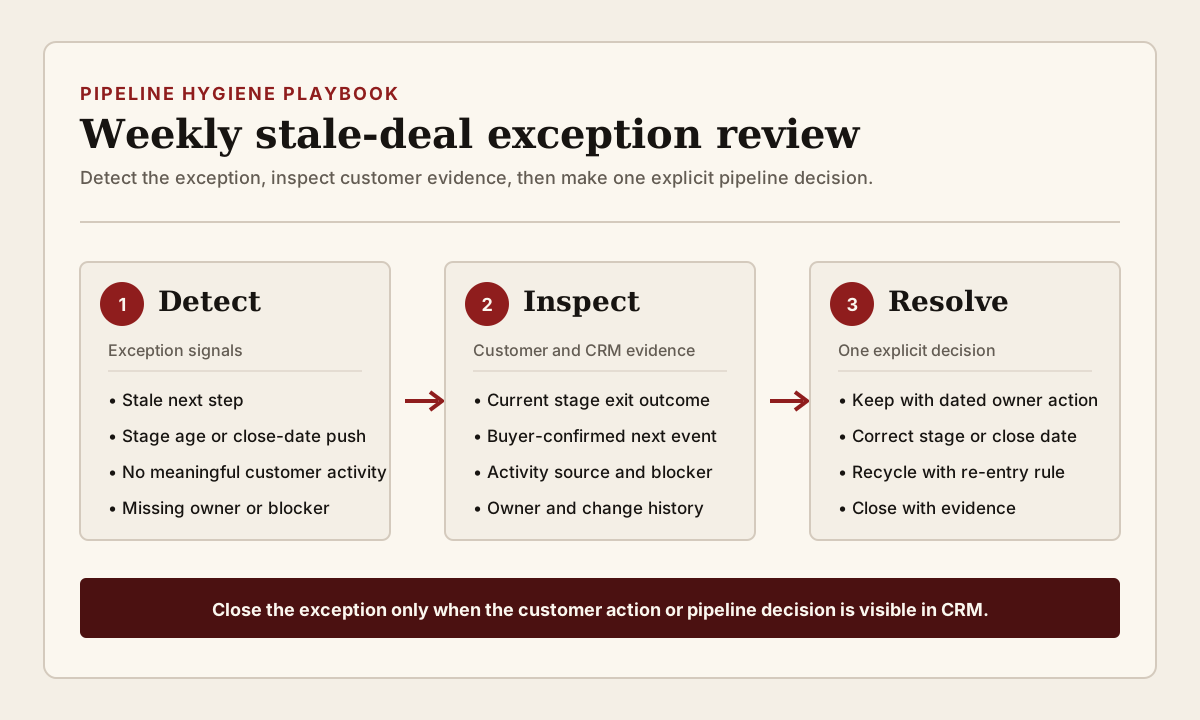
Start with a small set of explainable rules. Flag an opportunity when the next step is missing or overdue; when no meaningful customer activity exists inside the stage's expected working window; when the close date moved without a customer event or reason; when stage age exceeds the team's own reviewed threshold; when the owner is inactive or recently changed without acceptance; or when an unresolved blocker has no owner and due date.
Combine signals before escalating severity. Stage age alone may need inspection, not closure. Stage age plus no meaningful activity, an overdue next step, and a pushed close date is stronger evidence that the record no longer represents active work. Show every triggering condition in the queue so the owner can verify the rule rather than reverse-engineering a hidden score. Keep thresholds by pipeline, segment, stage, or sales motion when one global number would compare unlike deals.
Inspect customer evidence before changing the pipeline
For each exception, inspect the latest meaningful meeting, email, call, proposal, procurement update, or other customer record. Compare that evidence with the current stage, close date, amount, forecast category, next step, and blocker. Review field history when the current values look clean but the record moved repeatedly. A deal that changed close date three times needs a different conversation from a deal whose next meeting is confirmed but whose seller forgot to update the task.
The review should answer four questions: what has the customer done, what outcome supports the current stage, what event could move the deal forward, and who owns that event? If the team cannot answer from current evidence, the record needs correction, recycle, or closure rather than another vague note. Do not let an AI summary or activity score replace the source meeting, message, or commercial artifact when the decision affects pipeline and forecast reporting.
Resolve every exception through a limited decision set
Use a small set of outcomes. Keep active means the customer evidence supports the stage and one dated owner action is recorded. Correct means the stage, close date, amount, forecast category, next step, owner, or blocker state is changed to match the evidence. Recycle means the current buying motion is not active, but a named owner and explicit re-entry condition remain. Close means the opportunity is no longer active and the reason is connected to the latest evidence.
Do not use recycle as a hidden open stage. A recycled record should leave active pipeline and have a future review date or a clear event that can create a new inspection. If the owner says to wait for budget, a re-entry condition might be a customer-confirmed planning date or procurement event. If no future event is known, close the current motion and preserve the account context instead of carrying false precision into coverage and forecast views.
QA checks and risk controls
Before the weekly meeting, deduplicate the queue so one opportunity appears once with all reasons. Exclude records already closed, legitimately paused under a governed state, or changed after the extract. Confirm that owners, stages, timestamps, activities, and change history come from the intended pipeline and object. Sample both flagged and unflagged records so RevOps can see false positives and false negatives.
The main risks are mechanical cleanup, threshold gaming, and pipeline destruction. A manager can make a dashboard look cleaner by pushing deals into another stage or far-future date. A seller can log low-value activity to reset the clock. An aggressive rule can close valid long-cycle opportunities. Protect against these risks by preserving prior values, requiring a decision reason, reviewing current customer evidence, and keeping automatic actions limited to low-risk preparation or task creation. Stage, close-date, owner, amount, forecast, recycle, and closure decisions need a responsible human reviewer.
Measurement: track resolved decisions, not only cleaner totals
Measure exceptions created, reviewed, kept active, corrected, recycled, closed, escalated, and still unresolved. Track time to decision, repeated exceptions by deal, close-date pushes, missing next steps, owner changes, false positives, false negatives, and the share of resolved records with a customer-facing action or explicit pipeline decision. Compare results by pipeline, stage, segment, owner, and manager only when definitions are consistent.
Do not publish a universal stale-deal threshold or hygiene benchmark without comparable definitions and source evidence. Build an internal baseline from several review cycles. The useful learning is why exceptions repeat. Repeated next-step failures may point to seller workflow friction. Repeated close-date pushes may show weak exit criteria. High recycle volume without re-entry can show that recycle is being used to avoid closure. If the review creates corrections but no customer action, the workflow is maintaining data without improving execution.
Step-by-step workflow
- Choose one pipeline and document active stages, required stage outcomes, meaningful customer activity, and the rule for re-entering active pipeline.
- Assign the queue owner, deal owner, manager decision owner, and escalation owner. Keep these roles visible on every exception.
- Create combined exception rules for stale or missing next step, weak customer activity, stage age, close-date movement, owner gaps, and unresolved blockers.
- Build one deduplicated weekly view that shows every trigger, source record, change history, owner, and current pipeline state.
- Before the meeting, remove already resolved records and sample flagged and unflagged deals for false-positive and false-negative checks.
- During the review, inspect current customer evidence and choose keep active, correct, recycle, close, or escalate for every exception.
- For active deals, record one dated customer-facing next step. For recycled deals, record a re-entry event and owner. For closed deals, preserve the evidence and reason.
- After the meeting, verify that CRM values, tasks, forecast views, and pipeline reports reflect the decision rather than only the meeting note.
- Review repeated exceptions monthly and adjust field definitions, thresholds, stage outcomes, training, or automation only when the evidence supports the change.
CRM fields and signals needed
- Opportunity or deal ID, account or company, pipeline, stage, stage-entry date, stage age, owner, manager, segment, region, and product
- Amount, currency, close date, prior close dates, forecast category, probability where used, and latest field-change reason
- Next step, next-step due date, next-step source, upcoming customer event, task owner, and completion state
- Last meaningful customer activity, activity type, held meeting, direct reply, source record, customer outcome, and activity timestamp
- Stage exit outcome, buyer commitment, decision process, procurement step, quote or proposal status, and commercial artifact
- Blocker, blocker category, blocker owner, blocker due date, legal, security, procurement, finance, product, or implementation status
- Owner-change history, receiving-owner acceptance, territory or team change, and reassignment reason
- Exception reason, rule version, detected-at, reviewed-at, reviewer, decision, decision reason, and prior values
- Recycle status, recycle owner, review date, re-entry event, re-entry evidence, and new active-pipeline decision
- Customer action after review, action owner, due date, completion evidence, escalation state, and exception closed-at
Operating quality check
Use this check before adding more tooling. The goal is to prove that the workflow is owned, current, and inspectable inside the system of action.
| Area | Healthy pattern | Risk pattern |
|---|---|---|
| Trigger | The exception combines time, unstable fields, and missing customer evidence in a visible rule. | A single age threshold labels valid long-cycle deals as stale. |
| Ownership | RevOps governs the queue, the seller owns customer evidence, and the manager owns the deal decision. | A shared cleanup queue has no accountable commercial reviewer. |
| Customer evidence | The stage, close date, and next step can be traced to a current customer event or commercial artifact. | Internal notes, automated activity, or confidence language stand in for customer proof. |
| Decision | Every reviewed record is kept, corrected, recycled, closed, or escalated with a reason. | The same opportunity returns next week with no new action or decision. |
| Recycle control | Recycled deals leave active pipeline and need a named re-entry event, owner, and fresh evidence. | Recycle becomes a hidden open stage that protects coverage totals. |
| Automation | Automation prepares evidence and tasks; a responsible human reviews high-impact field and pipeline changes. | Age or activity scores close or move deals automatically. |
| Measurement | RevOps tracks decisions, repeat exceptions, follow-through, and false positives and negatives. | Success means only that the stale-deal count went down. |
Common mistakes
- Calling every old opportunity stale without checking the sales motion, stage outcome, or current customer evidence.
- Letting automated emails, internal notes, or task creation reset the meaningful-activity clock.
- Moving close dates forward to clear the queue without a new customer event or reviewed reason.
- Reviewing the full pipeline instead of a deduplicated exception list with visible triggers.
- Keeping recycle inside active pipeline or allowing recycled records to return without fresh evidence.
- Closing opportunities automatically from age or activity scores without manager review.
- Changing stages, dates, owners, or forecast categories without preserving prior values and decision reasons.
- Reporting fewer stale deals while ignoring repeat exceptions, unresolved actions, and false negatives.
Weekly stale-deal review checklist
- Confirm every exception reason and its source record before the manager review.
- Check current stage outcome, customer evidence, next event, close date, owner, forecast state, and blocker together.
- Choose keep active, correct, recycle, close, or escalate and record the reviewer and reason.
- Assign one dated customer action for active deals or one explicit re-entry event for recycled deals.
- Verify the decision appears in CRM tasks, fields, forecast views, and pipeline reporting after the meeting.
- Escalate repeat or unresolved exceptions instead of carrying them silently into the next review.
Example operating rhythm
- Thursday or Friday: RevOps validates rule inputs, removes resolved records, deduplicates triggers, and samples flagged and unflagged opportunities.
- Monday: sales managers review the highest-consequence exceptions and make keep, correct, recycle, close, or escalate decisions.
- Wednesday: RevOps checks whether customer actions and CRM corrections happened, then escalates unresolved high-impact items.
- Monthly: group repeat exceptions by pipeline, stage, owner, manager, rule, and decision reason to find process or data failures.
- Quarterly: revalidate stage outcomes, activity definitions, thresholds, recycle rules, permissions, integrations, and the reports that consume pipeline status.
Tooling options
- HubSpot deal views, workflows, tasks, pipeline settings, property history, and owner rules can support a CRM-native exception review when activity and stage definitions are governed.
- Salesforce opportunities, reports, field history, tasks, Flow, and manager review controls can support more complex pipeline and hierarchy requirements.
- Clari can support pipeline inspection and forecast governance when managers need a dedicated revenue cadence above CRM opportunity data.
- Gong or another conversation intelligence platform can provide customer evidence, but RevOps should still connect the decision to the CRM opportunity, owner, next step, and close rule.
- Spreadsheets can support a one-time audit or planning scenario, but they should not become the live exception queue when deal fields change in the CRM.
Source notes
These sources support the workflow model and product concepts. They do not prove a specific business outcome, benchmark result, or vendor claim.
- HubSpot pipeline setup and customization: Official context for configuring pipelines and stages. Use account-specific stage definitions and permissions when implementing the review.
- HubSpot property history export: Official context for exporting property history. Use it as supporting change evidence, not as a replacement for the current customer record and manager decision.
- Salesforce Opportunity History: Official context for inspecting opportunity history. Validate current edition, access, and retained history before relying on it for review evidence.
- Salesforce Field History Tracking: Official context for field-change history. DailyRevOps uses it to support the principle that high-impact pipeline changes should remain inspectable.
Last updated: 2026-07-24
Decision frameworks to read next
FAQ
What makes a deal stale?
A stale deal is not simply old. It has weak or missing current customer evidence, an overdue or vague next step, unstable stage or close-date fields, unresolved ownership, or no explicit manager decision.
Should RevOps automatically close stale deals?
No. Automation can prepare the exception and evidence, but a responsible manager should review customer context before stage, close-date, forecast, recycle, or closure decisions change active pipeline.
How should recycled deals return to active pipeline?
Require fresh customer evidence, a current owner, a dated next event, and a reviewed stage and close date. A future reminder alone is not enough.
What should the weekly pipeline hygiene meeting review?
Review only deduplicated exceptions with visible triggers. Inspect customer evidence, current stage outcome, next event, close-date history, owner, forecast state, blocker, and the decision needed.
How should pipeline hygiene be measured?
Track decisions, time to resolution, repeat exceptions, customer actions, CRM corrections, recycle and closure outcomes, unresolved items, and false positives and false negatives rather than only the remaining stale-deal count.