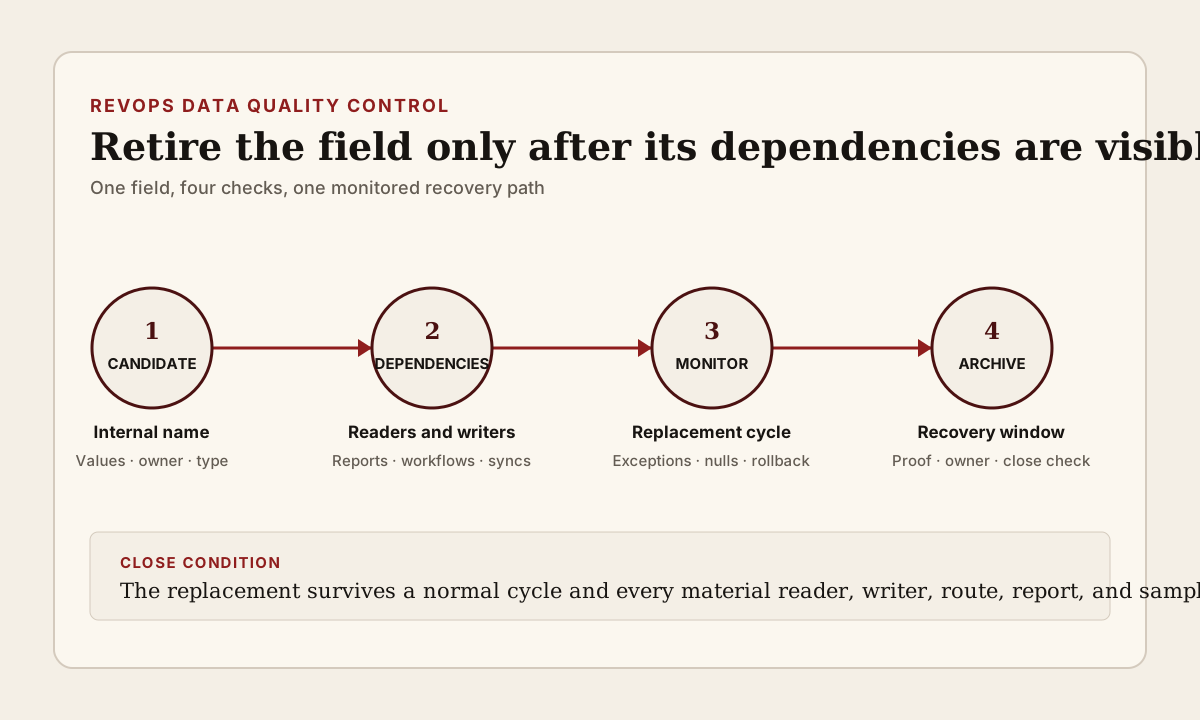
A CRM field can look unused while still controlling work. It may be hidden from the main record layout but read by a workflow, report, integration, calculated property, list, form, territory rule, renewal alert, warehouse model, or spreadsheet export. Another system may still write to it even when no operator remembers why it exists. Deleting the field because the label looks old can turn a cleanup task into a routing, reporting, or customer-workflow incident.
RevOps should treat field retirement as a dependency decision. Start with one candidate field, identify who reads it, who writes it, which records still carry values, and what business decision it supports. Then move through a monitored retirement window before archive or deletion. The goal is not to keep every field forever. It is to remove one safely without losing evidence, breaking a workflow, or making a rollback impossible.
What to watch today
Watch for fields marked legacy, old, duplicate, test, temporary, unused, do not use, or replaced. Also inspect fields with low fill rates, no visible owner, no recent manual updates, an unclear description, or a label that no longer matches the internal name. These clues justify a review. They do not prove that the field has no dependency.
Prioritize candidates that can change a high-impact operating path: lifecycle stage, lead status, account or deal owner, territory, pipeline stage, close date, forecast category, amount, renewal date, customer status, health status, consent or suppression state, service entitlement, next action, or routing reason. A hidden duplicate of one of these fields can still feed an automation or report after the visible field has changed.
A third warning is a field with values but no remembered reader. Old values can remain important for an active report, historical cohort, integration key, migration trace, contract or subscription association, or customer-state explanation. Low update volume is not the same as low operating value. Before retiring the field, sample the records where it is populated and ask what would become harder to explain if that value disappeared.
Why RevOps should care
CRM fields sit between data definition and operator action. One value can enroll a record in a workflow, select a branch, assign an owner, place an opportunity in a forecast view, route a renewal task, suppress communication, change a dashboard cohort, or trigger a write into another system. When the field disappears without a dependency map, each downstream surface can fail differently and at a different time.
HubSpot documents property usages and data sources as separate monitoring views in supported product configurations. Its property-management documentation also says that unused properties can be archived, that archived properties remain in an Archived tab before permanent deletion after 90 days, and that property definitions can be exported for review. HubSpot separately warns that changing a field type can invalidate current stored values and recommends exporting information before that edit.
Those platform controls help with discovery and recovery, but they do not decide whether a field is safe to retire. A usage screen may not represent an external warehouse query, a manually maintained spreadsheet, a private API client, a reverse ETL mapping, a downstream finance model, or a business process that reads an exported value. RevOps still needs named owners and a business-level check around the technical dependency list.
CRM and workflow signals to inspect
- CRM object, field label, internal or API name, field type, description, group, creation date, creator, last configuration change, and current field owner
- Record count with a value, blank count, unique-value count, last value update, oldest retained value, sampled records, and sensitive-data classification where applicable
- Workflows, lists, segments, reports, dashboards, forms, views, calculated fields, validation, scoring, routing, assignment, forecasting, renewal, health, service, and communication rules that read the field
- Imports, integrations, API clients, webhooks, enrichment jobs, reverse ETL, warehouse models, scripts, spreadsheets, and manual processes that write or export the field
- Source system, source record, allowed writer, update cadence, null behavior, overwrite rule, retry behavior, sync error, and latest successful write
- Replacement field, mapping rule, backfill status, value translation, historical-data treatment, cutover date, and records where old and new values disagree
- Business owner, technical owner, report owner, integration owner, affected team, customer-facing consequence, and next review date
- Proposed state such as keep, rename, hide, stop writing, replace, archive, permanently delete, or hold for evidence review
- Export location, dependency snapshot, approval, rollback owner, archive date, recovery deadline, verification sample, and explicit close condition
15-minute operator action
Choose one custom CRM field already described as old, duplicate, or unused. Open its definition and capture the object, label, internal name, type, description, fill rate or populated-record count, known usages, data sources, and latest value changes. Export the property definition or record sample through the platform's supported path. Do not edit, archive, or delete the field during this first pass.
Next, inspect five populated records. For each record, ask where the value came from, whether another field now represents the same decision, and which report, workflow, owner, or customer action could still rely on it. Search the internal name, not only the visible label, in workflow configuration, integration mappings, scripts, warehouse models, and operating documentation available to the team.
Classify the field as active operating dependency, reporting or historical dependency, external writer, external reader, replacement incomplete, safe retirement candidate, or evidence unclear. Name one owner for the next check and one rollback condition. The output is one dependency card and a decision about the next test, not a bulk field-deletion project.
Map readers and writers before choosing a replacement
Separate readers from writers. A workflow or report can read a field without changing it. An integration can keep writing a field that no visible CRM process reads. A calculated property can transform it. A warehouse model can use the internal name after the CRM label changes. List these paths separately so a stopped writer is not mistaken for a retired reader.
For every reader, record the decision it supports. A renewal view may use the field to select an account for review. A forecast report may use it only for grouping. A support handback may use it to assign an owner. A marketing workflow may use it to suppress or include a contact. The same technical reference can have very different risk depending on the decision it changes.
For every writer, record its authority and failure behavior. Identify whether the value comes from a person, import, CRM workflow, billing system, product system, customer-success platform, enrichment provider, warehouse sync, or API client. Check what happens when the destination field is missing, blank, read-only, changed to another type, or replaced by a new internal name. Do not assume a failed write will create a visible alert.
Run a controlled retirement window
When a replacement field exists, compare old and new values before cutover. Define how each old value maps, which blanks are acceptable, which historical values remain reference-only, and what happens when the two fields disagree. Backfill only through an approved and reversible method. Preserve the prior value and source evidence where the operating decision needs an audit trail.
Stop or redirect writers first, then observe. During the monitoring window, track new attempts to update the old field, reports or workflows that still query it, unexpected record-count changes, routing exceptions, sync errors, and requests from operators who can no longer find needed context. Keep the old field available but clearly outside the approved write path while the team confirms that the replacement workflow survives a normal cycle.
The monitoring period should follow the workflow, not an arbitrary universal number. A daily routing field can show failure quickly. A month-end report, quarterly territory rule, annual renewal field, or infrequent customer-status process needs a longer evidence window. If the team cannot observe the next normal event before the archive deadline, hold the field rather than pretending that a quiet week proves safety.
Archive with a recovery plan
Use the platform's current archive or deleted-field process only after the dependency check passes. HubSpot says properties must not be in use on records or assets for the documented archive path and that archived properties are permanently deleted after 90 days. Treat that period as a recovery window, not as permission to skip the pre-archive audit. Platform behavior, editions, permissions, and retention can change, so verify the current documentation in the target account.
Before archiving, store the field definition, object, internal name, type, options, description, sample values, usage evidence, known readers and writers, replacement mapping, approval, archive date, recovery deadline, and rollback owner in the team's approved change record. Avoid copying sensitive record values into an unrestricted project note. Preserve only the evidence required by company policy.
Do not permanently delete the archived field merely because no complaint appeared. Run the agreed verification first. If a dependency surfaces, restore through the supported platform path where available, repair the reader or writer, and repeat the monitored window. If restoration cannot recreate every downstream reference or external mapping, treat the event as a controlled incident rather than a cosmetic admin correction.
Verify the next normal operating cycle
After retirement or archive, test the affected path with representative records. Confirm that new records receive the intended value, owners and routes remain correct, reports and dashboards use the replacement definition, forecast and renewal views keep the intended population, customer-status and health workflows do not drift, and external systems no longer attempt to read or write the retired internal name.
Sample both normal and exception records. Include one blank value, one historical value, one recently changed value, one integration-written record, and one record that should not enter the downstream workflow. A clean happy path can hide a null rule, value-translation gap, stale export, or branch that runs only for an uncommon status.
Close the change only when another operator can see why the field was retired, which replacement now owns the decision, where historical evidence remains available, which readers and writers were checked, and what passed after one normal cycle. Update the data dictionary, workflow notes, integration mapping, report description, and field owner together so the old dependency does not return under a new label.
Risks and limits
Do not turn a field-retirement review into permission to export unrestricted CRM data. Property values can include customer, employee, commercial, support, consent, or other sensitive context. Follow access, retention, and data-minimization rules. A field definition and a small approved sample are often enough for the dependency decision.
Do not assume that a platform usage screen is complete for every connected system. External code, cached extracts, formulas, private reports, and human procedures can remain invisible. Do not assume that a field with zero current values is harmless either; it may be waiting for a seasonal event or serving as a destination that has not run recently.
Finally, do not measure CRM quality by the number of fields deleted. Hiding, renaming, documenting, restricting writers, changing a layout, or keeping a historical field read-only can be safer than deletion. The useful outcome is a smaller and more understandable data model whose operating fields have clear readers, writers, authority, owners, and recovery paths.
Related reading
CRM data quality workflows · CRM workflows · How to reduce CRM noise without missing signals · Will your CRM correction survive the next sync? · CRM user deactivation is an ownership audit · Clay vs manual CRM enrichment · HubSpot profile · Salesforce profile · Segment profile
Source notes
These official sources support the workflow model and product concepts. They do not prove a specific retention outcome, benchmark, or vendor claim.
- HubSpot organize, delete, and export properties: Official reference for exporting property definitions, checking usage, archiving unused properties, restoring archived properties, and the 90-day HubSpot archive window.
- HubSpot create and edit properties: Official reference for property configuration, usages, data quality, data sources, field-type changes, and HubSpot's recommendation to export information before a field-type edit.
- HubSpot property editor: Official reference for property definitions, field types, validation, and monitoring where a property is used and which tools update it.
- HubSpot record property history: Official reference for inspecting property-value changes, timestamps, change sources, and supported value restoration on CRM records.
- Salesforce manage deleted custom fields: Official Salesforce reference for the platform-specific deleted custom-field management path. Confirm current org behavior, dependencies, retention, permissions, and recovery before deletion.
Last updated: 2026-08-04