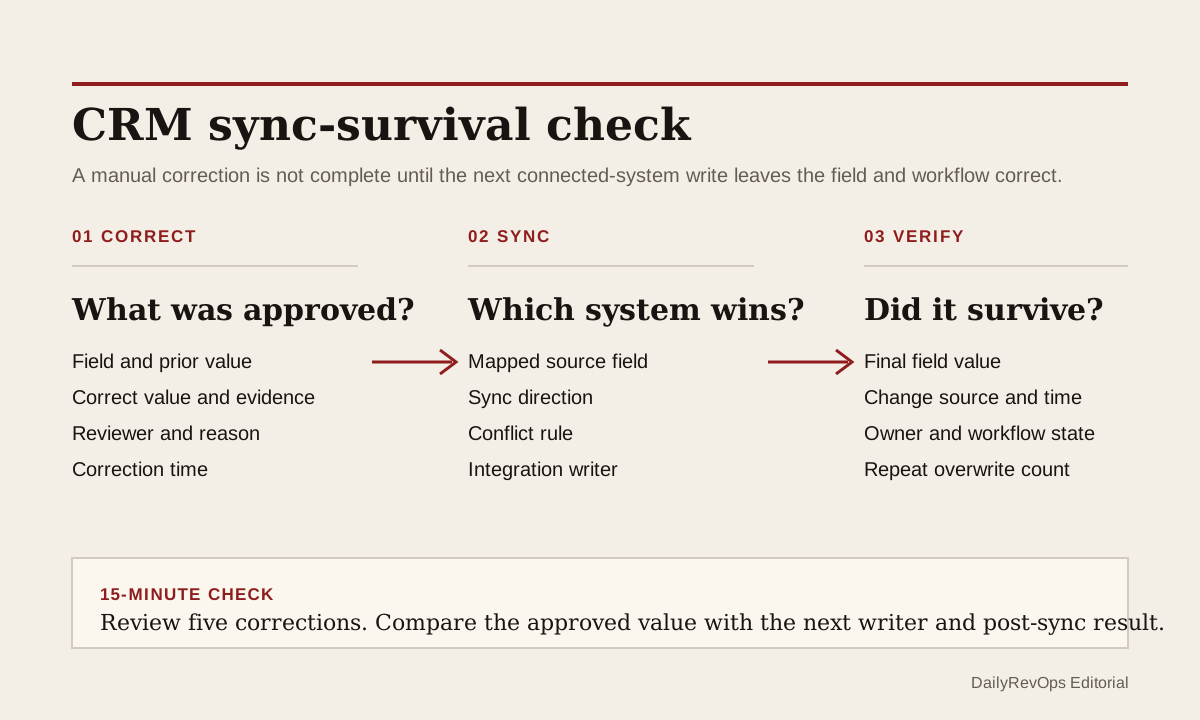
A CRM correction is not complete when the new value first appears on the record. If a billing platform, customer-success system, enrichment workflow, warehouse sync, integration user, or second CRM still owns the mapped field, the next sync can restore the stale value. The operator sees a clean record at 10:00 and the same wrong owner, lifecycle stage, renewal date, or customer status again later that day.
For today's operator brief, inspect whether important corrections survive the next integration cycle. The useful question is not only who changed the field. It is which system is allowed to win when two connected systems disagree, whether the change source is visible, and whether the corrected value remains stable long enough for the downstream workflow to use it.
What to watch today
Watch for fields that operators correct repeatedly. Common examples are account owner, customer-success owner, territory, lifecycle stage, customer status, renewal date, contract end date, forecast category, segment, and external system ID. A second warning is a correction that stays visible until an integration user, workflow, import, enrichment job, or scheduled sync updates the record.
Also watch for apparent workflow failures that are really authority conflicts. A renewal queue may reopen because the old date returned. A routing rule may move an account back to the previous owner. A customer may re-enter onboarding because another system restored an earlier lifecycle value. The automation can be behaving exactly as configured while the field behind it is no longer trustworthy.
Why RevOps should care
Silent overwrites damage operating trust twice. First, they put the wrong value back into the CRM. Second, they make a correct manual action look unreliable. Teams then add more edits, exceptions, alerts, and spreadsheets around a conflict that should have been solved at the field-mapping layer.
HubSpot documents that data sync field mappings control which values sync, the direction of the sync, and how conflicts are handled. Its data sync setup documentation also describes choosing a default app that overwrites the other when values disagree. HubSpot property history can show a field's change source and date. Salesforce field history provides a related audit mechanism for selected fields. These sources support an inspectable control pattern. They do not prove that a connected system is wrong or that one source should always win.
CRM and workflow signals to inspect
- CRM object, record ID, field name, corrected value, and previous stale value
- Correction time, correcting user or process, correction reason, and source evidence
- Next change time, change source, integration user, workflow, import, or connected app
- Sync direction, mapped source field, conflict rule, and system allowed to overwrite
- Source-system value, source-system update time, and external record ID
- Downstream routing, lifecycle, renewal, forecast, health, reporting, or customer action affected
- Number of repeated corrections and time between correction and overwrite
- Named field owner, exception owner, and the condition that closes the investigation
15-minute operator action
Open five recently corrected records from one high-impact field. Use property or field history where available to find the correction, then inspect the next change after it. Compare the CRM value with the connected source value and note which user, workflow, import, or integration wrote each version.
Mark each sample as correction survived, overwritten by sync, overwritten by workflow, source unclear, mapping direction unclear, or legitimate later update. Then make one bounded decision for the field: keep the current authority rule, move the mapping to review, pause that field's write-back in a safe test, or assign the mapping conflict to the system owner. Do not redesign every integration from five records.
Give each high-impact field one authority rule
Create a small field-authority table for the fields that direct customer or revenue work. For each field, name the system of record, allowed writers, sync direction, conflict behavior, human override rule, review owner, and rollback path. Owner and territory may belong to CRM routing. Contract end date may belong to billing or contract administration. Customer health may belong to a CS workflow. The right answer depends on the operating model, but unexplained shared ownership is not a safe default.
Separate authoritative values from supporting evidence. A product system can provide usage evidence without owning customer status. An enrichment tool can suggest a segment without automatically replacing a reviewed territory. A billing platform can provide contract dates while the CRM keeps the next renewal action. This reduces the number of fields where two systems can silently win against each other.
Verify that the correction survives
After changing a mapping or source record, wait through the next normal sync cycle and check the same five records again. Confirm the final value, change source, owner, and downstream workflow state. A fix is closed only when the corrected value remains stable or when a documented source-system update legitimately changes it.
Keep a narrow exception view for repeat overwrites on high-impact fields. The view should show the record, field, prior value, new value, change source, integration, recurrence count, business impact, and owner. Retire the exception when the field-authority rule and mapping produce stable results. Do not let the view become another permanent alert queue.
Risks and limits
Do not assume the newest value is correct. A newer timestamp can carry stale source data, while an older contract or customer record may contain the authoritative evidence. Resolve authority from the workflow and source record, not from time alone.
Do not disable a production sync broadly because one field is wrong. Connected systems may depend on other valid mappings. Isolate the field, object, direction, and sample first. Check permissions, integration users, imports, workflows, and custom code before changing the control.
History is evidence, not a complete explanation. Some tools may batch changes, use one integration identity for several processes, or retain history for a limited period. If the writer cannot be separated, add temporary logging or test the mapping on a controlled record before claiming the conflict is fixed.
Related reading
CRM workflows · CRM record merges need a survivor plan · AI CRM write-backs need human review · How to reduce CRM noise · Clay vs manual CRM enrichment · HubSpot profile · Salesforce profile · Clay profile
Source notes
These official sources support the workflow model and product concepts. They do not prove a specific retention outcome, benchmark, or vendor claim.
- HubSpot data sync field mappings: Official reference for how field mappings control which data syncs, in which direction, and how conflicts are handled.
- HubSpot data sync setup and conflict resolution: Official reference for sync direction, incremental sync behavior, field mappings, and choosing which app overwrites the other when values conflict.
- HubSpot record property history: Official reference for reviewing a property's historical values, change source, and change date on a CRM record.
- Salesforce field history tracking: Official reference for tracking changes to selected Salesforce fields and reviewing field history.
Last updated: 2026-07-18