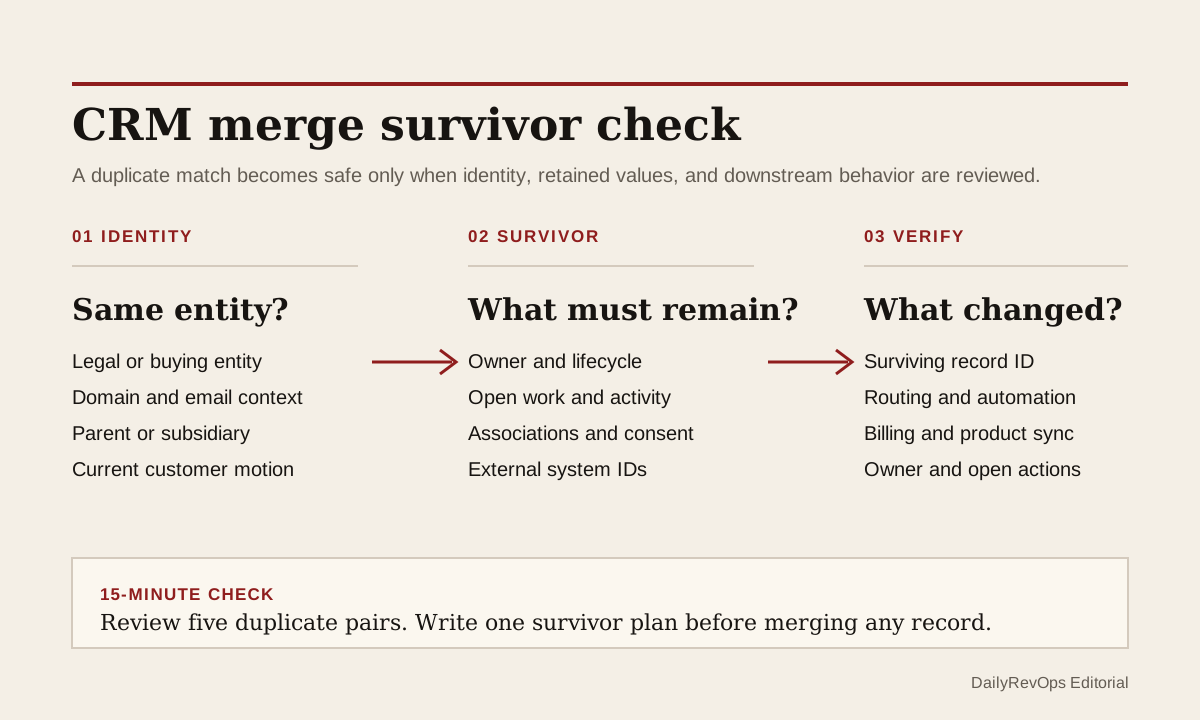
A duplicate match is not yet a safe merge decision. Two company, contact, lead, or account records can describe the same entity while carrying different owners, lifecycle values, activities, associations, consent context, external IDs, and open work. If RevOps merges them only because the names or domains match, the CRM can become cleaner on screen while the operating record becomes less trustworthy.
For today's operator brief, inspect the survivor plan before pressing merge. The useful question is not only whether the records belong together. It is which record should remain, which values need review, which relationships must survive, and which workflows or integrations may react when the records become one.
What to watch today
Watch for duplicate pairs where both records are active in different workflows. One may own the current opportunity while the other carries the support history, marketing status, renewal date, customer-success owner, or latest meaningful activity. Also watch for records that look identical by name but represent a parent company, regional entity, subsidiary, former domain, or separate buying group.
A second warning is silent field conflict. If one record says customer and another says prospect, or if owners, territories, lifecycle stages, renewal dates, and external system IDs disagree, completeness alone should not choose the survivor. The team needs a field-level decision tied to the current operating workflow.
Why RevOps should care
CRM merges affect more than reporting hygiene. The surviving record can influence routing, account ownership, pipeline inspection, customer health, renewal follow-up, campaign membership, attribution, support context, and synchronization with billing, product, warehouse, or enrichment systems. A bad merge can move work to the wrong owner or hide the source record that another system still expects.
HubSpot documents that a merged record can combine activities, associations, and most property values, and that operators can review which values are retained. HubSpot also documents automatic and manual duplicate handling. Salesforce documents duplicate-management controls and account merging. These sources support the feasibility of a governed merge process. They do not prove that a match is correct or that a merge is harmless in a specific CRM configuration.
CRM and workflow signals to inspect
- Record IDs, object types, names, domains, email addresses, and legal or regional entity context
- Current owner, account team, territory, lifecycle stage, customer status, and segment
- Open opportunities, tickets, tasks, renewals, subscriptions, quotes, and campaign relationships
- Last meaningful customer activity, latest internal update, and source-system timestamp
- External IDs used by billing, product, warehouse, support, enrichment, or integration tools
- Consent, subscription, suppression, and communication-preference fields when they apply
- Workflow enrollment, routing rules, scoring, automation, and sync jobs that can react to the merge
- Field conflicts, chosen survivor values, reviewer, review date, and merge reason
15-minute operator action
Open five duplicate pairs from one object, but do not merge them yet. For each pair, identify the likely survivor, then compare owner, lifecycle or customer status, open work, recent customer activity, associations, and external IDs. Mark each pair as safe to review, entity unclear, owner conflict, lifecycle conflict, association risk, integration risk, or not a duplicate.
Choose one pair with a clear identity and write a one-line survivor plan: keep record A, preserve these values, confirm these associations, check these external IDs, and verify these workflows after the merge. If that sentence cannot be written from the available evidence, move the pair to review instead of forcing a cleaner duplicate count.
Decide the survivor before the merge
Use the record that best represents the current operating entity, not automatically the oldest, newest, or most complete record. For a customer account, that may be the record linked to the live contract and active owner. For a prospect, it may be the record used by the current opportunity and routing model. The choice should follow the system-of-record rule for that workflow.
Keep a small merge log for material records: both original IDs, surviving ID, reviewer, reason, important retained values, systems checked, and post-merge verification result. The log does not need to become a new data warehouse. It needs to be enough for an operator to explain what changed if a task, owner, campaign, subscription, or integration later looks wrong.
Risks and limits
Do not treat email or domain equality as universal proof. Shared domains, personal emails, subsidiaries, franchise structures, consultants, and renamed companies can create valid exceptions. Matching rules should create a review candidate, not erase entity judgment.
Do not run a large merge batch before checking object-specific behavior and connected systems. CRM platforms, custom objects, marketplace apps, sync tools, and data warehouses can handle merged IDs differently. Test a small sample, record the expected result, and verify downstream systems after the merge.
A lower duplicate count is not the outcome. The outcome is one trustworthy operating record with the right owner, current workflow state, preserved customer context, and no unexplained downstream break. If those conditions cannot be checked, leave the records separate until the evidence is stronger.
Related reading
CRM workflows · How to reduce CRM noise without missing signals · Dirty CRM data is a retention problem · Clay vs manual CRM enrichment · HubSpot profile · Salesforce profile · Clay profile
Source notes
These official sources support the workflow model and product concepts. They do not prove a specific retention outcome, benchmark, or vendor claim.
- HubSpot merge records: Official reference for selecting records, reviewing retained values, and understanding object-specific merge behavior.
- HubSpot deduplicate records: Official reference for automatic and manual duplicate handling across CRM records.
- Salesforce Duplicate Management: Official learning reference for matching rules, duplicate rules, duplicate jobs, and duplicate-resolution controls.
- Salesforce merge accounts: Official reference for Salesforce account-merge behavior and operator steps.
Last updated: 2026-07-17