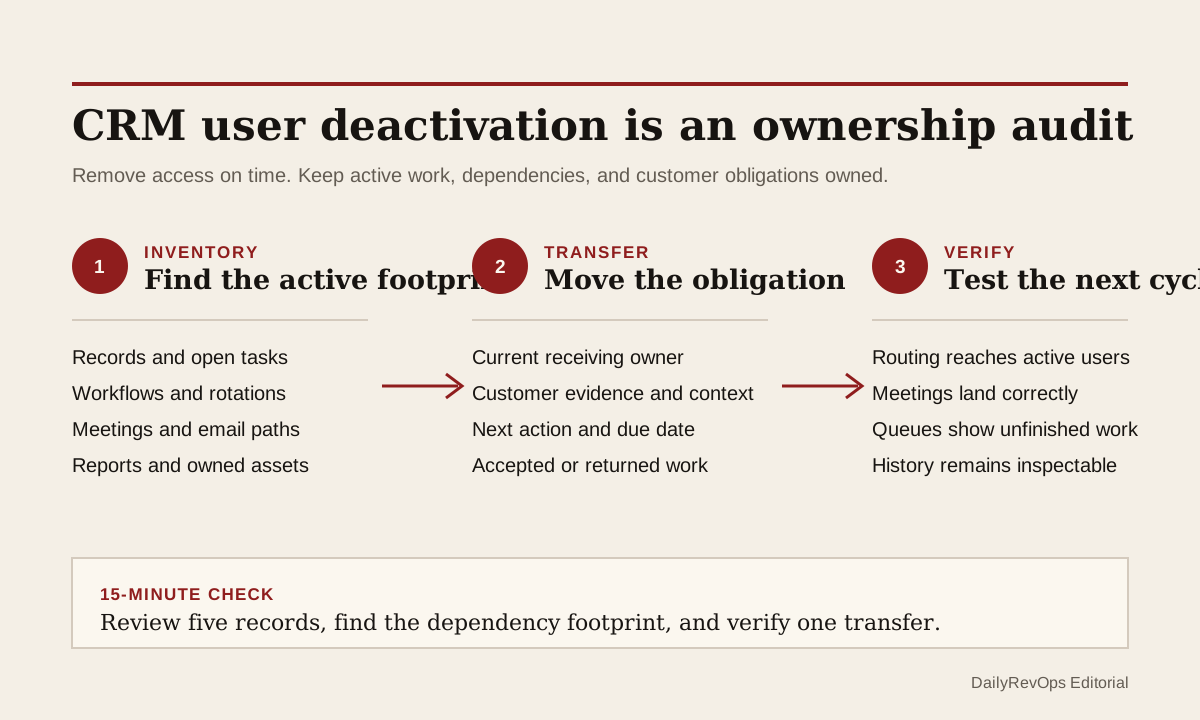
A CRM user can lose access while their work remains active. Accounts, deals, tickets, tasks, meeting rotations, workflow filters, connected email, reports, and customer commitments can still point to that person. The security action may be complete, but the operating handoff is not. RevOps should treat user deactivation as an ownership audit with a defined transfer and verification step.
This brief is broader than changing the forecast owner on an opportunity. A departing or role-changing user can appear across several objects and tools at once. One replacement owner on the account does not automatically move open tasks, meeting availability, workflow criteria, service work, renewal actions, or the judgment behind a current customer promise.
What to watch today
Watch for users scheduled for deactivation who still own active customer, pipeline, support, onboarding, renewal, or routing work. Prioritize people with open late-stage deals, renewals inside the active review window, unresolved tickets, booked meetings, incomplete sequences, workflow dependencies, shared inbox responsibilities, or integration access. The user list alone cannot show that footprint; inspect the records and tools that still depend on the person.
Also watch for a bulk reassignment that changes only the default owner field. A contact can move while its company, deal, ticket, task, or custom object keeps the prior owner. An account can move while an upcoming meeting still routes to the deactivated user. A forecast can move while the new owner has not accepted the close date or next step. Each object and operating decision needs its own transfer rule.
A third warning is a workflow that contains the user as a filter, branch, assignment target, approver, notification recipient, or rotation member. HubSpot explicitly recommends removing a user from owned assets and workflow criteria before deactivation. Its documentation also notes that deactivated users are skipped by record-owner rotation, personal email is disconnected, and meeting or scheduling dependencies can behave differently when they are not reassigned. These are concrete reasons to inspect the workflow footprint before access changes.
Why RevOps should care
User access, record ownership, and work ownership are related but different. Security or IT may need to remove access immediately. RevOps still needs to preserve history, route unfinished work, and show who accepted the next customer action. If those decisions are collapsed into one owner edit, customer work can disappear from queues while dashboards still show complete records.
The risk reaches pipeline hygiene, forecasting, renewals, Customer Success, support handbacks, routing, activity capture, and reporting. A task can remain assigned to someone who no longer receives notifications. A meeting can be booked into a path that no longer reaches the right person. A workflow can skip or misroute a record. A new owner can inherit a deal or account without knowing which customer promise, blocker, or deadline requires action first.
HubSpot documents user deactivation, record ownership, workflows, and permissions. Salesforce documents record transfers. These sources support the feasibility of preserving activity history, reassigning records, and reviewing access and automation dependencies. They do not prove that a bulk transfer moved every business obligation, that the replacement owner accepted the work, or that one offboarding sequence fits every security policy. Security, HR, Legal, Privacy, IT, and system owners still control access timing and evidence handling.
CRM and workflow signals to inspect
- User ID, email, team, role, manager, seat, permission sets, deactivation time, and access owner
- Contacts, companies or accounts, leads, deals or opportunities, tickets or cases, tasks, meetings, quotes, subscriptions, renewals, and custom records owned by the user
- Open stage or status, amount, renewal or close date, priority, next step, due date, blocker, and last meaningful customer evidence
- Primary record owner, workflow-specific owner, next-action owner, manager, queue, team, and escalation owner
- Workflows where the user is a trigger value, filter, branch condition, assignment target, rotation member, approver, or notification recipient
- Scheduling pages, round-robin groups, meeting rotations, booked meetings, sequences, personal email, shared inboxes, and calendar dependencies
- Reports, dashboards, lists, views, forecasts, saved filters, content, integrations, API users, and other assets owned by or filtered on the user
- Prior owner, receiving owner, transfer reason, transfer time, acceptance state, disputed work, correction owner, and close condition
15-minute operator action
Choose one user scheduled for deactivation or one recently deactivated user. Open five current records from different work types: one account or company, one opportunity or deal, one customer or renewal record, one ticket or case, and one open task or meeting. For each, check the current owner, next-action owner, due date, latest customer evidence, and whether the receiving person has accepted the work.
Then inspect the user's name or ID across workflow filters, assignment actions, rotations, scheduling pages, reports, lists, and notification settings. Classify every sample as transferred and accepted, transferred but not reviewed, still owned by the user, workflow dependency, meeting dependency, communication dependency, reporting-only history, or evidence unclear. Fix one material gap by assigning a named owner and a dated next action, then record what will prove the handoff worked.
The output is five classified records, one dependency inventory, and one verified transfer. It is not a blind portal-wide reassignment. If the sample reveals several unresolved paths, create a temporary user-offboarding queue with object, record ID, old owner, receiving owner, customer deadline, dependency type, acceptance state, reviewer, due date, and close condition.
Separate access removal from work transfer
An urgent access decision should not wait for a perfect CRM cleanup. Security may need to deactivate an account immediately. The operating control is to make unfinished transfer work visible and owned rather than pretending it was completed by the access change. Record the deactivation time, preserve the historical user identity where the platform allows it, and route open exceptions to current operators.
Do not reactivate a former user merely to make a workflow or meeting path work unless the authorized security owner approves that action. Repair the dependency through the platform's supported reassignment or configuration path. A broken process should not become a reason to restore access without review.
Keep historical activity separate from current responsibility. HubSpot says deactivation can preserve a user's historical activities and that the user can remain assigned to records until those records are reassigned. That history helps explain prior field changes and customer interactions. It should not make the deactivated user look like the current person expected to act.
Transfer the obligation, not only the owner field
A useful transfer packet is small. It shows the source record, current customer state, next commitment, due date, open blocker, prior owner judgment, receiving owner, and acceptance status. For a late-stage opportunity, include the current forecast and customer evidence. For a renewal, include the authoritative date and recent conversation. For a ticket handback, include impact, resolution, and the customer action still due.
Use object-specific rules. Moving a company owner may not move associated contacts, deals, tickets, tasks, subscriptions, or custom records. Reassign each object only when its ownership meaning is clear. If one field is used for reporting while another person owns the action, keep both roles explicit instead of overwriting history to make a dashboard look clean.
Ask the receiving owner to accept, correct, or return material work. Acceptance can mean the owner confirms the next step and due date, updates an unsupported forecast assumption, reroutes a ticket, or documents that no action is required. A bulk import or successful workflow run proves that a field changed. It does not prove that the customer obligation moved.
Verify after deactivation
After the access change, test one normal cycle. Confirm that new records no longer route to the former user, booked meetings reach an active owner, open tasks appear in a current queue, personal-email dependencies are understood, workflow branches still have valid targets, and reports retain the intended historical context. Check the exact high-risk path rather than relying on a clean user list.
Close the audit when another operator can identify the former user's active footprint, see who accepted each material obligation, and follow a sample record through its next normal workflow event. Keep unresolved records in a visible exception state. Do not hide them under a generic unassigned bucket without an owner and review date.
Risks and limits
Do not delay necessary access removal because RevOps has not finished reassignment. Access control follows the company's security process. Do not share sensitive HR details in CRM notes either. Operators usually need the effective access state, business role, affected work, transfer owner, and due date, not the personal reason behind the change.
Do not assume every asset should move to one manager. Different records can belong to Sales, Customer Success, Support, Finance, Marketing Operations, or a system administrator. Broad reassignment can create a second failure by giving one person records they cannot interpret or act on. Use materiality and workflow ownership to split the transfer safely.
Finally, platform behavior can vary by subscription, object, permission model, integration, and release. Test the current account configuration and official documentation before a large transfer or removal. The useful outcome is not a deactivated user with zero records. It is preserved history, controlled access, current owners, accepted customer work, and verified automation after the change.
Related reading
CRM workflows · CRM data quality workflows · Changing a forecast owner: the acceptance check most teams skip · How to run a sales-to-customer success handoff in CRM · Handoff debt is where RevOps work quietly breaks · How to reduce CRM noise without missing signals · HubSpot profile · Salesforce profile
Source notes
These official sources support the workflow model and product concepts. They do not prove a specific retention outcome, benchmark, or vendor claim.
- HubSpot deactivate and remove users: Official reference for deactivation and removal behavior, retained historical activity, owned assets, workflow criteria, meeting rotations, personal email connections, and record reassignment.
- HubSpot assign ownership of records: Official reference for record-owner properties and individual, bulk, import, and workflow-based assignment methods.
- HubSpot create workflows: Official reference for workflow triggers, actions, associated-record updates, permissions, and publishing controls.
- HubSpot user permissions guide: Official reference for CRM object, activity, workflow, ownership, and user-management permissions.
- Salesforce transfer records: Official Salesforce reference for record transfers and the ownership considerations that need review during reassignment.
Last updated: 2026-07-29