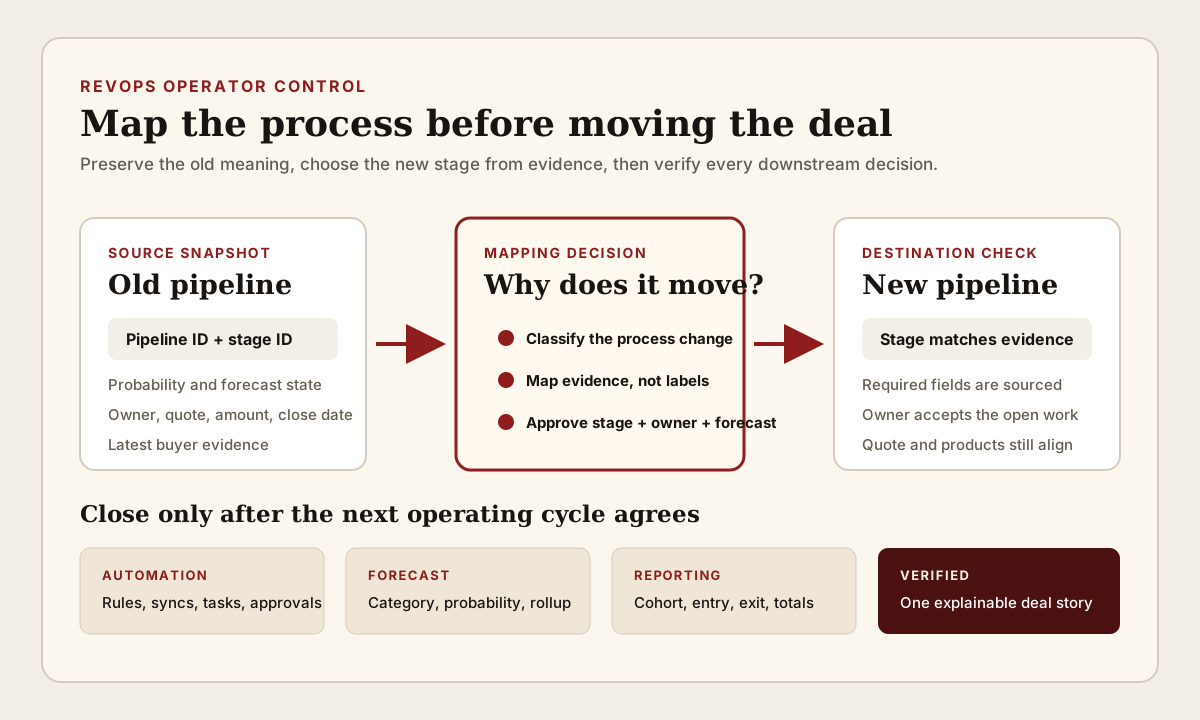
Moving an open deal to another pipeline can look like a tidy CRM edit. The account, amount, close date, quote, owner, activities, and customer conversation may all remain attached to the same record. Yet the new pipeline can use different stage definitions, probabilities, required fields, automation, access rules, forecast views, and reporting cohorts. If nobody maps those meanings, one unchanged opportunity can enter the next review as a different commercial claim.
RevOps should treat the move as a process change, not only a pipeline-field update. Preserve the old pipeline and stage, name why the record is moving, choose the destination stage from current buyer evidence, review downstream rules, and verify the next forecast and report. The goal is not to block valid transfers between motions. It is to stop a routing decision from silently rewriting what the deal means.
What to watch today
Watch for open deals moved between new-business, expansion, renewal, partner, enterprise, self-service, regional, product, or migration pipelines. Prioritize late-stage opportunities, commit or best-case deals, records with active quotes or products, material amounts, owner changes, and moves made close to a forecast call or reporting cutoff.
The first warning is a destination stage selected because its label looks similar. Discovery in one pipeline may represent an accepted first meeting. Discovery in another may require confirmed pain, budget context, or a qualified account. Proposal can mean an internal draft in one motion and a buyer-facing commercial document in another. Equal labels do not prove equal exit criteria, probability, or forecast meaning.
The second warning is a pipeline change followed by several automatic updates. A configured workflow may change owner, team, forecast category, task set, close date, lifecycle field, approval status, or notification. Conditional stage properties may ask for fields that were not part of the source process. The move can therefore create a clean-looking destination record while the original commercial evidence remains incomplete.
The third warning is a reporting jump with no customer event. If a deal leaves one pipeline and appears in another, dashboards can record an exit, entry, stage movement, weighted-value change, or cohort change even when the buyer did nothing. The team needs to separate process reclassification from customer progression before interpreting the movement.
Why RevOps should care
A pipeline is more than a board column. It can define which stages are available, what those stages mean, how probabilities contribute to weighted views, which properties appear during a manual move, which rules or approvals apply, and which automations or reports read the record. HubSpot explicitly recommends separate pipelines when processes have unique stages and documents pipeline-specific rules, automations, conditional stage properties, and deal-stage probabilities.
That makes the pipeline-stage pair the meaningful unit. Stage alone is incomplete because the same label can belong to different operating processes. Pipeline alone is incomplete because the destination still needs a stage supported by current evidence. RevOps should preserve both prior values and approve both new values together.
Salesforce models the problem differently. Its official opportunity documentation connects opportunity records to stages, account context, amount, products, activities, close dates, record types, and the sales process. The exact configuration differs from HubSpot, but the operator question is the same: when a record enters another governed process, which definitions, fields, access, automation, and reporting assumptions now apply? Platform documentation supports the available record controls. It does not decide whether the customer advanced or which forecast treatment is commercially correct.
This brief is distinct from a forward-stage-jump or stage-regression review. Those checks ask whether movement inside one process matches buyer evidence. A pipeline-change review asks whether the process itself changed and whether the source stage, destination stage, forecast treatment, ownership, and reporting cohort remain comparable across that boundary.
CRM and workflow signals to inspect
- Deal or opportunity ID, account, current owner, manager, team, territory, segment, motion, product, opportunity type, record type, and created date
- Prior pipeline ID and label, prior stage ID and label, prior stage probability, prior forecast category, and prior reporting cohort
- Destination pipeline ID and label, destination stage ID and label, destination stage probability, destination forecast category, and destination reporting cohort
- Move time, requested effective time, changed-by user or process, request source, controlled move reason, approver, and source evidence
- Current buyer event, completed stage outcomes, next customer step, blocker, decision process, stakeholder coverage, last meaningful activity, and source record URLs
- Amount, currency, close date, products, line items, quote version, contract or order context, discount, term, and any commercial approval already in progress
- Owner assignment, team access, sharing, queue, task, sequence, playbook, approval, notification, and handoff that can change in the destination process
- Workflow enrollment, reenrollment, suppression, branch, delay, webhook, integration, and calculated or synchronized field that reads pipeline or stage
- Required or conditional destination fields, blank values, default values, overwritten values, validation result, and exception owner
- Source report, destination report, pipeline snapshot, weighted amount, forecast submission, conversion measure, attribution cohort, and duplicate-count risk
- Review outcome, correction owner, next forecast check, next sync check, monitoring window, and explicit close condition
15-minute operator action
Open the five most recent open deals whose pipeline changed. For each one, capture the old pipeline-stage pair, the new pipeline-stage pair, the change time and writer, the move reason, the latest buyer evidence, the owner, amount, close date, forecast category, active quote, and any workflow or field changes recorded around the same time.
Do not start by asking whether the new stage sounds reasonable. Compare the documented exit criteria and probability of the source stage with the entry or exit criteria of the destination stage. Then classify each move as customer motion changed, ownership or territory transfer, product or segment reclassification, renewal or expansion conversion, duplicate-process repair, migration correction, automation or integration write, reporting-only reclassification, or unresolved.
Choose one material unresolved move. Preserve the prior snapshot, map the customer evidence to the correct destination stage, review owner and forecast treatment, and inspect the workflow plus reporting effects before the next rollup. The output is five classified moves and one verified cross-pipeline mapping. It is not a portal-wide pipeline redesign.
Map evidence, not stage labels
Create a small mapping table for every allowed source-to-destination move. Record the source pipeline and stage, the destination pipeline and stage, the customer evidence required, the probability or forecast consequence, required fields, allowed reasons, approver, and exceptions that must stop for review. Avoid a universal stage-name map. Similar names can hide different process outcomes, while different names can represent the same verified buyer milestone.
Use the current customer state as the anchor. A new-business deal becoming an expansion opportunity may keep the same account and conversation history, but the commercial owner, product scope, baseline value, decision group, approval route, and reporting definition can change. A direct deal moving to a partner motion may require a partner relationship, sourcing evidence, account ownership rule, and different next action. Map what the buyer and operating model require now rather than carrying the old stage forward by position.
Keep the old pipeline-stage pair in history or a governed change record. HubSpot documents stage internal names and pipeline API identifiers that integrations can use, while its property history can show prior values, date, and change source. Labels may be renamed. Stable IDs, timestamps, and the reviewed move reason make the transition easier to reconstruct.
Review automation, access, and required fields
List the rules that read either the pipeline or stage before approving the move. Check workflow enrollment and reenrollment, assignment, tasks, approvals, notifications, sequences, integrations, webhooks, calculated fields, required properties, conditional stage logic, team access, and forecast inclusion. A successful save proves only that the platform accepted the update. It does not prove that every dependent workflow made the intended business decision.
Pay special attention to defaults and blanks. A destination stage may require a field that the source process never collected. An operator may enter a convenient value to complete the move, or automation may write a default. That can turn missing evidence into apparently complete data. Route material missing fields to an exception owner and preserve unknown as unknown until the right source confirms the value.
Check timing as well as final state. Workflow actions can execute after enrollment according to configured timing, branches, delays, suppression, and other settings. A record can look correct immediately after the move and change later. Review the first save, the next normal automation window, and the next integration sync before closing a high-impact transfer.
Keep forecast and reporting movement explainable
Compare the record in the exact views used for pipeline inspection and forecast. Record whether the move changed stage probability, weighted amount, forecast category, manager hierarchy, pipeline total, conversion cohort, source-pipeline exit count, destination-pipeline entry count, or close-date reporting. Separate each reporting effect from any customer-confirmed progress.
Do not describe a pipeline reclassification as stage advancement unless fresh buyer evidence supports that claim. Likewise, do not describe the source-pipeline exit as a lost deal when the same opportunity remains active elsewhere. Reporting definitions should say whether cross-pipeline moves remain one continuing opportunity, begin a new cohort, create a linked successor record, or require an explicit exclusion from particular conversion measures.
If the business must create a new opportunity instead of moving the record, preserve the relationship between old and new IDs, the reason, carried evidence, commercial scope, ownership, and reporting treatment. Avoid counting both records as active pipeline or treating the successor as newly sourced without a governed definition. The choice between move and recreate should follow data-model and reporting requirements, not convenience alone.
Close the review only after the destination stage matches current evidence, ownership is accepted, required fields are sourced, automation has run as intended, the active quote and products remain coherent, and one forecast plus one reporting view explain the transfer correctly. Reopen the exception if a later sync restores the old pipeline, changes the stage, duplicates the record, or reruns an unintended workflow.
Risks and limits
Do not build a central approval for every harmless correction. A bounded review is most useful for open material deals, different stage models, forecast impact, owner or territory changes, active commercial documents, customer-motion changes, and moves that trigger automation. Low-consequence administrative fixes can use a simpler reason and post-change sample when the dependency map is already trusted.
Do not infer customer progress from stage probability. HubSpot documents probability as part of deal-stage configuration and weighted board views. A configured percentage is an operating input, not independent evidence that a particular opportunity will close. Forecast judgment still needs current customer evidence and the team's approved process.
Do not assume platform history captures every external consequence. Warehouse models, spreadsheets, BI extracts, private integrations, compensation logic, and manually maintained forecast files may read pipeline or stage outside the visible CRM dependency list. Include those readers in the mapping when they influence a decision.
Finally, pipeline, stage, workflow, permission, and forecasting behavior depends on CRM configuration, edition, integrations, and release. Test the current account with representative records and current documentation. The useful result is not zero cross-pipeline moves. It is one continuing deal story whose process, evidence, owner, forecast, automation, and reporting meaning remain inspectable before and after the change.
Related reading
A forward stage jump can hide an unfinished buyer step · When a deal moves backward, the forecast should move too · Before a closed deal re-enters the pipeline · Preserve the forecast baseline through a deal-currency change · Revenue forecasting workflows · CRM data quality workflows · CRM workflows · HubSpot vs Salesforce for RevOps workflows · HubSpot profile · Salesforce profile · Clari profile
Source notes
These official sources support the workflow model and product concepts. They do not prove a specific retention outcome, benchmark, or vendor claim.
- HubSpot set up and manage object pipelines: Official reference for distinct pipelines, deal stages, stage probabilities, conditional stage properties, pipeline rules, automation, internal stage names, and moving records between pipelines.
- HubSpot Pipelines API: Official developer reference for pipeline and stage IDs, display order, metadata, audit access, and programmatic pipeline configuration.
- HubSpot record property history: Official reference for reviewing prior CRM property values, change dates, and the user or process recorded as the change source.
- HubSpot workflow settings: Official reference for workflow timing, enrollment-related settings, suppression, and execution behavior that should be inspected around a pipeline move.
- Salesforce opportunities: Official Salesforce reference for opportunity records, deal details, activities, stages, products, and the wider sales process.
- Salesforce opportunity management: Official Salesforce learning reference for record types, opportunity stages, close dates, account links, activities, products, and movement through a sales process.
Last updated: 2026-08-06