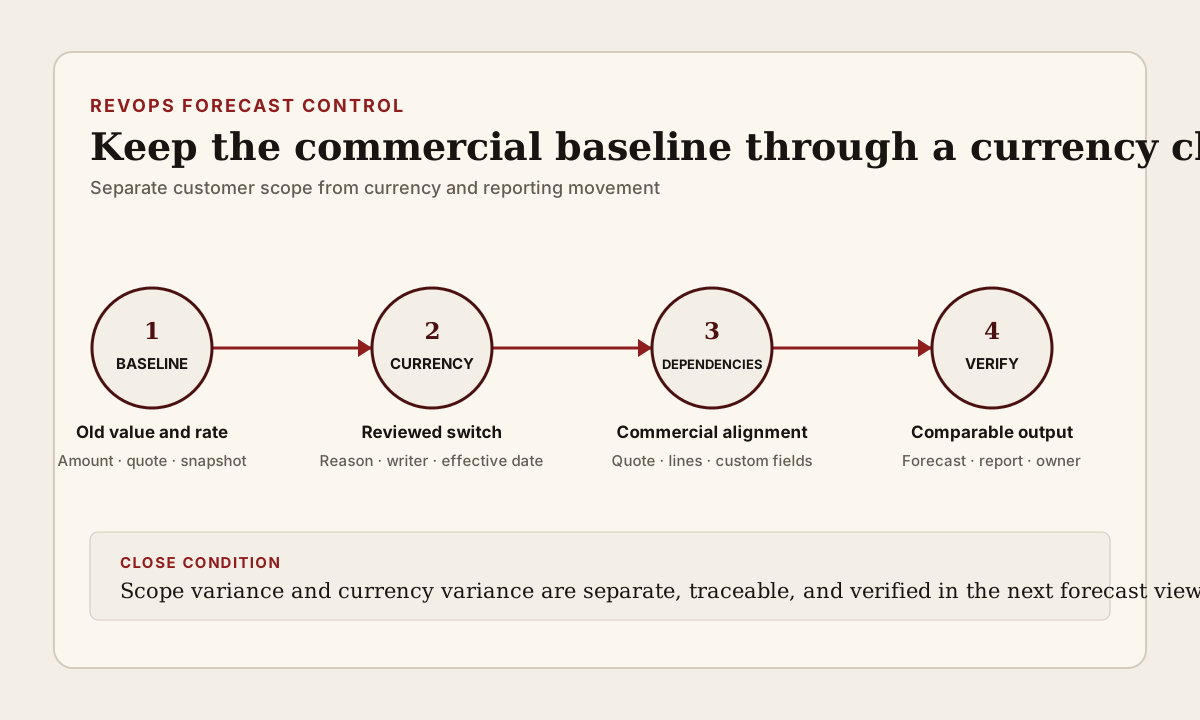
Changing the currency on an open deal is not a normal formatting edit. The customer scope may be unchanged while the CRM amount, converted company-currency value, quote, line-item prices, forecast rollup, and historical comparison begin answering different questions. If the team treats the currency field as a label, a real conversion change can look like pipeline growth, contraction, or seller correction.
The operating decision is whether the same opportunity can keep one traceable commercial baseline through the change. RevOps should preserve the old amount and currency, identify the reason and effective time, reconcile the active quote and line items, record the conversion rule used for reporting, and verify the next forecast view. The goal is not to prevent legitimate currency changes. It is to stop one field edit from silently rewriting the deal story.
What to watch today
Watch for open opportunities whose currency changed after products, line items, a quote, a manager forecast, or a customer-facing commercial document already existed. Prioritize commit and best-case deals, material values, changes made close to a forecast review, and records where the company-currency amount moved even though quantity, products, discount, term, and customer scope did not.
A second warning is a quote or line item that remains in the old currency. HubSpot documents that line-item currency must match the deal currency and can surface a missing-currency alert that requires updated pricing. The exact behavior depends on the CRM and commercial configuration, but the operator check is stable: the opportunity, active quote, products, and line items must use a coherent currency and price basis before the record returns to normal forecast review.
A third warning is a custom currency field that still shows the old numeric value under the new currency label. HubSpot notes that custom properties using deal currency do not automatically update their values from exchange rates when the deal currency changes. A commission estimate, custom annual value, services total, implementation amount, or other record-currency field can therefore look valid while carrying the wrong basis.
Also watch the converted reporting value. In HubSpot, open deals use the most recent configured exchange rate for the calculated company-currency amount. Salesforce explains that standard conversion-rate updates can affect opportunities, forecasts, and other currency amounts, while Advanced Currency Management introduces dated rates for opportunity and opportunity-product history. These models are not interchangeable. RevOps needs to know which one the current system and report actually use.
Why RevOps should care
Opportunity currency sits near forecasting, pipeline reporting, territory reviews, manager submissions, approvals, quote operations, commissions, capacity planning, and Finance reconciliation. A currency change can be commercially correct and still break comparability if the old native amount, the conversion basis, and the next rollup are not preserved together.
The failure is easy to miss because each individual record may look plausible. The deal shows a current amount. The quote has a total. The forecast dashboard converts values into company currency. The change history records an edit. Yet leadership may compare this week's converted amount with last week's number as if the difference represented customer movement. Without a currency-change reason and baseline, the pipeline delta is ambiguous.
This is distinct from reviewing a late-stage amount increase. That workflow asks whether customer-confirmed scope growth supports a larger opportunity. A currency-change review asks whether the same commercial scope remains comparable after its denomination or conversion basis changes. The first decision is about commercial value. The second is about preserving measurement meaning through a record change.
Official CRM documentation supports the platform behavior and the available controls. It does not decide the contract currency, accounting treatment, recognized revenue, commission policy, tax result, or the correct exchange-rate source for a specific company. Finance, Deal Desk, Legal, Sales Ops, and the system owner still need approved business rules for those decisions.
CRM and workflow signals to inspect
- Opportunity or deal ID, account, owner, manager, pipeline, stage, close date, forecast category, and current forecast submission
- Prior currency, new currency, change time, effective date, changed-by user or process, request source, and controlled change reason
- Prior native amount, new native amount, quantity, product scope, term, discount, one-time value, recurring value, and any approved commercial delta
- Company or corporate currency, prior and current exchange rate, rate source, rate effective date, converted amount, and reporting snapshot date
- Active quote ID, quote version, quote currency, status, issue date, expiration date, total, acceptance state, and buyer-facing source record
- Product, price-book, or line-item ID, currency, unit price, quantity, discount, billing frequency, term, tax context, and missing-price or missing-currency status
- Custom currency fields such as commission estimate, implementation amount, services value, annual value, partner value, or other team-defined commercial totals
- Prior dashboard or forecast snapshot, current rollup, variance attributed to currency, variance attributed to scope, and any manual manager adjustment
- Review status, reviewer, source links, correction owner, next forecast-check time, final decision, and exception close condition
15-minute operator action
Open the five most recent open opportunities whose currency changed. For each one, capture the prior and current currency, prior and current native amount, company-currency amount, change time, writer, exchange-rate basis, active quote currency, and line-item currency. Then compare product, quantity, discount, term, and customer evidence to determine whether the commercial scope changed too.
Classify each sample as denomination correction with unchanged scope, customer-requested contract currency change, quote rebuild, price-book or line-item repair, exchange-rate update, migration or import correction, integration write, or unresolved. For one unresolved opportunity, preserve the old baseline in the review evidence, align the authoritative quote and line items, and ask the forecast owner to approve the resulting pipeline treatment before the next rollup.
The output is five classified currency changes and one verified forecast baseline. It is not a full multicurrency implementation audit. If three or more samples need reconstruction, create a temporary currency-change exception view with old and new currency, native amount, converted amount, rate date, quote and line-item status, scope-change flag, owner, reviewer, and due date.
Preserve three values, not one total
Keep the customer-facing commercial value, the operating opportunity value, and the company-currency reporting value conceptually separate. They may match after a clean conversion, but they serve different decisions. The quote can represent the current offer in the agreed currency. The opportunity can carry the value used by the sales process. The converted amount can support cross-currency reporting and forecast aggregation.
Before the edit, record the prior currency, native amount, converted amount, exchange rate or rate date, quote version, and forecast snapshot. After the edit, record the same fields again. A useful review shows whether the native value was converted, manually re-entered, recalculated from line items, copied from a quote, or written by an integration. The operator should not have to infer that from the final amount alone.
Do not use a note such as changed to euros as the entire audit trail. Record whether customer scope stayed the same, which rate or pricing basis was used, who approved the commercial representation, and how reporting should explain the variance. A small structured reason field plus source links is more useful than a long note that no workflow can inspect.
Reconcile the quote and every dependent value
If a buyer-facing quote exists, confirm whether it should be replaced, repriced, or preserved as historical evidence under the team's process. Match the quote currency to the intended contract or offer currency, then verify products, quantities, discounts, term, billing frequency, and totals. A new currency label on the opportunity should not make an old quote appear current.
Check line items independently. A product library can hold prices in several currencies, but the active line item still needs an applicable price and a clear relation to the deal and quote. Missing or manually substituted prices should enter a bounded Deal Desk or RevOps exception rather than being silently repaired with the first available number.
Review custom currency properties as a separate dependency class. Some teams store commission estimates, partner amounts, implementation fees, recurring value, or local planning numbers outside the standard amount field. If those values use record currency without automatic conversion, the currency edit can relabel the number without changing its economic basis. Update or explicitly exempt each material field and keep the prior value visible in history or review evidence.
Keep forecast movement explainable
After the commercial records align, compare the opportunity in the same forecast and pipeline views used by managers. Separate scope variance from currency variance. If the customer bought the same products and term, an exchange-rate or denomination change should not be described as expansion or contraction. If scope changed too, record both components so the manager can explain the movement without collapsing them into one delta.
Inspect weekly snapshots, forecast submissions, dashboards, exports, data-warehouse models, commission inputs, and Finance handoffs that read the opportunity amount or converted amount. A dashboard that recalculates history with current rates answers a different question from a snapshot that preserves the rate used at review time. Neither is universally correct. The report name, metric definition, and review cadence should make the chosen basis clear.
Close the exception only after the active opportunity, quote, line items, converted reporting value, forecast treatment, and one downstream report agree with the documented decision. If the platform or integration cannot preserve enough history, keep a bounded before-and-after evidence record outside the mutable fields rather than pretending the current record explains the past.
Risks and limits
Do not build a heavy approval path for every exchange-rate refresh. Focus the review on deal-currency changes, material converted-value movement, active quotes, late stages, manager forecast impact, and custom currency dependencies. Normal automated rate updates can follow a separate monitored process when the system behavior and reporting definition are already governed.
Do not treat the CRM conversion as an accounting rate or contract decision. Treasury, Finance, billing, tax, CPQ, and legal systems may use other sources, effective dates, or policies. The operator brief is a CRM and forecast comparability control, not accounting advice.
Do not overwrite a signed or customer-accepted commercial trail merely to make the opportunity tidy. Preserve the approved document and follow the organization's change, amendment, quote-replacement, and retention rules. If the customer scope or contract currency is uncertain, route the issue to the accountable commercial owner.
Finally, migrations, imports, integrations, deleted line items, inactive currencies, manual rates, and changing close dates can weaken the history. Mark unresolved cases as data-quality or forecast exceptions with an owner and due date. The safe result is not a perfectly smooth chart. It is a forecast where another operator can explain which movement came from the customer, which came from currency, and which still needs review.
Related reading
The quote trail behind a late-stage amount increase · The forecast review after a quote expires · Can the CRM defend the commit? · Revenue forecasting workflows · CRM data quality workflows · Weekly forecast review with CRM evidence · HubSpot vs Salesforce for RevOps workflows · HubSpot profile · Salesforce profile · Clari profile
Source notes
These official sources support the workflow model and product concepts. They do not prove a specific retention outcome, benchmark, or vendor claim.
- HubSpot account currencies: Official reference for company currency, deal currency, exchange rates, historical rates, converted deal amounts, record-currency properties, and line-item currency alignment.
- HubSpot create and send quotes: Official reference for quote records, deal associations, line items, totals, acceptance, and buyer-facing commercial details in HubSpot.
- HubSpot create and manage products: Official reference for product-library prices and currencies used when products become line items on deals and quotes.
- HubSpot record property history: Official reference for inspecting historical CRM property values, change times, and the user or process that changed them.
- Salesforce multiple currency settings: Official Salesforce learning reference for corporate currency, conversion rates, their effect on opportunities and forecasts, and dated exchange rates for opportunity history.
- Salesforce change opportunity currency: Official Salesforce guidance for changing the currency on an opportunity and reviewing the record constraints around that change.
Last updated: 2026-08-05