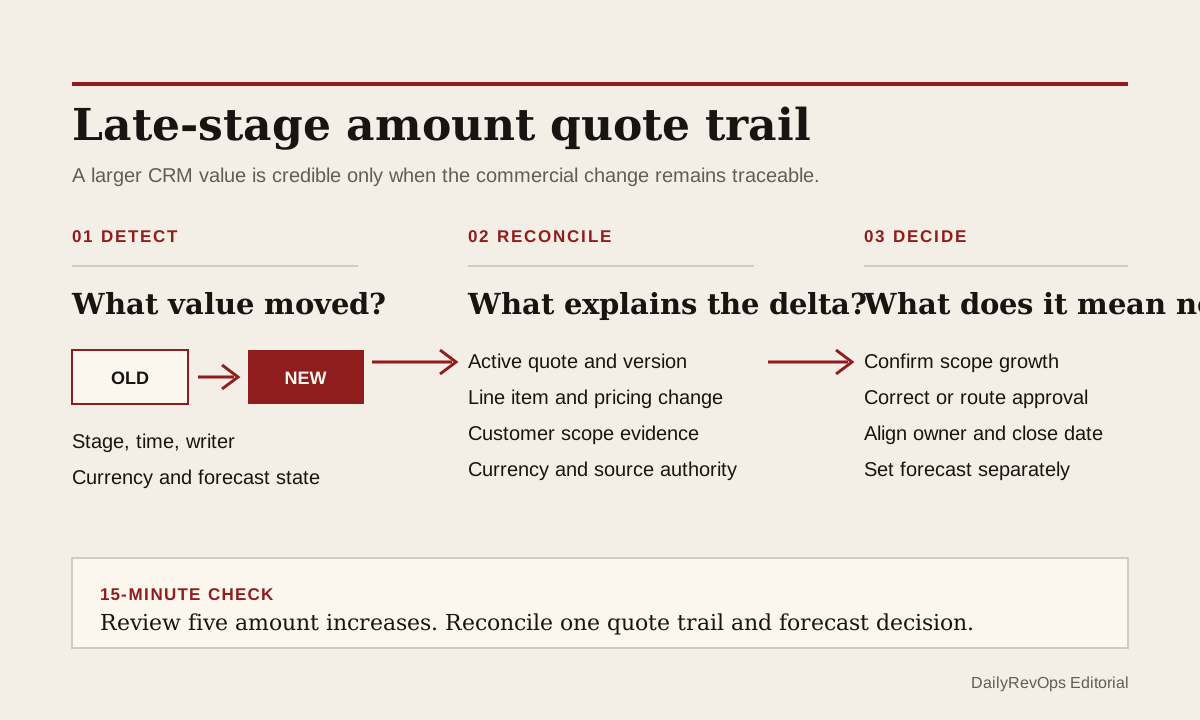
A late-stage opportunity can grow because the customer asked for more seats, added a product, changed the contract term, or expanded the implementation scope. The same amount movement can also come from a revised discount, a currency conversion, a copied quote, a line-item correction, an integration write, or a seller updating the deal before the commercial document is ready. The CRM delta alone cannot tell RevOps which event happened.
The useful control is a quote-trail check. When the amount rises after proposal, negotiation, procurement, or another team-defined late stage, connect the old and new opportunity values to the current quote, line-item changes, customer evidence, currency, and accountable owner. Treat the increase as a reviewable commercial change until those records tell one coherent story.
What to watch today
Watch for open opportunities whose amount increased after a quote was created, sent, approved, or discussed with the customer. Prioritize commit and best-case deals, material increases, changes close to the expected close date, and records where the stage or forecast category improved at the same time. A higher amount may be valid. The timing decides whether the forecast needs a fresh evidence check.
Also watch for a deal amount that no longer matches the active quote total or the sum of its current line items. The mismatch may reflect tax, fees, recurring versus one-time values, contract length, billing frequency, or platform-specific calculation rules. It may also mean that one record was revised while another was left behind. Do not force equality before the team defines what each amount is meant to represent.
A third signal is an increase written by an import, workflow, integration user, quote sync, or bulk edit rather than the deal owner. Property history can help identify when a value changed and which user or process wrote it. That evidence still needs a commercial explanation: the writer shows how the field moved, not whether the customer accepted the new scope.
Why RevOps should care
Opportunity amount can affect pipeline value, forecast rollups, manager inspection, approval routing, commission planning, capacity assumptions, and downstream handoffs. If the amount grows without an aligned quote trail, leadership may discuss expansion that is still only a configuration change. The opposite failure is also possible: a real customer-confirmed expansion can remain absent from the forecast because the commercial records were never reconciled.
HubSpot documents quotes connected to deals, products and line items used across commercial records, multiple currencies and exchange rates, and record property history. Salesforce documents quote creation from opportunities. These sources show that deal, quote, product, currency, and history records can be structured and inspected. They do not prove that an amount is contractually agreed, forecastable, or recognized as revenue for a particular business.
RevOps should therefore separate three decisions. Did the customer request or accept a scope change? Do the CRM and quote records represent that change correctly? What does the reviewed change mean for close date, forecast category, approvals, and the next owner action? One field update should not silently answer all three.
CRM and workflow signals to inspect
- Opportunity or deal ID, account, owner, manager, pipeline, stage, and expected close date
- Prior amount, current amount, delta, percentage change, change time, and changed-by user or process
- Deal currency, company currency, exchange rate, exchange-rate date, and any converted reporting amount
- Active quote ID, quote status, version, created date, sent date, expiration date, total, and quote owner
- Product or line-item ID, quantity, unit price, discount, term, billing frequency, one-time value, and recurring value where available
- Customer evidence for the change: reply, meeting, approved scope, procurement request, order form, or another governed source record
- Controlled reason: customer scope growth, product addition, quantity change, term change, discount change, currency effect, pricing correction, migration, import, automation, or unexplained
- Prior and current forecast category, manager submission, approval status, next customer step, next-step owner, and due date
- Review status, reviewer, source links, correction owner, final decision, and exception close condition
15-minute operator action
Open the five most recent late-stage opportunities whose amount increased. For each record, capture the old amount, new amount, change time, writer, currency, active quote total, and the line item or commercial event nearest to the change. Then open the customer activity or approved scope record that supports the increase rather than relying on the seller note alone.
Classify each sample as customer-confirmed scope growth, quote revision in progress, discount or pricing change, term or billing change, currency effect, CRM correction, integration or import write, duplicate quote issue, or unexplained. For one unresolved deal, ask the commercial owner to link the supporting evidence, identify the authoritative quote version, and make an explicit close-date and forecast decision.
The output is five classified increases and one reconciled deal. It is not a full pricing audit. If all five records require detective work, create a temporary amount-change view with prior value, current value, currency, active quote, line-item delta, change source, customer-evidence status, forecast state, owner, and review due date.
Keep scope growth separate from record cleanup
A bigger CRM amount is commercial growth only when the underlying scope changed. Adding seats, products, services, regions, or a longer committed term may support that classification when current customer evidence and the commercial record agree. Removing an old discount, fixing a quantity, changing the price book, converting currency, or correcting an import can raise the displayed amount without adding new customer demand.
Record the reason before using the delta in expansion reporting. If the team needs both booked scope and expected opportunity value, define those fields separately. If recurring and one-time values matter, keep them distinct rather than forcing one total to support every forecast, billing, and performance question.
Do not overwrite the old amount explanation with the new quote note. Preserve enough history to show the prior value, the triggering event, the quote or line-item version, the reviewer, and the decision. That trail lets Finance, Sales Ops, and the deal owner discuss the same change without pretending that every CRM amount is a signed commercial commitment.
Name the authority for each commercial value
The opportunity may remain the operating forecast record while the quote holds the current customer-facing configuration. Another team may use a CPQ, billing, order, or contract system as the stronger source after approval. RevOps should name which record owns proposed value, approved value, signed value, billing value, and reporting conversion instead of allowing the newest writer to win by default.
When the quote is still being drafted, label the opportunity increase as under commercial review if it affects a material forecast decision. When the customer scope is confirmed but the quote is not yet updated, keep the customer evidence visible and assign the commercial correction. When the quote is accepted but the deal amount is stale, correct the CRM through the approved sync or owner workflow and verify the downstream rollup.
Close the exception with an explicit result: scope growth confirmed and forecast aligned, quote revision pending, amount corrected, currency effect documented, pricing approval required, duplicate quote resolved, or increase rejected for insufficient evidence. A comment that says updated pricing is not enough when another operator still cannot trace the value.
Risks and limits
Do not block legitimate expansion with a heavy approval workflow for every small line-item edit. Use a materiality rule based on stage, amount delta, forecast category, timing, currency, or approval impact. The control should focus attention where the increase can change a real forecast or customer commitment.
Do not assume the active quote is legally binding or commercially final. Quote status, signatures, approvals, contracts, orders, and billing records can have different meanings across companies and CRM configurations. Legal, Finance, Deal Desk, or the contract owner may need to decide which document governs the commitment.
Finally, history can be incomplete after migrations, quote replacements, CPQ integrations, deleted line items, or exchange-rate changes. If the old configuration cannot be reconstructed, classify the increase as a data-quality exception instead of inventing scope growth. The goal is not to suppress larger deals. It is to make the commercial reason, source record, amount, currency, owner, close date, and forecast consequence inspectable.
Related reading
Can the CRM defend the commit? · A forward stage jump can hide an unfinished buyer step · Every manual forecast override should expire · Revenue forecasting workflows · CRM workflows · Weekly forecast review with CRM evidence · HubSpot vs Salesforce for RevOps workflows · HubSpot profile · Salesforce profile · Clari profile
Source notes
These official sources support the workflow model and product concepts. They do not prove a specific retention outcome, benchmark, or vendor claim.
- HubSpot create and send quotes: Official reference for creating quotes from deal records, reviewing quote details and line items, and managing the quote process in HubSpot.
- HubSpot products and line items: Official reference for using products and line items on deals, quotes, invoices, payment links, and subscriptions.
- HubSpot account currencies: Official reference for company currency, additional currencies, exchange rates, and currency-aware record values.
- HubSpot record property history: Official reference for reviewing historical property values, change times, and change sources on CRM records.
- Salesforce create quotes: Official reference for creating quotes from opportunities and working with quote records in Salesforce.
Last updated: 2026-07-25