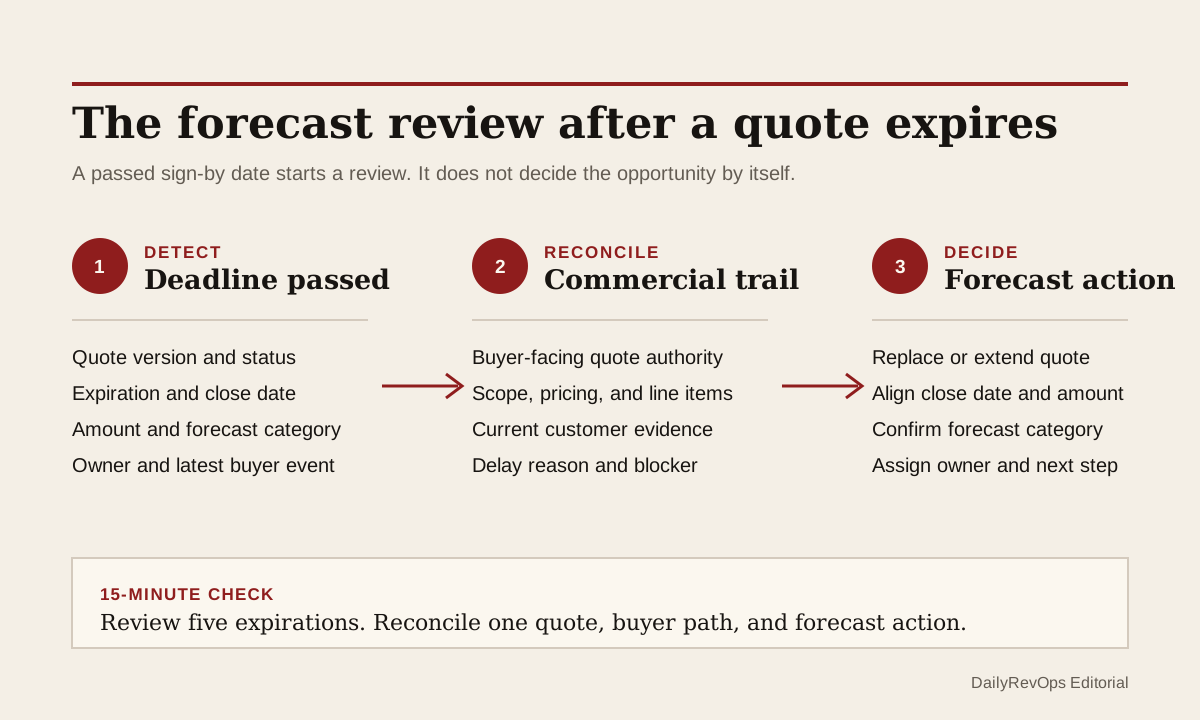
A sales quote can reach its expiration date while the opportunity remains open, late stage, or even in commit. That does not prove the deal is lost. The buyer may need a revised sign-by date, a new legal entity, a corrected product configuration, or more time for procurement. It does mean that one piece of commercial evidence no longer supports the forecast in the same way it did before the deadline passed.
RevOps should treat quote expiration as a review trigger, not an automatic stage change. The useful control connects the expired quote to the current buyer conversation, commercial scope, close date, forecast category, and next owner action. The team should be able to explain whether the quote still represents the intended deal, why the deadline passed, and which new evidence now supports the forecast.
What to watch today
Watch for open opportunities with a quote whose expiration or sign-by date passed since the last pipeline or forecast review. Prioritize late-stage deals, commit or best-case opportunities, material amounts, and records whose close date is on or before the expired quote date. The mismatch is the signal: the commercial document says its review window ended while the CRM still presents an active buying timeline.
Also watch for several quote versions attached to one opportunity. One may be expired, another may be draft, and a third may have been sent outside the CRM. The newest created record is not automatically the authoritative commercial version. Check which quote the buyer received, which scope and pricing it contains, who owns it, and whether the opportunity amount and products still match the intended offer.
A third warning is an expiration-date extension with no fresh buyer evidence. Moving the date can be reasonable when procurement, security, legal, or an approved customer contact asked for more time. It becomes weak forecast evidence when the date changes only because a seller, workflow, or integration kept the link active. Record the reason and source before treating an extended quote as renewed buying intent.
Why RevOps should care
Quotes sit between pipeline judgment and a customer-facing commercial artifact. Their dates, products, line items, terms, acceptance state, and associations can influence how Sales, Deal Desk, Finance, Legal, and RevOps interpret a late-stage opportunity. If the quote expires without a review, the forecast can keep relying on pricing, scope, approval, and timing that the buyer has not reconfirmed.
HubSpot documents quotes created from deal records, issue and expiration dates, line items, acceptance methods, and related commercial details. Its current guidance describes the expiration date as a buyer sign-by deadline in relevant configurations. Salesforce documents quote creation from opportunities, while its opportunity guidance covers stages, close dates, activities, products, and quotes. These sources show that quote and opportunity records can be connected and inspected. They do not prove that an expired quote means a deal will slip, that a buyer rejected the offer, or that every company should use the same expiration policy.
RevOps should separate three decisions. Is the current quote still commercially valid under the team's process? Does fresh customer evidence support the same scope and decision timing? What should change in the opportunity, forecast, approval path, or owner action now? A passed date can start that review, but it should not answer those questions by itself.
CRM and workflow signals to inspect
- Opportunity or deal ID, account, owner, manager, pipeline, stage, amount, currency, close date, and forecast category
- Quote ID, quote owner, quote version, associated deal or opportunity, issue date, expiration date, and current status
- Sent date, viewed date where legitimately available, acceptance state, signature state, payment state, and last buyer-facing event
- Product and line-item IDs, quantity, price, discount, term, billing frequency, one-time value, recurring value, and total
- Customer evidence for the delay: reply, meeting outcome, procurement update, legal request, security review, approval step, or another governed source record
- Expiration-change history, prior date, new date, changed-by user or process, reason, reviewer, and source evidence
- Active quote authority: buyer-facing version, draft replacement, superseded version, or external commercial document
- Current buyer next step, internal next-action owner, due date, blocker, blocker owner, and expected decision event
- Review outcome, forecast decision, quote action, correction owner, review date, and explicit close condition
15-minute operator action
Open the five most recent open opportunities with an expired quote. For each record, capture the quote expiration date, opportunity close date, forecast category, active quote version, amount, line items, last meaningful customer event, and next customer step. Then compare the quote deadline with the latest buyer evidence rather than assuming the opportunity fields are current.
Classify each sample as buyer requested extension, replacement quote in progress, scope or pricing revision, procurement delay, legal or security delay, customer decision pending with current evidence, stale opportunity, quote sent outside CRM, duplicate or superseded quote, or evidence unclear. For one unresolved opportunity, ask the commercial owner to identify the authoritative quote, link the latest buyer evidence, and make an explicit close-date and forecast decision.
The output is five classified expirations and one reconciled forecast record. It is not a full quote-process redesign. If all five require reconstruction, create a temporary expired-quote review view with opportunity, quote version, expiration date, last buyer evidence, close date, forecast category, owner, next action, review date, and close condition.
Keep quote validity separate from opportunity status
A quote can expire without ending the opportunity. The buyer may still be active while the commercial document needs a new date, revised terms, different products, or another approval. Keep the opportunity in the stage supported by current customer evidence, not the quote status alone. Use a separate quote-review state when the commercial artifact needs work but the buying process remains active.
The opposite is also important. A quote can be extended or replaced while the opportunity evidence has weakened. A new sign-by date does not prove that the close date, forecast category, amount, or buyer next step still holds. Treat the commercial-document action and the forecast decision as separate reviewed updates.
Define which record answers each question. The opportunity or deal may own pipeline stage, forecast category, close date, and manager judgment. The quote may own the current buyer-facing scope, products, pricing, terms, acceptance method, and sign-by date. A CPQ, contract, order, or billing system may become authoritative later. RevOps should document those boundaries instead of letting the newest timestamp decide.
Rebuild the commercial trail before extending the date
Before changing an expired quote, confirm whether the buyer-facing scope remains current. Compare products, quantities, term, discounts, currency, legal entity, billing details, and approval state with the latest approved customer conversation or commercial request. If any material element changed, create or revise the quote through the governed process instead of extending an old version that no longer represents the intended agreement.
Preserve the expired version and its reason where the platform and retention policy allow it. Another operator should be able to see which offer reached its deadline, what changed afterward, who approved the replacement or extension, and how the opportunity was updated. Do not overwrite the old commercial trail merely to make the current record look clean.
When the quote is still correct and the buyer requested more time, record the request source, revised deadline, owner, and next decision event. Then review the opportunity separately. The close date may remain, move, or require a manager exception depending on current evidence. The forecast category may stay or change. The correct result comes from the buyer path and operating policy, not from one universal expiration rule.
Close on an explicit forecast action
Close the exception with a named outcome: quote replaced, expiration extended with buyer evidence, scope revised, approval rerouted, opportunity date updated, forecast category updated, stale opportunity moved to review, or no change with a documented reason. A fresh quote URL or a note that says buyer needs time is not enough when the record still contains conflicting timing.
Sample the resolved records after the next normal forecast cycle. Check whether the buyer-facing quote, opportunity amount, products, close date, forecast category, next step, and owner action still agree. Reopen the exception when an automation restored the old date, a replacement quote was never sent, or the customer evidence did not progress as expected.
Risks and limits
Do not automate a stage regression or forecast downgrade from quote expiration alone. Some companies use short quote windows for pricing control, approvals, or administrative reasons that do not map directly to buyer intent. Use materiality, stage, current evidence, and company policy to decide which expirations deserve review.
Do not extend or replace commercial terms outside the authorized Deal Desk, Finance, Legal, security, or pricing process. RevOps can route the exception and reconcile CRM evidence, but it should not infer authority to change discounts, terms, tax, payment, legal entity, or signature requirements. The current platform package and configuration can also change quote behavior, so test the actual account setup.
Finally, do not treat quote views, email opens, or automated status changes as proof of buyer acceptance. Use the strongest approved customer or commercial evidence available and keep uncertainty visible. The useful outcome is not zero expired quotes. It is a forecast where the active commercial document, buyer evidence, close date, amount, owner action, and review decision tell one inspectable story.
Related reading
The quote trail behind a late-stage amount increase · Can the CRM defend the commit? · A forward stage jump can hide an unfinished buyer step · Revenue forecasting workflows · CRM workflows · Weekly forecast review with CRM evidence · HubSpot vs Salesforce for RevOps workflows · HubSpot profile · Salesforce profile · Clari profile
Source notes
These official sources support the workflow model and product concepts. They do not prove a specific retention outcome, benchmark, or vendor claim.
- HubSpot create and send quotes: Official reference for quote creation, deal associations, line items, issue and expiration dates, acceptance, signatures, payments, and current Revenue Hub quote behavior.
- HubSpot legacy quotes API: Official developer reference for legacy quote records, properties, associations, publication, and quote status behavior.
- HubSpot record property history: Official reference for reviewing prior CRM property values, change times, and change sources on records.
- Salesforce create quotes: Official Salesforce reference for creating quote records from opportunities and managing quote work in the CRM.
- Salesforce opportunity management: Official learning reference for opportunity stages, close dates, activities, products, quotes, and current deal information.
Last updated: 2026-07-31