A CRM product can look ready to remove because nobody sells it anymore. The catalog entry is inactive, the replacement SKU is available, and new quotes use the new name. Yet active opportunities may still carry the old product as a line item. Approved quotes, renewal records, discount logic, integrations, commission extracts, and historical reports can still depend on its ID, price-book entry, or copied commercial values. Retiring the catalog record without tracing that trail can make one cleanup appear later as a pricing, forecast, renewal, or audit problem.
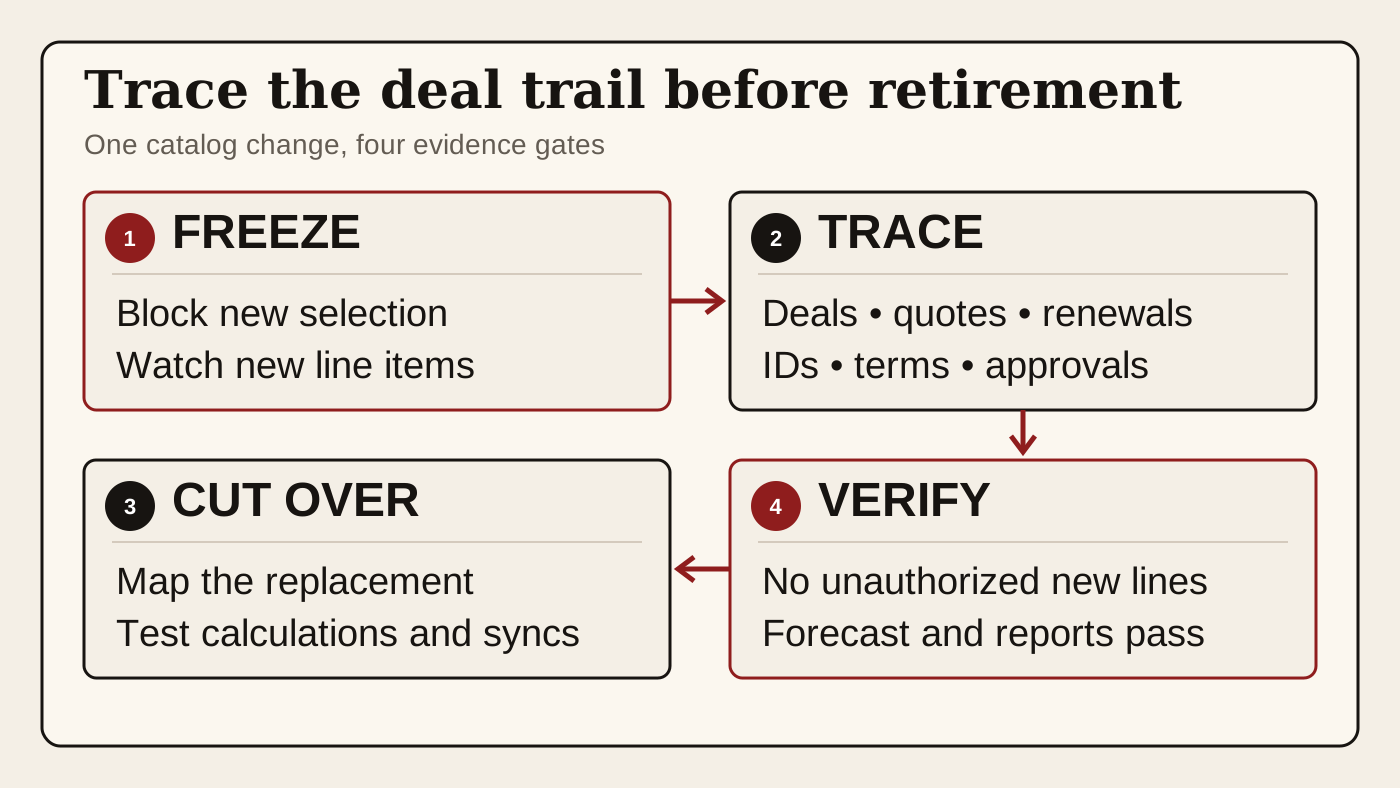
RevOps should treat product retirement as a commercial-record cutover. Stop new selection, inventory every active and historical use, preserve the line-level terms that explain prior deals, map continuing motions to an approved replacement, test every reader and writer, and observe one normal quote plus reporting cycle before final removal. The goal is not to keep an obsolete catalog forever. It is to retire one sellable definition without rewriting the customer and deal evidence that was created under it.
What to watch today
Watch for products marked legacy, discontinued, duplicate, migration-only, old package, prior edition, former region, test, do not use, or replaced by another SKU. Prioritize entries that still appear on open deals, draft or approved quotes, expansion or renewal opportunities, active subscriptions, order records, product-based workflows, approval rules, or recurring exports.
The first warning is a catalog search that shows no recent additions while existing line items remain. A product definition and a line item are related but different records. HubSpot's developer documentation exposes separate product and line-item APIs. A line item can carry product references and copied commercial properties while being associated with a deal or quote. The absence of new product selection does not prove that the existing commercial trail can be removed or remapped safely.
The second warning is a replacement with a similar label but different terms. The new product may use another SKU, billing frequency, unit price, currency, tax treatment, discount policy, contract term, service scope, revenue category, or approval route. Mapping by display name alone can make old and new sales look comparable when their commercial meaning differs.
The third warning is a clean opportunity total after a line change. The amount can still add up while the active quote points to another version, a discount approval refers to the retired SKU, a renewal model expects the old product family, or an integration restores the prior product ID. A correct total is one check. It is not proof that the quote, customer obligation, forecast, and downstream records agree.
Why RevOps should care
Products and price-book entries sit between catalog governance and revenue execution. They can influence what sellers select, which price is available, which line items appear on an opportunity, how a quote is built, which approvals run, how an amount is calculated, which renewal motion opens, how an integration maps billing data, and which product cohort appears in reporting. Removing the definition without a dependency map can affect each surface at a different time.
HubSpot documents product records and line-item records separately. Its Products API supports product retrieval, update, archive, and restoration. Its Line Items API covers line-item properties and associations to deals and quotes, and warns that sharing or changing one line item across parent records can create unwanted relationship changes. HubSpot's quote documentation adds buyer-facing terms, approvals, signatures, and payment context. Together, those surfaces show why a catalog cleanup must follow the line-level commercial record rather than only the product-library row.
Salesforce's official Trailhead project similarly connects products and price books to opportunities, quotes, and orders. Its opportunity exercise adds products from a selected price book as opportunity line records. The exact objects and controls differ across CRM and CPQ setups, but the operating question is stable: which active work, historical evidence, calculations, approvals, integrations, and reports still use this sellable definition, and what approved treatment replaces each use?
Official platform documentation supports the available record model and technical controls. It does not decide whether a historical line can be altered, which contract terms remain binding, how revenue should be recognized, how a commission should be recalculated, or whether two SKUs are commercially equivalent. Finance, Deal Desk, Legal, Sales Ops, Customer Success Ops, and the CRM owner still need the approved business rule.
CRM and workflow signals to inspect
- Product ID, SKU, visible name, internal name, product family, description, status, creation date, last update, catalog owner, replacement product, and intended retirement date
- Price-book entry ID, price book, active state, list price, unit price, currency, billing frequency, term, quantity rules, discount limits, tax context, and effective dates
- Opportunity or deal ID, account, owner, pipeline, stage, close date, forecast category, amount, currency, motion, and current customer evidence
- Line-item ID, product reference, line description, quantity, unit price, discount, net value, recurring or one-time value, term, start date, end date, and manually overridden properties
- Quote ID, quote version, status, approval state, signature state, expiration date, buyer-facing terms, associated deal, associated line items, and accepted or superseded version
- Contract, order, subscription, invoice, entitlement, renewal opportunity, expansion opportunity, service record, and any source ID used to connect the commercial lifecycle
- Workflow, approval, calculation, validation, task, list, sequence, notification, forecast rule, renewal alert, and customer handoff that reads product or line-item fields
- API client, import, integration mapping, CPQ or billing sync, warehouse model, reverse ETL, commission extract, spreadsheet, and report that reads or writes the product ID, SKU, family, or price-book entry
- Historical report, product cohort, attach rate, pipeline mix, renewal base, bookings analysis, forecast snapshot, commission input, and Finance reconciliation that needs the old definition
- Business owner, catalog owner, Deal Desk reviewer, CRM owner, integration owner, report owner, replacement decision, monitoring window, rollback owner, and explicit close condition
15-minute operator action
Choose one product already marked discontinued or replaced. Capture its product ID, SKU, active state, price-book entries, currencies, billing terms, replacement SKU, and proposed retirement date. Do not archive, delete, rename, or bulk-replace anything during this first pass.
Find the five most recent open deals with that product and five recent closed deals where its line items still explain a customer commitment. For each sample, open the line item, active or accepted quote, amount, discount, approval state, renewal or subscription association, and source history. Search the product ID, SKU, and price-book entry ID in workflows, integrations, reports, warehouse models, commission files, and approved operating documentation.
Classify each dependency as active sell motion, accepted customer evidence, active service or renewal, historical reporting, external reader, external writer, replacement incomplete, safe catalog retirement, or evidence unclear. Choose one material unresolved record and name the replacement treatment, decision owner, next test, and rollback condition. The output is one product dependency card and one verified decision, not a catalog-wide delete operation.
Freeze new selection before changing old records
Stop new use before rewriting history. Remove the product from normal seller selection or deactivate the relevant price-book entry through the supported platform control when the replacement is ready and access allows it. Update templates, default bundles, guided selling, imports, integrations, and operator instructions that can still add the old SKU. Keep a controlled exception path for a deal that must finish under an already approved offer.
Monitor for new line items after the freeze. Any new occurrence is dependency evidence. Capture the writer, time, parent deal or quote, selected price book, source request, and downstream effects. Repair the source template, integration, copied opportunity, or automation instead of repeatedly replacing the line by hand.
Do not rename the old product to the new one as a shortcut. Labels can change while IDs and historical terms remain. A renamed catalog entry can make an old quote appear to contain a product that did not exist under that definition at the time. Preserve the old name and identifiers in the historical trail, then use an explicit replacement relationship for new work.
Separate catalog retirement from line-item treatment
Decide separately what happens to the product definition, price-book entries, open line items, accepted quotes, and historical line items. The catalog record may become unavailable for new selection while old line records remain required evidence. An open deal may need a reviewed replacement line. An accepted quote may need to stay immutable. A renewal may need a new product mapping while retaining the prior subscription and contract trail.
For every active line, compare the customer-facing scope and terms with the proposed replacement. Record whether quantity, unit price, discount, currency, billing frequency, term, start date, service level, tax context, approval, and delivery obligation stay the same. When they differ, treat the change as a commercial amendment or fresh quote decision under the approved process, not as data cleanup.
Preserve before-and-after values and source records. Keep the old product ID, SKU, price-book entry, line-item ID, parent deal and quote, prior amount, replacement reason, change time, writer, reviewer, and resulting commercial values. If the platform's mutable history is not enough, use the approved change record rather than overwriting the only evidence of what the customer saw.
Test quotes, approvals, calculations, and integrations
Open the exact quote version used for the current customer decision. Confirm its status, line items, totals, discounts, terms, signature or acceptance state, and relation to the opportunity. A draft can often be rebuilt under controlled rules. An approved, sent, signed, or accepted quote may need preservation and a separate successor instead of edits that blur the buyer-facing trail.
Review every calculation that groups or prices the product. Check opportunity amount rollups, recurring and one-time totals, weighted pipeline, discount thresholds, approval branches, bundles, taxes, renewal values, commission logic, forecast categories, and warehouse transformations. Reconcile both the total and the component lines. A matching grand total can conceal a missing recurring line or a shifted product family.
Test readers and writers separately. A billing or CPQ integration can write the old SKU while a report reads only the product family. A workflow can branch on the product ID while a warehouse model joins on SKU. Replace one reference in a controlled test, confirm null and error behavior, retries, duplicate protection, association handling, and rollback, then observe the next normal sync.
Preserve renewal and historical meaning
A retired new-business product can remain active in the installed base. Renewal management may need the original SKU, contract dates, quantity, entitlement, billing schedule, prior price, amendment history, and approved successor offer. Do not remove an account from renewal review merely because the product is no longer sold to new customers.
Define whether reporting follows sold product, current service, replacement family, or both. Historical bookings and pipeline analysis may need the original definition. Current portfolio reporting may need a mapped family. Renewal forecasting may need the old subscription plus the proposed successor. Make each metric's basis visible instead of bulk-relabeling every old line into the newest catalog structure.
Close the retirement only after no unauthorized new lines appear, every open material deal has an approved treatment, accepted quotes remain explainable, renewal and entitlement records retain their trail, integrations use valid values, and one normal forecast, billing or CPQ sync, renewal review, and reporting cycle passes. Keep the catalog snapshot and rollback decision until those checks are complete.
Risks and limits
Do not delete or rewrite customer, quote, order, contract, invoice, entitlement, or historical records merely to make a product archive succeed. Those records can support customer obligations, revenue operations, finance, tax, legal, support, commission, forecast, and audit decisions. Follow the organization's retention, access, amendment, and approval rules.
Do not create a heavy approval for every harmless description correction. Focus the controlled review on inactive or replaced products with active deals, material value, accepted quotes, renewals, integrations, calculations, approvals, reporting, or unclear ownership. A catalog-only test item with no records or dependencies can follow a simpler verified retirement path.
Do not assume platform history captures private code, spreadsheets, data-warehouse logic, copied templates, or human routines. Search stable IDs as well as labels and ask the owners of the decisions the product supports. A product is retired when new use stops and every continuing commercial decision remains explainable, not when the library row disappears.
Finally, CRM, CPQ, billing, quote, price-book, product, line-item, archive, and restore behavior depends on configuration, edition, permissions, integrations, and release. Verify current documentation and test representative records in the target environment. The useful outcome is one obsolete catalog definition removed from new work while active deals, customer terms, renewals, integrations, forecasts, and historical reporting retain a traceable deal trail.
Related reading
The quote trail behind a late-stage amount increase · The forecast review after a quote expires · Preserve the forecast baseline through a deal-currency change · Who still reads this CRM field? · A retired CRM pipeline can keep running · Revenue forecasting workflows · CRM data quality workflows · GTM Operations and Sales Ops workflows · HubSpot profile · Salesforce profile
Source notes
These official sources support the workflow model and product concepts. They do not prove a specific retention outcome, benchmark, or vendor claim.
- HubSpot create and manage products: Official reference for product-library records, pricing, product properties, associations, activation, and the supported product-management surface.
- HubSpot Products API: Official developer reference for product records, properties, retrieval, updates, archival, and restoration through the CRM Products API.
- HubSpot Line Items API: Official developer reference for line-item records, product references, deal and quote associations, updates, archival, and the warning that shared line items can create unwanted relationship changes.
- HubSpot create and send quotes: Official reference for quote records, deal associations, line items, buyer-facing commercial details, approvals, signatures, and payment-related quote workflows.
- Salesforce manage products, prices, quotes, and orders: Official Salesforce project for the relationship between products, prices, price books, opportunities, quotes, and orders.
- Salesforce create an opportunity and add products: Official Salesforce exercise showing products and price-book entries added to an opportunity as commercial line records.
Last updated: 2026-08-08