A customer champion can change role, move to another business unit, or leave the company while the CRM still treats that person as the primary relationship. The contact remains associated with open opportunities, renewal plans, support history, tasks, and account notes. Dashboards continue to show coverage, but the person who understood the product, coordinated stakeholders, or carried the next decision may no longer be available.
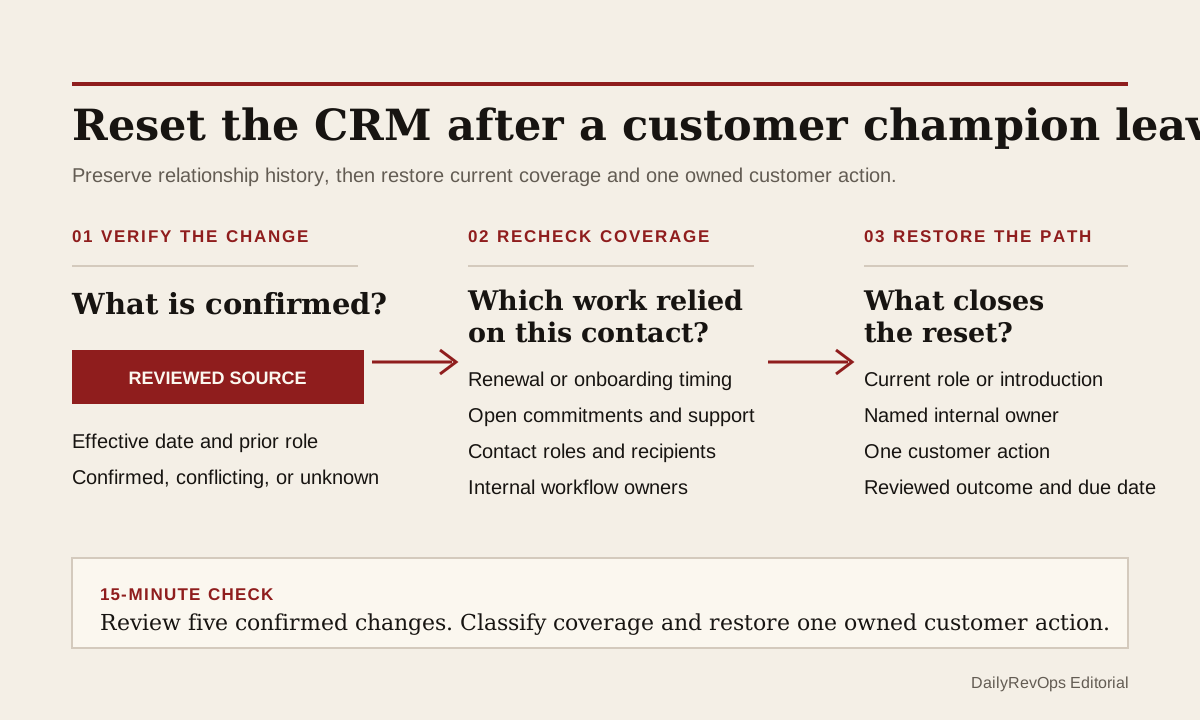
RevOps should treat a confirmed stakeholder departure as a small account-plan reset. The useful control is not to delete the contact or declare the account at risk. It is to preserve the relationship history, verify what actually changed, recheck the owners and customer commitments that depended on that person, and assign one next customer action. A job change is evidence for review, not evidence of churn, loss, or expansion.
What to watch today
Watch for active customers and late-stage opportunities where a key contact is marked inactive, has an email bounce that a person reviewed, appears in an approved account note as having changed role, or is confirmed by the customer as no longer owning the work. Prioritize records inside a renewal, onboarding, implementation, escalation, procurement, or executive-review window. The timing makes the relationship change operationally relevant; it does not make the commercial outcome predictable.
Also watch for a contact departure with no change to the account plan. The same person may still be named as champion, decision maker, administrator, renewal contact, executive sponsor, next-step owner, or recipient of an open task. A company can have several valid contacts, so do not assume that one departure removes all coverage. Check which decisions and commitments were attached to that person before routing new work.
A third signal is false continuity created by automation. Sequences, renewal reminders, meeting tasks, or support updates may continue using an old recipient because the workflow reads an association or field that was never reset. Pause only the affected customer communication after a reviewed confirmation. Do not suppress a whole account because one signal is uncertain.
Why RevOps should care
Relationship coverage affects renewal planning, onboarding, account strategy, escalation handling, opportunity progression, customer health, and the next meaningful conversation. If a key stakeholder changes and the operating record does not, the account team can prepare from stale assumptions. A task can look assigned, a renewal plan can look active, and a next step can look current even though the customer-side owner has changed.
HubSpot documents contact records, associations between CRM objects, and property history. Salesforce documents account teams and contact roles. These sources show that contact context, relationships, team responsibility, and selected changes can be structured and reviewed. They do not prove that a person has left, that a stakeholder is a champion, or that the account is commercially at risk. The team still needs a trustworthy confirmation and human judgment.
RevOps should separate three decisions. What is verified about the contact change? Which customer and internal workflows relied on that person? What is the smallest next action needed to restore current relationship coverage? Keeping those decisions separate prevents an uncertain people signal from becoming an unsupported risk score or an automatic customer message.
CRM and workflow signals to inspect
- Contact ID, account or company, current title, role, business unit, contact status, and last verified time
- Confirmation source, confirmation date, reviewer, confidence, and whether the source can be stored under company policy
- Associated opportunity, renewal, contract, subscription, ticket, onboarding plan, task, meeting, and account plan
- Relationship role such as champion, decision maker, administrator, procurement, billing, legal, executive sponsor, or renewal contact
- Current account owner, CSM, renewal owner, opportunity owner, support owner, and executive owner
- Last meaningful customer conversation, stated outcome, open commitment, promised response, next step, and due date
- Renewal date, notice date, implementation milestone, open escalation, forecast state, and customer-health review window
- Replacement contact, relationship-coverage status, outreach owner, introduction requested, and customer response
- Workflow enrollment, sequence recipient, alert recipient, task owner, sync source, and affected communication that may need review
- Reset status, reviewer, review due date, final decision, and close condition
15-minute operator action
Open five active accounts where a key contact change was confirmed recently. For each account, preserve the source and date of that confirmation, then inspect the contact's open associations: renewal, opportunity, onboarding, support escalation, task, meeting, and account plan. Check whether another current customer contact can support the same decision or whether the relationship role is now uncovered.
Classify each sample as coverage unchanged, replacement known, introduction needed, customer confirmation needed, internal owner missing, open commitment at risk, automation recipient review, or evidence uncertain. For one material gap, assign a named internal owner and one bounded customer action, such as confirming the new contact, asking for an introduction, rescheduling a review, or updating the account plan after the customer responds.
The output is five classified accounts and one owned relationship reset. It is not a broad re-engagement campaign. If all five accounts need manual reconstruction, create a temporary stakeholder-change view with confirmation source, prior role, affected workflow, renewal or milestone timing, replacement-contact status, internal owner, next action, due date, and close condition.
Reset the plan without erasing the relationship history
Do not delete the departed contact simply to clean the dashboard. The record can still explain earlier decisions, meetings, support cases, approvals, and customer commitments. Mark the current status and effective date, preserve the prior relationship role, and stop using the contact for active workflow decisions when the change is verified. Historical context and current reachability are different fields.
Recheck every role that the contact represented. A champion can also be the product administrator or day-to-day coordinator, while procurement, billing, legal, and executive sponsorship sit elsewhere. The reset should identify which role became uncovered, not label the whole account as having no relationship. One replacement contact may cover part of the gap without inheriting every prior assumption.
Keep internal ownership explicit too. The CSM or account executive may own the customer conversation while RevOps owns the workflow correction, Support owns an open case, and Finance owns a billing contact change. One account-owner field cannot describe all of those responsibilities. Use one next-action owner for the immediate reset and keep the workflow-specific owners visible.
Verify the signal before changing customer communication
A bounced email, public profile update, enrichment value, or colleague note can be a review signal. It should not automatically rewrite the contact record, remove consent context, enroll a replacement person, or trigger a customer message. Confirm the change through an approved source or a customer interaction, record only the evidence your policies allow, and show whether the status is confirmed, probable, conflicting, or unknown.
Use minimum necessary context. The operator usually needs the business role, effective status, source date, affected workflow, and next action. Personal detail about why someone left is not required for renewal or account planning. Access rules and retention policies should decide who can see source notes, while the wider account team receives only the operational conclusion it needs.
Before another automated message runs, inspect recipient logic for the affected account. A renewal reminder may need a current billing or commercial contact. A product update may still have other valid recipients. A support notification may belong to an administrator who remains active. Change only the communication whose source field or association is no longer trustworthy, then test the next workflow step.
Close on restored coverage, not a filled contact field
The exception should close when the relevant customer workflow has a current path forward. That can mean a replacement contact is verified, another existing stakeholder accepts the role, an introduction is scheduled, the customer says the role is not needed, or the team documents that the open work can continue without a replacement. Adding a name from enrichment without customer context is not enough.
Review material accounts again at the next operating meeting. Check whether the customer action happened, whether the replacement role is accurate, whether open commitments moved, and whether renewal, forecast, health, or onboarding records now reflect the new reality. Reopen the exception if the replacement contact never responds or if another workflow still points to the former stakeholder.
Risks and limits
Do not treat stakeholder departure as automatic churn risk or a reason for urgent outreach. People change roles for many reasons, and another strong relationship may already exist. Do not infer employment status from one failed message or unverified external signal. False positives can create awkward customer contact and unnecessary CRM churn.
Do not erase consent, suppression, communication preferences, or source history while replacing a contact role. A new stakeholder does not inherit the prior person's permissions or relationship context by default. Marketing, Sales, Customer Success, Support, Legal, and Privacy owners may apply different rules to communication and record retention.
Finally, do not confuse a complete contact field with restored relationship coverage. The useful outcome is a verified current role, a named internal owner, a relevant next customer action, and corrected workflows where needed. The account plan should tell another operator what changed, what remains uncertain, and what will close the review without inventing a commercial story.
Related reading
Customer Success Operations · What a customer health score cannot tell RevOps · Ticket closed, customer follow-up still open · Handoff debt is where RevOps work quietly breaks · Renewal reviews need conversation evidence · CRM workflows · CRM data quality workflows · Vitally profile · Sighub profile · HubSpot profile · Salesforce profile
Source notes
These official sources support the workflow model and product concepts. They do not prove a specific retention outcome, benchmark, or vendor claim.
- HubSpot create contacts: Official reference for contact records and the properties used to hold customer-contact context in HubSpot.
- HubSpot CRM associations: Official developer reference for associating contacts with companies, deals, tickets, and other CRM records.
- HubSpot record property history: Official reference for reviewing prior property values, change times, and change sources on CRM records.
- Salesforce account teams: Official reference for using account teams to represent people who work together on an account.
- Salesforce contact roles: Official reference for contact roles in Salesforce sales records and customer relationships.
Last updated: 2026-07-27