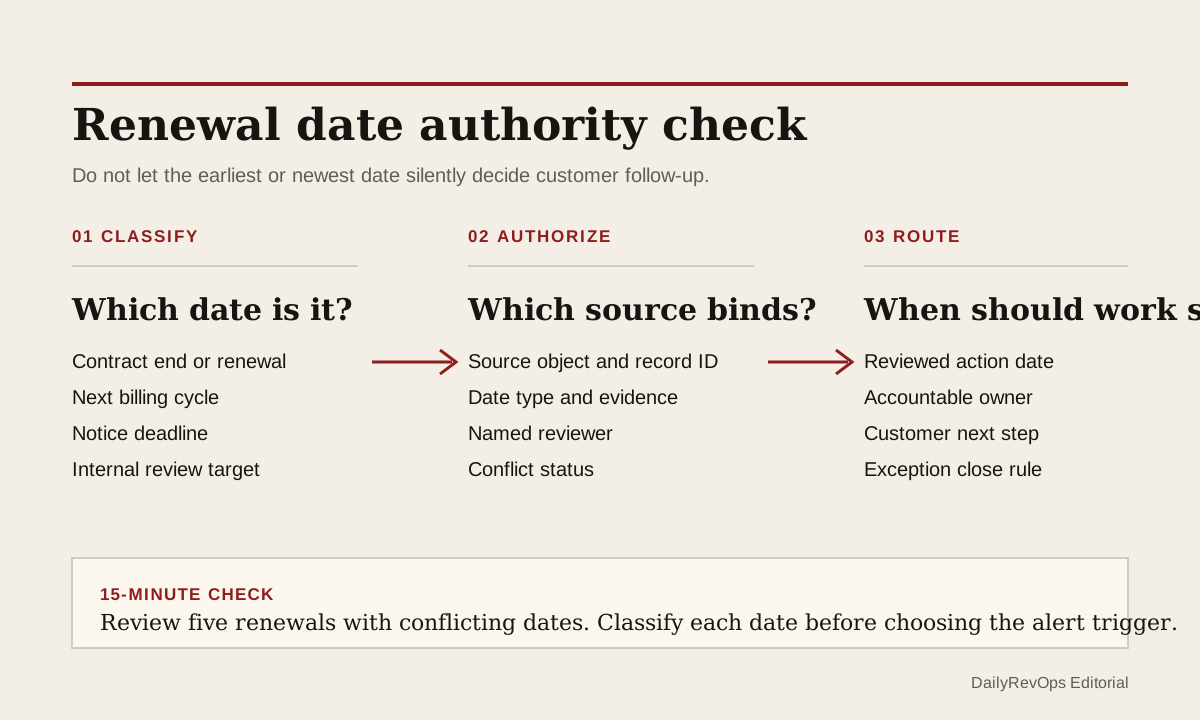
A renewal workflow can find several dates for the same customer and still have no trustworthy trigger. The CRM may show a contract end date. Billing may show the next invoice date. A subscription record may show a period end. Customer Success may maintain an internal renewal target, while a contract note contains an earlier notice deadline. Choosing the earliest or newest value without classifying it can send the wrong task at the wrong time.
For today's operator brief, inspect date authority before adding another reminder. The useful question is not which date looks most urgent. It is what each date means, which source supports the binding customer commitment, and which separate action date should start the team's renewal work.
What to watch today
Watch for accounts where renewal, contract end, next billing, subscription end, cancellation, notice, and internal review dates disagree. A difference is not automatically a data error. Monthly billing can sit inside an annual agreement. A cancellation can be scheduled for the end of a paid period. An internal review date can deliberately precede a contractual deadline. The risk begins when all of these values are labeled renewal date or copied into one field without their original meaning.
Also watch for automations that select the minimum date across objects. The earliest date may be a billing event rather than the binding renewal moment. The latest date may be a manually updated planning target. A workflow should not turn either into customer action until the date type, source record, and authority rule are visible.
Why RevOps should care
Date ambiguity changes real work. It can open a renewal task months too early, delay a notice decision, place the wrong account in a 90-day review, or make forecast and retention reporting disagree. Operators then spend the meeting debating the calendar instead of deciding the customer action.
HubSpot's subscription documentation shows separate next billing and end-date properties on subscription records. Stripe documents a billing-cycle anchor for recurring billing and separate cancellation behavior, including end-of-period and scheduled cancellation. Salesforce documents contract records for managing customer agreements. These sources support a control that preserves date meaning across systems. They do not decide which record is legally binding for a specific customer or agreement.
CRM and workflow signals to inspect
- Account or company ID, subscription ID, contract ID, deal or opportunity ID, and external billing ID
- Date value, date type, source object, source system, source record URL, and last modified time
- Contract start, contract end, renewal term, notice deadline, and auto-renewal status where reviewed evidence exists
- Billing-cycle anchor, next invoice or billing date, current period end, scheduled cancellation, and effective cancellation date
- CRM renewal date, Customer Success target date, internal review date, and how each value was derived
- Named commercial owner, CSM, contract reviewer, billing owner, and exception owner
- Date-authority status: confirmed, conflicting, missing evidence, derived, superseded, or not applicable
- Reviewed action date, next customer step, due date, alert source, and exception close condition
15-minute operator action
Open five customer records inside the nearest renewal window where at least two date fields disagree. Put every visible date into one short table with four columns: value, date type, source record, and current owner. Do not correct or merge the dates yet.
Classify each value as contractual commitment, notice deadline, billing cadence, subscription state, or internal planning date. Mark the record confirmed only when one source can support the binding renewal moment and another operator can trace that decision. Mark it conflict when the source evidence disagrees, and missing evidence when the team is relying on copied or manually entered values with no supporting record.
For one confirmed record, set a separate reviewed action date for the customer workflow. For one conflict, pause the renewal alert for that record and assign the evidence review to a named owner. The output is five classified records and one authority decision, not a redesign of every renewal field.
Keep source dates separate from the action date
A robust model preserves raw source dates instead of overwriting them with one convenient renewal date. The contract or approved commercial record may own the binding commitment. Billing should keep its own cadence. A notice deadline should remain a distinct control because it can precede the end date. Customer Success can keep an earlier review target without pretending that target came from the contract.
The workflow can then calculate or set a reviewed action date from those inputs. That date should explain its rule, such as start commercial review a defined number of days before the confirmed notice or renewal event. Store the rule version, reviewer, and reviewed-at time with the result. If the source changes, reopen the authority check before moving the customer task.
This is different from letting one system silently overwrite another. Date authority is a semantic decision first: what does the field represent and which evidence makes it usable for this workflow? Sync direction matters after that decision, because the team then knows which reviewed value may flow into CRM and which source dates must remain read-only context.
Risks and limits
Do not infer legal meaning from a field label. A CRM property called contract end date may be copied, outdated, or incomplete. RevOps can govern the operating record, but contract interpretation and notice obligations may need legal, finance, or contract-owner review.
Do not automatically choose the earliest date as a safety rule. That can create unnecessary customer contact and permanent alert noise. Do not automatically choose the billing period end either, because recurring billing cadence may not equal the commercial renewal decision. Route conflicts to review rather than hiding them inside a formula.
Finally, do not delete the disagreeing source values after choosing an authority rule. Keep enough provenance to explain why the workflow acted, which record was reviewed, and when the decision changed. The goal is not one clean-looking date. It is a renewal task that starts from a traceable commercial moment.
Related reading
Renewal tracking across CRM · Renewal reviews need conversation evidence · CRM corrections need a sync-survival check · Customer Success Operations · CRM workflows · Sighub profile · HubSpot profile · Salesforce profile
Source notes
These official sources support the workflow model and product concepts. They do not prove a specific retention outcome, benchmark, or vendor claim.
- HubSpot manage subscriptions: Official reference showing that HubSpot subscription records can hold distinct next billing and end-date properties and can change with subscription updates.
- Salesforce contracts overview: Official reference for Salesforce contract records and their role in managing customer agreements.
- Stripe subscription billing cycle: Official reference for the billing-cycle anchor that sets recurring billing dates on a Stripe subscription.
- Stripe subscription cancellation: Official reference for immediate, end-of-period, and scheduled subscription cancellation behavior.
Last updated: 2026-07-19