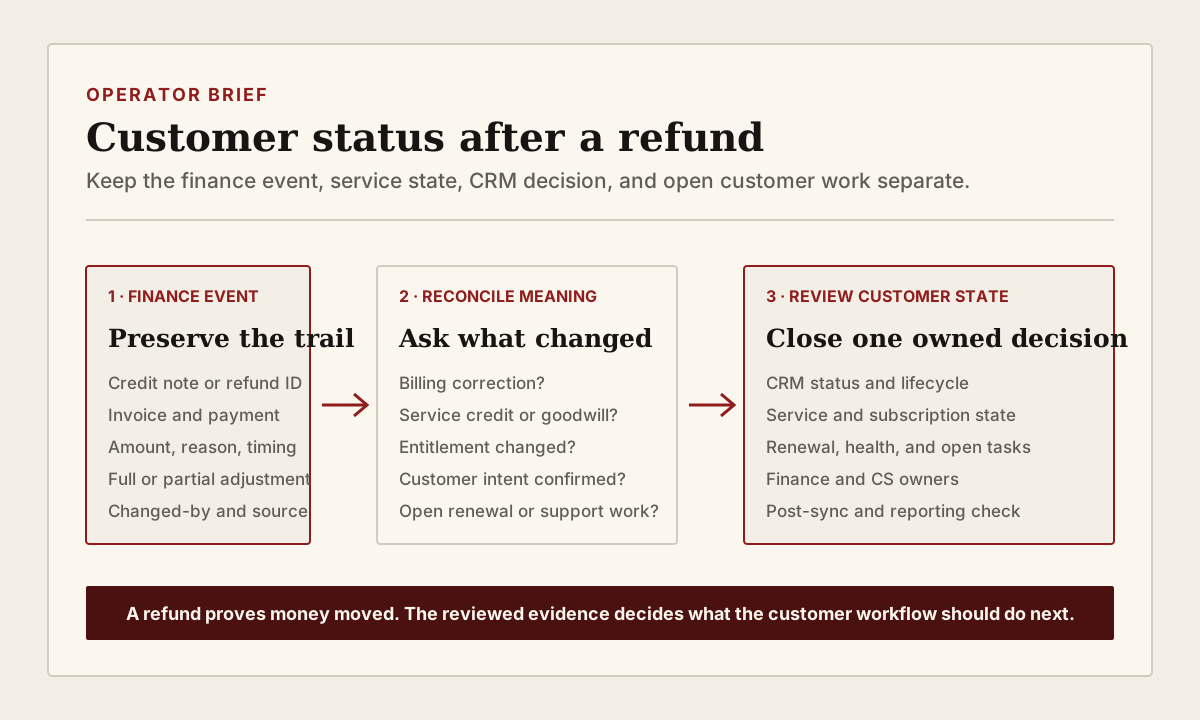
A credit note or refund proves that a finance record changed. It does not by itself explain whether service ended, the customer cancelled, an invoice was corrected, a goodwill credit was approved, or one line item was removed while the wider relationship continued. If automation treats every returned amount as churn, the CRM can close customer work that still needs an owner.
RevOps should route material refunds through a small customer-status review. Preserve the finance event, then compare it with the subscription or service state, customer evidence, renewal work, Customer Success plan, CRM status, and reporting rule. The goal is not to slow down Finance. It is to stop one monetary event from silently deciding several customer workflows that answer different questions.
What to watch today
Watch for full or partial refunds and credit notes issued since the last billing, renewal, or Customer Success review. Prioritize active customers, accounts inside a renewal window, credits linked to a service issue, invoices covering several products or periods, repeated adjustments, and events that changed lifecycle, customer status, health, renewal stage, or open tasks automatically.
The first warning is a refund reason that is too broad for the downstream decision. Labels such as requested by customer, duplicate, service issue, pricing correction, goodwill, unused time, or other can help Finance process the event. They may not show whether the customer keeps access, which product changed, whether the commercial relationship continues, or whether another team owes a response.
The second warning is timing disagreement. A refund can be created after the original payment, while service continues through a paid period or under a different subscription. A credit note can reduce an open or paid invoice without replacing the original invoice. A subscription cancellation can be immediate, scheduled, or effective at period end. Record those moments separately before changing customer status.
The third warning is closed work with no reviewed customer outcome. A refund webhook or integration may mark an account churned, close a renewal opportunity, suppress a Customer Success task, remove the account from a health queue, or change reporting before anyone confirms what the adjustment means. The clean automation run is not evidence that the customer workflow made the right decision.
Why RevOps should care
Refunds sit at the boundary between Finance, Billing Operations, RevOps, Customer Success, Support, Sales, and reporting. A billing correction may have no effect on entitlement. A service credit may require a Customer Success follow-up but no lifecycle change. A partial refund may remove one product while another subscription remains active. A confirmed cancellation may require offboarding and a customer-status update while open support, data-return, or contractual work stays visible.
Stripe documents credit notes as adjustments that can reduce an open or paid invoice. Its examples include an overcharge, undelivered items, and a negotiated discount. Stripe separately documents full and partial refunds and subscription cancellation timing. HubSpot separately documents subscription records and lifecycle stages. These sources show why the payment, invoice, subscription, and CRM relationship states should be inspected as separate records.
The documentation supports the event and record model. It does not decide whether a customer has churned, whether service should end, how revenue should be recognized, or which contractual obligation remains open. Finance policy, contract terms, entitlement rules, accounting treatment, customer confirmation, and the team's approved lifecycle definitions still control those decisions.
CRM and workflow signals to inspect
- Account or company ID, billing customer ID, invoice ID, payment ID, refund ID, credit note ID, subscription ID, contract ID, and product or service record
- Original amount, credited amount, refunded amount, currency, tax context, remaining invoice balance, and whether the adjustment is full or partial
- Refund or credit reason, reason detail, requested time, created time, effective time, completed or failed time, source record URL, and changed-by user or process
- Invoice status, payment status, credit note status, refund status, subscription status, service entitlement, access state, and paid-through or service-through date
- CRM lifecycle stage, customer status, account type, Customer Success stage, health status, renewal stage, forecast treatment, and reporting cohort
- Customer evidence such as a cancellation request, pricing correction approval, support resolution, service complaint, product-scope change, contract amendment, or confirmed goodwill decision
- Current Finance owner, Billing owner, CSM, commercial owner, renewal owner, Support owner, status-review owner, and next-action owner
- Open renewal, expansion, downgrade, support case, onboarding plan, task, customer commitment, offboarding step, or data-return obligation
- Workflow, webhook, sync, integration, report, audience, access rule, health rule, or renewal alert that reads the finance or customer-status fields
- Reviewed outcome, authority decision, correction owner, next review date, monitoring window, and explicit close condition
15-minute operator action
Open the five most recent refunds or credit notes for active or recently active customers. For each one, capture the finance event, amount, reason, invoice, subscription or contract, service state, CRM customer status, renewal state, open customer work, and current owners. Do not infer customer intent from the refund reason alone. Open the strongest approved customer, contract, support, or commercial evidence attached to the account.
Classify each sample as billing correction only, duplicate payment, partial product or scope adjustment, service credit, goodwill credit, cancellation scheduled, cancellation effective, downgrade, refund failed or pending, customer-status conflict, or evidence unclear. Then choose one real conflict. Name the authority for the finance record, service entitlement, commercial relationship, Customer Success work, and reporting treatment. Assign one owner and one review date.
The output is five classified finance events and one reconciled customer-state decision. It is not a new refund approval process. If all five cases require reconstruction, create a temporary refund review view with account, event ID, amount, reason, invoice, subscription, service state, CRM state, renewal work, customer evidence, owner, due date, and close condition.
Keep the finance event separate from customer intent
A refund reason is useful evidence, but it is not a complete customer statement. Duplicate payment, incorrect amount, unused quantity, service credit, price correction, cancelled order, and contract cancellation describe different operating events. Preserve the selected reason and supporting finance record, then add a reviewed customer-impact classification only when the evidence supports it.
Do not overwrite the original invoice, payment, credit note, or refund trail to make the CRM look consistent. Another operator should be able to see the original amount, adjustment, timing, reason, source, and final state. Keep the finance source values available even when RevOps writes a separate reviewed customer status or workflow outcome.
Use effective dates. A refund may complete after service already ended, before a scheduled cancellation becomes effective, or while a replacement invoice or subscription is active. The date money moves can differ from the date entitlement changes and from the date the CRM should leave an active customer cohort. Reporting should document which date and definition it uses rather than letting the newest event timestamp win.
Protect service and open customer work
Do not remove access or close Customer Success work from a refund alone. Confirm the current entitlement, product scope, contract or subscription state, paid-through date, approved exception, and customer communication first. A partial adjustment may affect one line item while the rest of the service continues. A goodwill credit may require follow-up precisely because the relationship remains active.
Review open obligations before changing lifecycle or customer status. Support may owe a resolution summary. Customer Success may owe confirmation that the fix worked. Finance may need to explain the adjustment. A renewal owner may need to update scope, amount, or timing. Legal, Privacy, Product, or Operations may own offboarding, access, or data-return steps. Closing the account view should not hide those tasks.
Use separate statuses when the questions differ. Finance can own refund and credit-note state. The subscription or entitlement system can own service access. CRM can hold a reviewed commercial relationship status. Customer Success can hold the account-plan state and next customer action. Reporting can derive a governed cohort from approved fields and effective dates. The model is stronger when those states can disagree briefly and route a review than when one event forces instant agreement.
Reconcile automation and reporting
List every workflow that reacts to a refund, credit note, invoice balance, subscription cancellation, or customer-status update. Check lifecycle automation, health rules, renewal alerts, commission or forecast views, marketing suppression, product access, support entitlement, Customer Success queues, warehouse models, and executive reporting. Pause or narrow only the path that creates a real wrong decision.
After the reviewed correction, wait through one normal sync and reporting cycle. Confirm that the finance event remains intact, the CRM status did not revert, service access matches the approved entitlement, open work stayed visible, and the account appears in the intended customer and renewal views. If another system restores the old value, route the field-authority conflict instead of asking the operator to repeat a manual edit.
Keep churn, retention, refund, contraction, service credit, and billing correction as separately defined measures where the business uses them. A returned amount can affect cash and finance reporting without proving a lost customer relationship. A confirmed cancellation can affect customer reporting even when the refund happens later or not at all. RevOps should publish the definitions and source fields behind each view rather than reconciling only the final totals.
Risks and limits
Do not delay a valid refund while waiting for a complete CRM review. Finance and Support should follow the approved customer and payment process. The customer-status review can run after the event, with the exception made visible and owned. Do not make RevOps the approver for accounting, tax, legal, privacy, contract, entitlement, or payment decisions outside its authority.
Do not label a customer as churned or retained from one technical event. A refund can be partial, pending, failed, duplicated, reversed, connected to a replacement charge, or limited to one product. A customer can also confirm cancellation without receiving a refund. Use the strongest approved commercial and customer evidence and keep uncertainty visible when records disagree.
Finally, platform behavior varies by payment method, product configuration, subscription model, sync design, and release. Test the current setup on a small sample, preserve event IDs and field history, and verify the next normal cycle before expanding automation. The useful outcome is not fewer refunds. It is one inspectable finance trail connected to the correct service state, CRM decision, open customer work, reporting rule, and named next action.
Related reading
Billing changed first. Did the CRM customer status follow? · Customer Success Operations · Renewal management workflows · CRM data quality workflows · Will your CRM correction survive the next sync? · Ticket closed, customer follow-up still open · Sighub profile · Vitally profile · HubSpot profile · Salesforce profile
Source notes
These official sources support the workflow model and product concepts. They do not prove a specific retention outcome, benchmark, or vendor claim.
- Stripe issue credit notes: Official reference for credit notes that reduce open or paid invoice amounts, including overcharges, undelivered items, negotiated discounts, credits, and refunds.
- Stripe refunds and payment cancellations: Official reference for full and partial payment refunds, refund reasons, refund status, balance handling, and failed or pending refund behavior.
- Stripe cancel subscriptions: Official reference for immediate, end-of-period, and scheduled subscription cancellation behavior and related invoice handling.
- HubSpot manage subscriptions: Official reference for subscription records, statuses, billing details, and supported pause, resume, and cancellation actions in HubSpot.
- HubSpot lifecycle stages: Official reference for contact and company lifecycle stages, their configuration, and controlled manual or automated updates.
Last updated: 2026-08-02