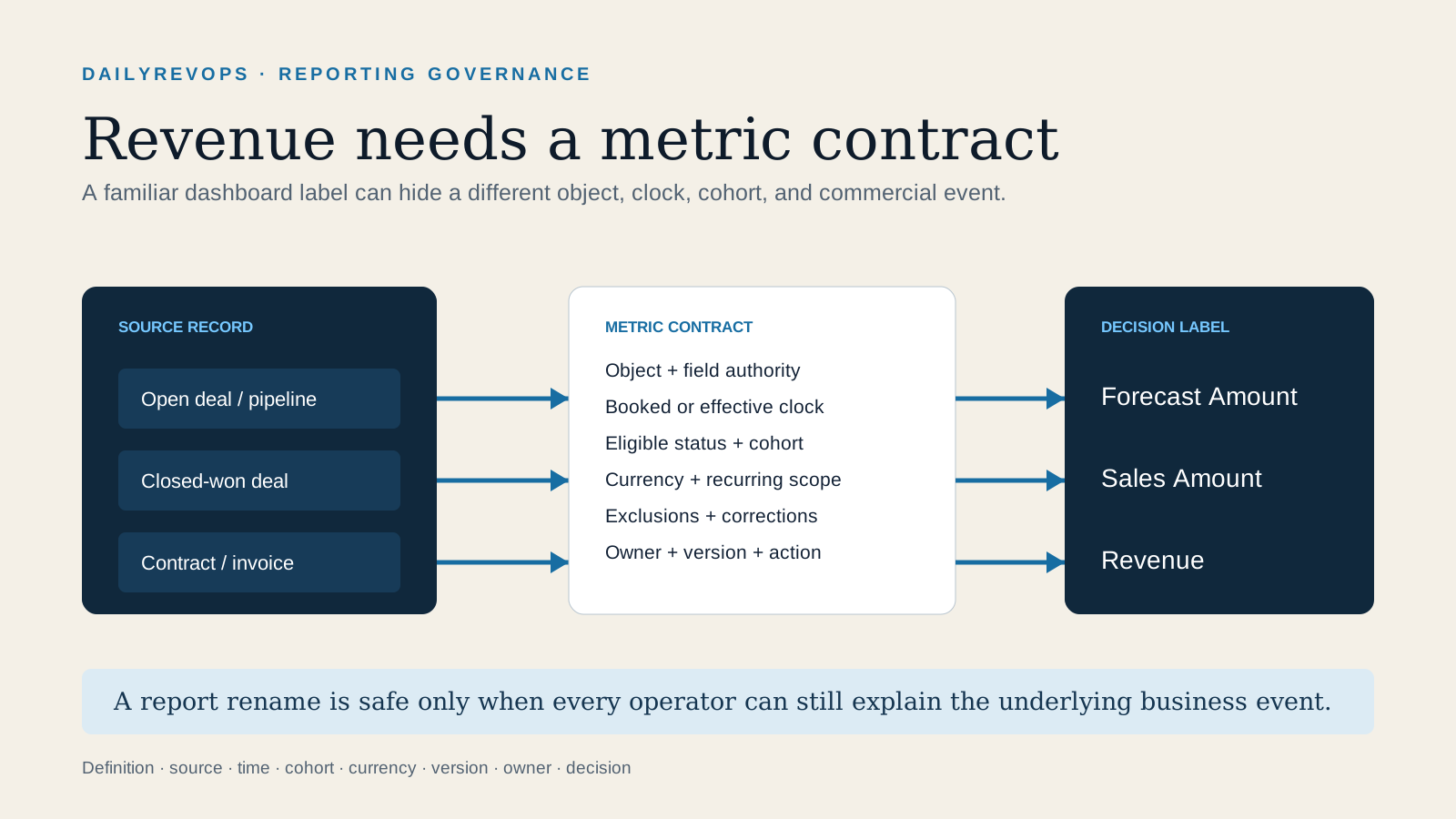
On 21 August, HubSpot announced four contract-backed reports and a naming change intended to separate three different commercial views. Open deals are to be described as Forecast Amount, closed-won deals as Sales Amount, and contracts or invoices as Revenue. HubSpot said the report logic would not change with the naming update, which was scheduled for 16 September. The product change is useful because a single word had been carrying several incompatible meanings.
For RevOps, the important work is larger than relabeling a dashboard. Pipeline, bookings, contracted recurring value, invoices, cash, recognized revenue, and retention can all be valid measures, but they answer different questions. When several reports are called revenue, people can agree on a number without agreeing on the underlying business event. A metric contract makes the source object, amount, status, clock, cohort, currency, owner, and decision explicit before anyone changes the chart.
What HubSpot changed in late August
HubSpot's product update describes four contract-backed reports: an MRR waterfall, net new MRR, booked MRR, and booked total contract value. The MRR waterfall and net new MRR use contract effective timing to show recurring-value movement. Booked MRR uses the booking date. Booked total contract value reports the value booked by a contract action and, according to the update, should not be read as the resulting value of the contract after every action.
That final distinction matters. A contract modification can add, remove, or replace value. The value of the action and the ending contract value are not necessarily the same number. A report can be internally correct and still be used incorrectly when its label is detached from its object, event, and time rule.
HubSpot also distinguishes the existing deal views from the newer contract or invoice views. Open deals remain a statement about expected pipeline. Closed-won deals describe completed sales records. Contracts and invoices describe a later commercial or billing layer. The platform documentation provides the available records and report behavior; each company still needs to define which event is authoritative for planning, compensation, billing, accounting, retention, and management review.
The distinction does not mean a contract record equals accounting revenue. Recognized revenue depends on the company's accounting policy, performance obligations, delivery, timing, adjustments, and Finance controls. RevOps can maintain the operational lineage. Finance and Accounting retain authority over accounting treatment.
Build the metric contract before changing the dashboard
Write one contract for every number used in a recurring commercial review. Start with the decision: pipeline inspection, forecast submission, sales performance, booking review, billing readiness, recurring-value movement, cash collection, or financial reporting. A measure with no named decision often becomes a decorative total that people interpret differently in every meeting.
Then record the source object and stable identifiers. For a forecast measure, that may be the deal ID, stage, forecast category, amount, currency, close date, owner, and snapshot. For a sales measure, it may be the closed-won deal and the accepted quote or order version. For a contract-backed measure, it may be the contract ID, action ID, associated company and deal, status, booked time, effective time, recurring amount, total value, currency, and change reason. For an invoice measure, preserve the invoice and line identifiers rather than joining only on customer name.
Define the amount field and its unit. State whether the value is gross or net, recurring or non-recurring, annualized or period-specific, tax-inclusive or tax-exclusive, list or contracted, invoiced or paid. Do not allow a report title to supply a definition that is absent from the data model.
Choose the business event and status that admit a record. Open, committed, closed-won, booked, effective, invoiced, paid, cancelled, credited, and recognized are separate states. If a record can re-enter or be corrected, document the reversal and restatement rule. A report that includes a cancellation without reversing its prior value can show movement while overstating the ending position.
Name the clock. Close date, booking time, contract effective date, service start, invoice date, due date, payment date, and accounting period can place the same customer in different months. Store the timezone and the rule for late-arriving or corrected records. If a dashboard uses a calendar month while Finance closes on another boundary, that difference belongs in the contract.
Define the cohort and grain. Say whether one row represents a deal, quote, contract, contract action, subscription, invoice, invoice line, customer, product, or currency-period. Document parent-child account handling, multiple deals for one contract, amendments, renewals, co-terms, migrations, and bundled products. A join that multiplies one contract across several associated records can create a valid-looking but duplicated total.
Record currency treatment. Preserve the transaction currency, amount, exchange-rate source, rate date, reporting currency, converted amount, and precision rule. Never overwrite the original amount with a later rate. Forecast, booking, invoice, and accounting views may intentionally use different rates; the difference must be visible rather than reconciled away by hand.
Finish with inclusion and exclusion rules, refresh cadence, transformation version, responsible owner, reviewer, and correction method. Every material change should carry a date, reason, affected history, approver, and whether prior periods were restated. The contract should be short enough to use and precise enough for another operator to recreate the figure from source records.
Trace one commercial record through the system
Select five recent examples before approving the new report: a normal new sale, an upgrade, a downgrade, a renewal, and a cancellation or correction. Include at least one future effective date, one multi-currency record, and one account with several associated commercial records if those cases exist in production.
For each example, trace the deal to the accepted quote or order, the contract and contract action, the subscription or invoice, the payment state, and the downstream reporting row. Capture stable IDs, source links, event times, amounts, currencies, status transitions, owners, and the report inclusion reason. The goal is not to force every surface to show one number. It is to explain why each surface shows the number appropriate to its decision and clock.
Compare the open-deal forecast view with the closed-won sales view. When the deal closes, verify whether the forecast snapshot is preserved, whether the booked sales amount follows the accepted commercial record, and whether later contract or invoice records associate to the same customer and transaction. A stage change alone should not silently create a contract, invoice, entitlement, or accounting conclusion.
Next compare booking date and effective date. A contract booked in August for service beginning in October can belong in an August bookings report and an October effective-MRR report without contradiction. If the dashboard only retains one date, users will resolve the ambiguity outside the system in a spreadsheet or meeting note.
For upgrades and downgrades, inspect both the action value and ending recurring value. Preserve the prior state, signed or approved change, effective period, credit or proration, new state, and reason. For cancellations and corrections, confirm that the original record remains traceable and that the reporting model applies the documented reversal or restatement behavior.
Prepare for the 16 September naming change
HubSpot said the underlying report logic would remain the same while names change automatically. Treat that as a language migration with downstream dependencies. Inventory saved reports, dashboard tiles, subscriptions, exports, warehouse models, spreadsheet tabs, board packs, forecast decks, compensation workbooks, API consumers, enablement documents, meeting agendas, and any metric dictionary that uses the old labels.
Map every old label to its source object and intended new label. Do not bulk-replace the word revenue without checking context. A custom report called revenue may be a pipeline amount, a closed-won booking view, an invoice total, a cash view, or a Finance-controlled measure. Rename only after its metric contract is known.
Keep a temporary alias where people need transition help: for example, Sales Amount with a note that the prior label was Deal Revenue. Add the effective date and owner. Retire the alias after the review cadence has completed at least one normal cycle and users can identify the correct view without relying on the old term.
Test scheduled deliveries and exports after the change. A report can render correctly in HubSpot while a downstream spreadsheet, presentation, or warehouse job still expects an old title, column header, or file name. Verify the destination, refresh time, record count, total, currency, and named recipient rather than relying on a successful export status.
A 30-minute operator review
Open the three most-used commercial dashboards. For each prominent number, write the decision it supports, source object, stable ID, status, amount field, clock, cohort, currency rule, refresh time, owner, and current label. Mark any field that the group cannot answer from the report or linked documentation.
Choose one ambiguous number and trace five representative records through deal, quote or order, contract, invoice, and reporting output. Record differences instead of correcting records during the first pass. Classify each difference as expected by definition, association defect, timing difference, currency treatment, status mismatch, duplication, missing record, stale refresh, or unresolved.
Assign one owner to resolve the metric contract and one reviewer from the function that owns the decision. Update the report label, description, filters, internal documentation, and downstream consumers together. The output is a governed definition and an exception list, not a promise that every commercial system will carry the same amount at the same time.
Risks, limits, and decision rights
Availability and behavior can depend on HubSpot edition, permissions, object configuration, data quality, rollout state, and the selected data sources. Confirm current documentation and the target portal before changing production reports. Custom report joins, calculated fields, filters, associations, and imported records can produce results that differ from a standard report even when titles look similar.
RevOps can own source mapping, operational definitions, CRM associations, report configuration, lineage, workflow controls, and reconciliation. Sales leadership owns forecast judgment and sales operating use. Deal Desk or Commercial Operations owns approved commercial structure. Billing Operations owns invoice workflow. Finance and Accounting own accounting definitions, recognition, close, and external reporting. Data teams own transformation reliability where a warehouse or BI layer is involved.
A naming improvement cannot prove forecast accuracy, sales productivity, revenue growth, or data quality. It can make a decision inspectable. The practical standard is simple: a reviewer should be able to select a number, identify the source records and business event behind it, reproduce the inclusion rule, explain its clock and currency, and route a correction without guessing which version of revenue the dashboard meant.
Related reading
HubSpot's Smart CRM index rollout · Six quote-to-cash releases · Late-August change controls · Revenue forecasting workflows · CRM data quality workflows
Source notes
These official sources support the workflow model and product concepts. They do not prove a specific retention outcome, benchmark, or vendor claim.
- HubSpot revenue report update: Official 21 August 2026 product update describing four contract-backed revenue reports and the planned naming distinction between forecast, sales, and revenue reports.
- HubSpot Revenue Analytics Suite: Official reporting documentation for the Revenue Analytics Suite, including report behavior, data requirements, filters, and availability considerations.
- HubSpot revenue reporting guide: Official guidance explaining several ways HubSpot users can report revenue from deals, recurring revenue properties, and payments or invoices.
- HubSpot Contracts API: Official developer reference for contract records, properties, associations, and object-level operations used when tracing contract-backed metrics.
- HubSpot custom report builder: Official reference for selecting data sources, joins, properties, filters, and chart settings in custom reporting.
Last updated: 2026-09-01