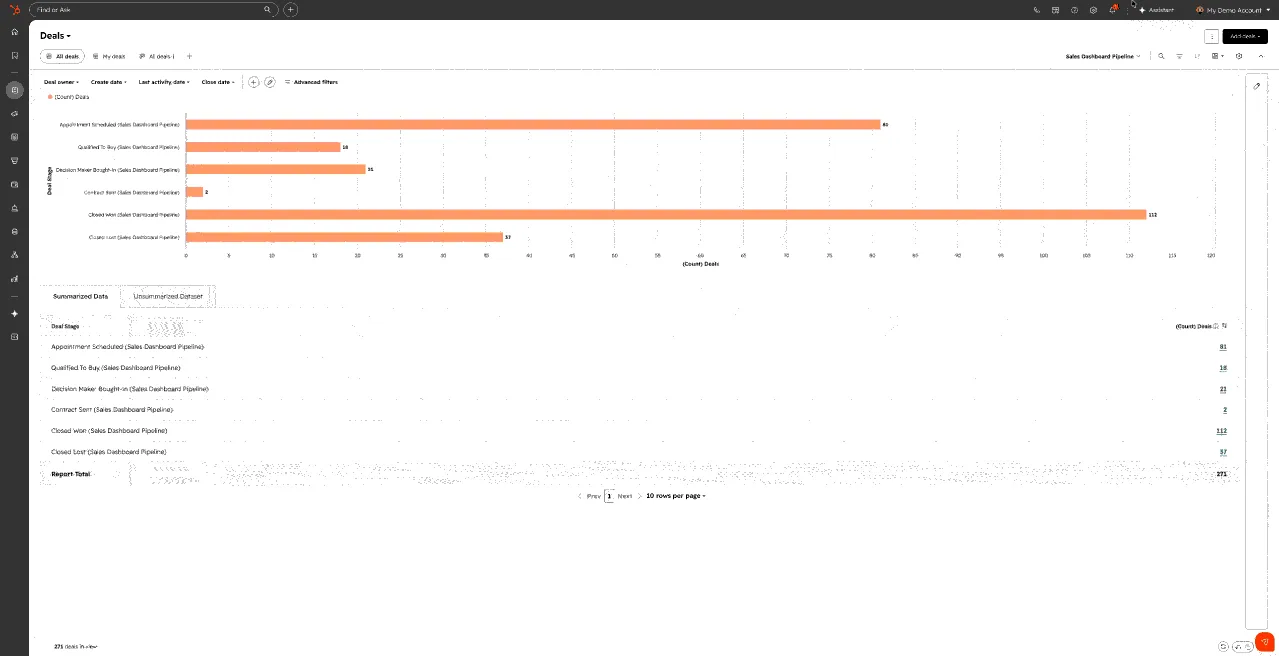
HubSpot's Smart CRM index reaches a late-August operating change
HubSpot is moving filters, metrics, report views, AI insights, and property management into the object index. The rollout can reduce navigation, but it also changes the workspace where reps and admins inspect and alter CRM records. Treat it as a controlled user migration, not a cosmetic refresh.
What HubSpot is rolling out
HubSpot's official Community post describes a redesigned Smart CRM index for contacts, companies, deals, tickets, and custom objects. It brings view settings onto the index, makes filters and metrics collapsible, adds an inline report view, offers Breeze-generated insights across columns, and places property management closer to the record table. HubSpot says the experience moves to all customers in late August 2026 after an opt-in period.
The source calls the index a central workspace for sellers, managers, and CRM administrators. That makes the release operationally relevant even though it does not change the meaning of a deal, company, ticket, or custom object by itself. A different default surface can change which records people notice, which filters they reuse, how they interpret counts, and how quickly an authorized user creates or exposes a property.
HubSpot's Community guidance says a Super Admin can test the experience and points teams to training resources. A Community response also notes team-level enrollment constraints and suggests an Enterprise sandbox where available. These are product and rollout statements from HubSpot. DailyRevOps has not independently tested every edition, permission set, object type, browser, or portal configuration.
The index becomes a decision surface
Saved views often function as operating queues: open renewals, stale opportunities, unassigned tickets, accounts without activity, or records waiting for enrichment. If a migration changes a visible column, default filter, sort order, count, or team access rule, the underlying records can remain intact while daily work becomes incomplete. The migration checklist should therefore start with named decisions and queues, not screenshots of the new navigation.
Inline reports and AI column insights can accelerate inspection, but a chart or generated observation still inherits the selected object, visible population, filters, permissions, currency, date field, and record quality. Operators should be able to move from an insight to the exact records behind it. Do not treat an index-level pattern as a forecast, root cause, or customer conclusion without checking the source records and the definition used.
Property management beside the index shortens the distance between observation and schema change. That is useful for authorized admins, but it makes naming, duplication, field authority, access, workflow dependencies, reporting, and retirement controls more important. A new property should still have a business definition, owner, permitted writers, eligible objects, downstream consumers, and a reason it does not duplicate an existing field.
Run a bounded migration test
Select one Super Admin, one sales or customer-success manager, and two representative users. Capture five existing views before enrollment: a normal queue, a high-volume table, a restricted view, a custom-object view, and a view that feeds a recurring meeting. Record the view ID where available, filters, columns, sort, pinned fields, visible count, sharing rule, owner, and the decision the view supports.
After enrollment, rebuild the same inspection. Compare record totals, the first and last visible records, filter behavior, column values, object associations, permissions, inline report totals, exports, saved URLs, and the actions available from the page. Test a user who should not create properties and one who should. If AI insights are enabled, compare each observation with the filtered rows and record any omitted context or unsupported interpretation.
Keep one support path and one stop condition. A stop condition may be a critical queue that cannot be reproduced, a permission expansion, a material count mismatch, a saved link that breaks a weekly review, or an admin action that lacks an adequate audit trail. Document the affected user, object, view, evidence, workaround, owner, and next review date instead of asking the entire team to adapt around an unexplained exception.
- Reconcile five saved views and their underlying record counts before and after enrollment.
- Test view, export, bulk-action, and property permissions under real representative roles.
- Trace every inline report or AI insight back to the active filters and source records.
- Record training, support, and stop conditions before moving an entire team.
- Review newly created properties and changed views after the first normal operating cycle.
Decision and limits
Proceed when representative users can reproduce their queues, counts, restricted access, and recurring-review workflow, and when administrators understand the closer property controls. Use the migration as an opportunity to retire genuinely unused views only after confirming that no user, report, automation, or meeting depends on them. A cleaner index is not a reason to erase historical definitions or access evidence.
Measure support exceptions, broken or rebuilt views, time to find the next record, count mismatches, unauthorized actions, new duplicate properties, and completion of the first weekly inspection. These are local migration controls, not vendor adoption or productivity benchmarks. A lower click count matters only if users reach the correct record population and take the correct next action.
The release should not be used to infer that HubSpot changed the underlying business meaning of CRM objects or that AI insights are decision-grade. Edition, permissions, object configuration, beta status, and later documentation can change. Verify the current target portal and keep the original source attached to the migration record.
Original source
This DailyRevOps article is written in our own words from the source signal and adds RevOps context, workflow analysis, and operator interpretation.
- Original source: HubSpot Community
- Original publication date:
- Source link: Read the original article