Problem
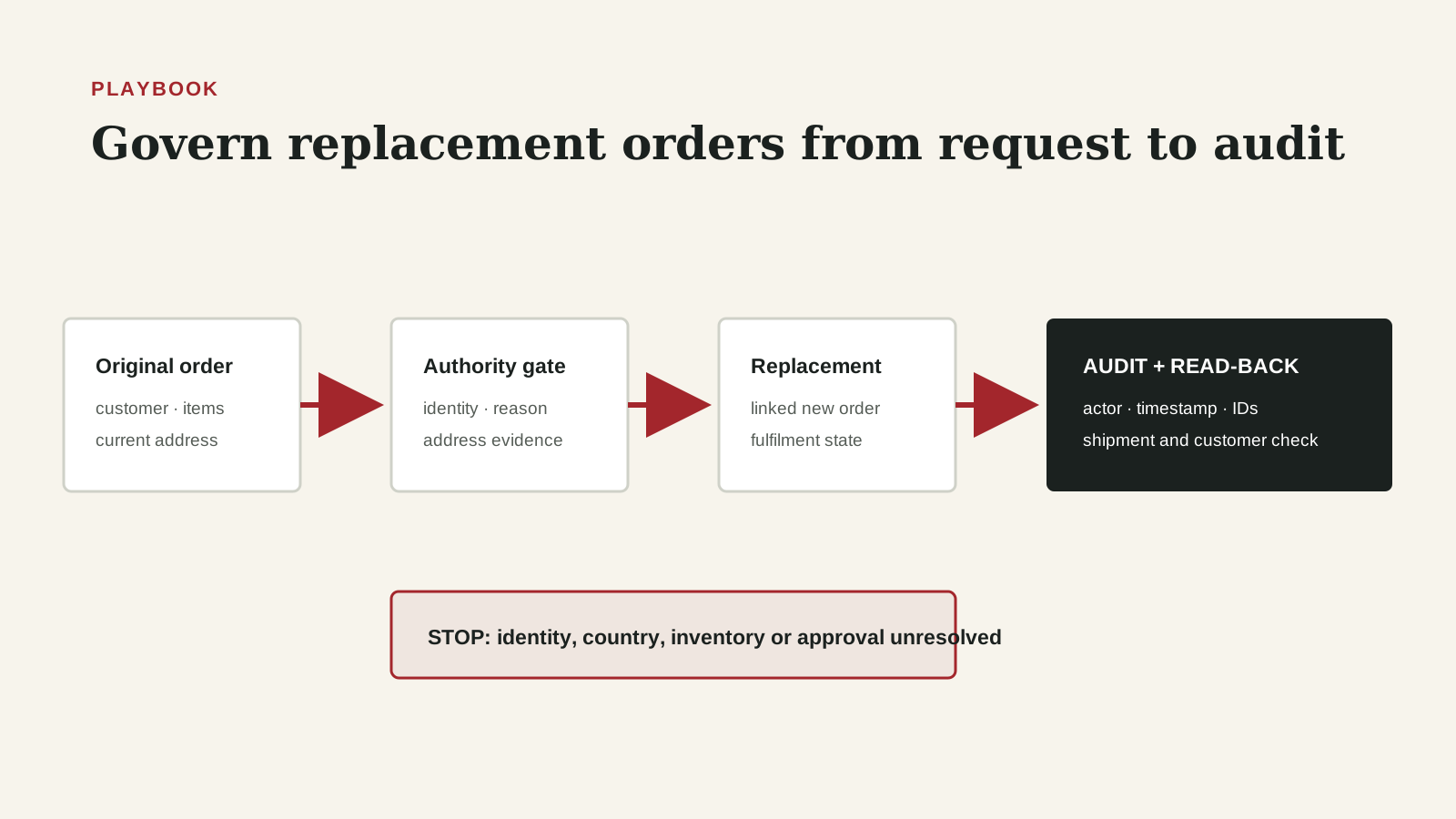
A replacement request looks like a support action, but it changes fulfilment, inventory, shipping, customer communication and audit evidence. Intercom now lets an agent send a Shopify replacement to a different address within the same country. That removes a manual detour, while making the confirmation, authorization and reconciliation design more important.
Why it matters
The workflow keeps a helpful customer experience from becoming an untracked commercial exception. It gives Support, RevOps and Operations one chain from original order through eligibility, address confirmation, replacement creation and final delivery, with a named owner when any link is missing.
Trigger: open a replacement case before creating the order
Start this playbook when an agent accepts a credible damaged, missing or incorrect-item request and a replacement may be the right remedy. The case must reference the original Shopify order and preserve the customer's stated problem. A new delivery address, if requested, belongs in the case as a proposed value until the customer confirms it.
Do not treat a replacement as a simple resend. The action creates a new zero-value Shopify order in Intercom's documented workflow. That order affects fulfilment capacity and customer expectations even when it does not create revenue. The operating trigger should therefore create a case identifier, owner, timestamp and reason before the write action.
Eligibility: separate service policy from tool capability
Confirm that the request meets the company's replacement policy: covered reason, eligible items, permitted quantity, allowed country and any required evidence. Intercom's address control is limited to another address in the same country. That product boundary does not decide whether the replacement itself is commercially authorized.
Record both decisions. The eligibility result explains why the business approved a replacement. The capability result explains whether the supported Intercom-to-Shopify flow can execute it. When either fails, route to the named exception path instead of improvising a manual order with weaker evidence.
Identity and address confirmation
Resolve the requester to the customer and original order before exposing order details or taking action. Compare the proposed recipient name, postal code, country and available order identifiers. If the identity match is uncertain, pause and escalate rather than using shipping information as a substitute for authentication.
Present the complete proposed delivery address back to the customer and capture affirmative confirmation in the conversation. Do not infer confirmation from the fact that the customer supplied only one changed line. The evidence record should show the final address that the operator used, the confirmation timestamp and the agent who proceeded.
Create: preserve the original-to-replacement relationship
Open the original order inside the Intercom conversation, choose the replacement action, select the approved items and quantity, supply the required reason, and choose the confirmed same-country address from the Shopify-backed region list. Review the complete summary before submitting.
Save the resulting replacement order identifier next to the original order identifier and case identifier. Intercom's help documentation describes a new $0 order. Preserve that fact without assuming a zero-value order has zero operational cost. Pick, pack, shipping, inventory and service recovery still need reporting.
Verify: test the destination and the audit trail
After submission, verify that Shopify contains the new order, its recipient and address match the customer's confirmation, the expected items and quantities are present, and the reason is attached. Confirm that the replacement appears in the Intercom conversation and that the action is represented in Auditing events.
A successful click is not a verified outcome. Capture the new order status and expected fulfilment handoff. If the order exists but contains the wrong address or line items, stop downstream fulfilment where possible and open an exception immediately. Never silently edit evidence to make it look as if the first action was correct.
Reconcile: connect service recovery to customer and inventory outcomes
Close the loop when the replacement reaches a terminal operational state: fulfilled, delivered, cancelled or escalated. Reconcile the original reason, replacement items, shipping cost if available, delivery outcome and any further customer contact. This is the minimum evidence needed to distinguish a resolved recovery from a duplicated shipment.
RevOps should report replacement volume by reason and outcome, not by agent activity alone. Use the evidence to find policy gaps, fulfilment failure patterns and repeat replacements. Do not turn a small sample into a vendor-performance claim; label incomplete or late-arriving delivery data.
Exceptions: make unsupported paths explicit
Create named routes for cross-country address changes, unavailable regions, high-value items, identity uncertainty, split shipments, inventory shortages, already-refunded orders and suspected abuse. Each route needs an owner, approval rule, allowed system of action and evidence required to return to the normal flow.
If an operator must use Shopify Admin directly, preserve the same original order, case, reason, approver and destination fields. Manual execution should change the tool, not lower the evidence standard. Mark the path so later reporting can separate native Intercom replacements from Shopify Admin exceptions.
Weekly control review
Review replacements created, exceptions opened, address changes requested, failed or cancelled replacements, duplicate shipments and records missing customer confirmation. Sample several successful cases as well as every high-risk exception. Validate that the conversation, Shopify order and audit record agree.
Assign each break to a failure class: identity, policy, address, inventory, integration, fulfilment or evidence. The owner should repair the immediate case and decide whether a policy, field, permission or training change is needed. Keep the denominator visible so a low raw exception count is not mistaken for a low rate.
Step-by-step workflow
- Open a replacement case tied to the original Shopify order and customer conversation.
- Confirm policy eligibility, item scope, quantity, reason and same-country address support.
- Resolve customer identity and capture affirmative confirmation of the complete destination.
- Create the replacement in Intercom and preserve the new $0 Shopify order identifier.
- Verify recipient, address, items, quantity, reason and audit event after creation.
- Track fulfilment to a terminal state and reconcile service, inventory and customer outcomes.
- Route every unsupported or failed case through a named exception owner.
- Review weekly rates and sampled evidence before changing policy or permissions.
CRM fields and signals needed
- Replacement requests by reason and eligible order population
- Share with a proposed address change and share confirmed before creation
- Native Intercom replacements versus Shopify Admin exception orders
- Missing original-to-replacement order links
- Duplicate, cancelled or failed replacement orders
- Time from approval to creation and from creation to fulfilment
- Cases missing a required reason, confirmation or audit event
- Repeat replacement rate by original order and reason
Operating quality check
Use this check before adding more tooling. The goal is to prove that the workflow is owned, current, and inspectable inside the system of action.
| Area | Healthy pattern | Risk pattern |
|---|---|---|
| Identity | Customer and original order resolve to one supported case. | Requester or order match remains uncertain. |
| Authorization | Policy eligibility, items, quantity and reason are explicit. | Tool access is being treated as approval. |
| Destination | The complete same-country address is customer-confirmed. | Only a partial change or inferred address is recorded. |
| Creation | Replacement order is linked and read back from Shopify. | The interface reported success but no verified order exists. |
| Audit | Actor, timestamp, reason and audit event are retained. | Evidence depends on a retrospective note. |
| Outcome | Fulfilment reaches a reviewed terminal state. | Order creation is counted as customer resolution. |
| Exception | Unsupported paths have a named owner. | Operators improvise direct changes without preserving evidence. |
Common mistakes
- Treating same-country product support as commercial authorization
- Changing only one address line without confirming the complete final destination
- Counting order creation as successful delivery
- Assuming a $0 order has no cost or reporting consequence
- Using manual Shopify execution without preserving the case and approval chain
- Measuring agent clicks while ignoring duplicate shipments and unresolved outcomes
- Editing the case retrospectively without retaining the original evidence
Replacement-order control review
- Support supplies the case, confirmation and reason
- Operations verifies the replacement order and fulfilment
- RevOps preserves identifiers, status and exception taxonomy
- Finance or Risk joins only when policy, value or abuse threshold requires it
Example operating rhythm
- After every replacement: verify the Shopify order and audit event.
- Daily: review failed, cancelled, duplicated and unsupported cases.
- Weekly: sample standard cases and reconcile fulfilment outcomes.
- Monthly or after an incident: revisit policy, permissions and reason taxonomy.
Tooling options
- Intercom for the customer conversation and supported replacement action.
- Shopify for order and fulfilment state.
- Intercom Auditing events for action evidence.
- A governed case or warehouse table for reconciliation.
- Access controls for customer-confirmed address and identity evidence.
Source notes
These sources support the workflow model and product concepts. They do not prove a specific business outcome, benchmark result, or vendor claim.
- Intercom: manage Shopify orders from the Inbox: Official workflow details for replacement creation, reasons and Auditing events.
- Intercom change: send replacements to a new address: Official October 7, 2026 source for the same-country address change.
- Shopify: create and fulfill return and exchange orders: Official Shopify context for direct returns and exchange administration.
Last updated: 2026-10-08
Decision frameworks to read next
FAQ
Does a different address mean any international address?
No. Intercom's October 7 update says the replacement can use a different address within the same country. Cross-country cases need a separate exception path.
Is customer confirmation enough authorization?
No. Confirmation proves the destination the customer requested. Your replacement policy and permission design still determine whether the business authorizes the remedy.
Why reconcile a $0 order?
Because it still consumes inventory, fulfilment and shipping resources, and it can create duplicates or unresolved service cases.
What should be authoritative?
The conversation supports customer intent, Shopify supports order and fulfilment state, and the audit record supports who took the action. The playbook links them rather than declaring one source universally authoritative.