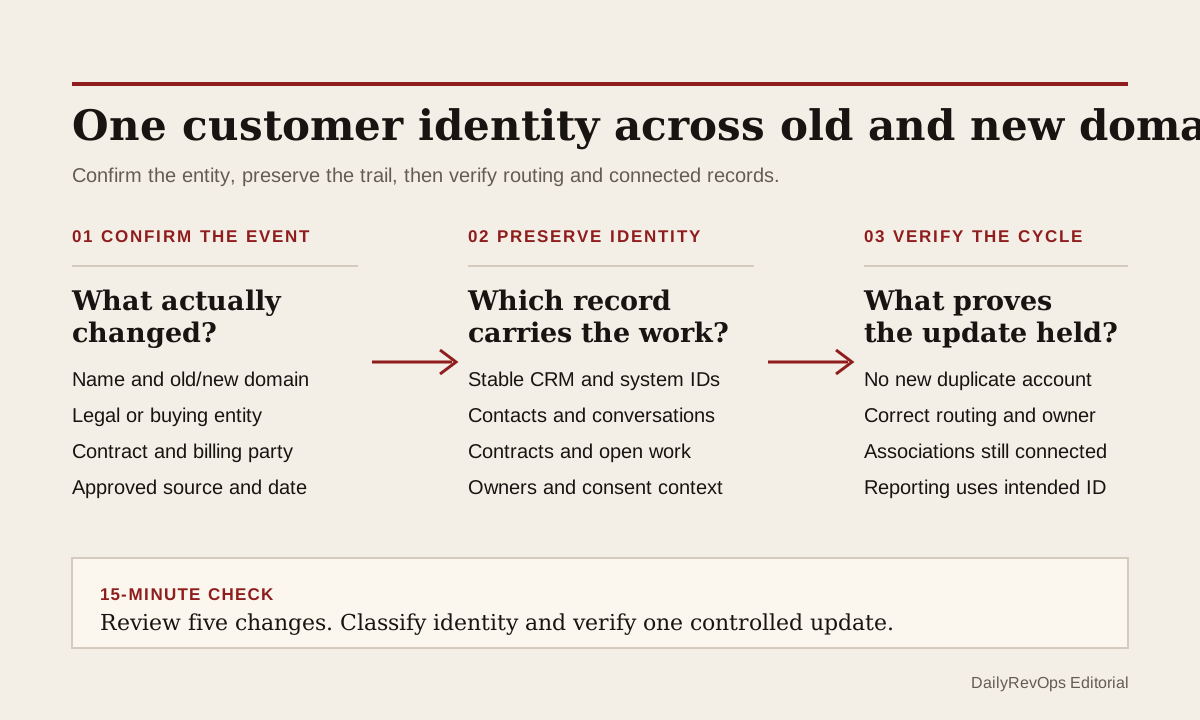
A customer can adopt a new company name and email domain while remaining the same operating relationship. The CRM may react as if a new account appeared. New contacts arrive with the new domain, automatic association rules create or select another company, enrichment rewrites the name, and connected systems keep using the old account ID. The result can be two partial customer histories when the team needs one reviewable identity trail.
RevOps should treat a confirmed domain change as an entity-control event, not a formatting edit. Preserve the old domain as history, confirm whether the legal or buying entity actually changed, identify the account record that should remain authoritative, and review every workflow that uses domain as an identity or routing key. A rebrand can support one continuing account. An acquisition, carve-out, regional structure, or separate contract can require more than one valid account. The customer name alone does not decide.
What to watch today
Watch for active customers where contact email domains, website domain, company name, billing name, contract party, or external account ID changed recently. Prioritize records with an open renewal, onboarding plan, support escalation, opportunity, subscription, invoice, or customer-success action. The operating risk is highest when a customer-facing workflow is active while different systems disagree about which account represents the relationship.
Also watch for a second company record created soon after new-domain contacts entered the CRM. HubSpot documents that contacts can be associated to companies by matching email and company domains. Its documentation also warns that automatic company association can create duplicate company records in some connected Salesforce configurations. Those behaviors make domain changes useful review signals, but they do not prove that two records describe the same legal, commercial, or service entity.
A third warning is silent routing drift. The new-domain record may receive a new owner, territory, lifecycle stage, score, campaign, support route, or customer-success plan while the old record keeps the contract and activity history. Both records can look valid in isolation. The split becomes visible only when an operator compares stable IDs, associations, active work, and the system that owns each field.
Why RevOps should care
Company identity sits underneath pipeline, renewals, customer health, attribution, support, billing, product access, ownership, and reporting. If a domain change creates a second account, teams can miss prior conversations, double-count the customer, route work to the wrong owner, or inspect a renewal without its active contract. If RevOps merges too quickly, it can also collapse two entities that Finance, Legal, Support, or the customer needs to keep separate.
HubSpot documents company records, domain-based association, record associations, property history, and merge behavior. Salesforce documents duplicate-management controls. These sources show that names, domains, associations, change history, and duplicate review can be structured. They do not establish that a rebrand leaves the legal entity unchanged, that an acquisition requires a merge, or that one CRM record is correct for every connected system. Those decisions need current contract, billing, customer, and system-owner evidence.
RevOps should separate three decisions. Did the public name or domain change? Did the underlying legal, buying, billing, or service entity change? Which CRM and connected-system IDs should represent the continuing work? Keeping those decisions separate prevents a website update from silently becoming an account merge or a customer reclassification.
CRM and workflow signals to inspect
- Current and prior company name, primary domain, additional domains, effective date, change source, and reviewer
- CRM account or company ID, parent account, legal entity, billing account, subscription ID, and warehouse customer key
- Old-domain and new-domain contacts, contact status, role, primary company association, and last verified customer interaction
- Open opportunities, renewals, contracts, subscriptions, quotes, invoices, tickets, onboarding plans, tasks, and customer-success records
- Current account owner, CSM, sales owner, renewal owner, support owner, territory, segment, and routing rule
- Lifecycle stage, customer status, health state, forecast inclusion, attribution state, and reporting cohort
- Consent source, subscription status, suppression state, communication preference, and approved evidence retained under company policy
- Enrichment source, integration user, workflow, import, or sync that last changed the name, domain, owner, or association
- Duplicate candidate, match rule, confidence, entity decision, chosen authoritative record, and do-not-merge reason where needed
- Migration status, correction owner, downstream systems checked, monitoring window, and explicit close condition
15-minute operator action
Open five active customer records where a company domain or name changed recently. For each one, write down the stable CRM ID, old domain, new domain, contract or subscription party, primary customer owner, and every second company record created or updated near the same time. Then compare the open associations and external IDs before changing any primary record.
Classify each sample as same entity and identity intact, same entity with duplicate candidate, rebrand awaiting contract confirmation, acquisition with parent-child review, separate legal or buying entity, routing drift, association split, external-ID conflict, or evidence unclear. For one clear same-entity case, assign a named owner to preserve the old domain as history, update the governed domain field, attach new-domain contacts to the authoritative account, and check one downstream workflow after its next normal run.
The output is five classified changes and one controlled identity update. It is not a bulk merge. If all five records require reconstruction, create a temporary domain-change queue with old and new domain, stable ID, entity decision, active contract, duplicate status, affected workflows, owner, review date, and close condition.
Keep domain and entity identity separate
A domain is a useful matching signal, but it is not a universal customer key. A business may use several domains, share a parent domain across subsidiaries, change its brand while retaining the same contract party, or operate separate legal entities under one brand. Preserve a stable internal account or customer ID and record the domain as a dated attribute or alias where the CRM model allows it.
Use current commercial evidence to decide continuity. The strongest evidence may be the contract party, billing customer, subscription, customer confirmation, product tenant, or another governed master record. A website redirect or enriched company name can support review, but it should not independently move renewals, ownership, consent context, or historical reporting to another account.
If one customer legitimately has several legal or regional records, document the relationship rather than forcing one flat account. Parent-child or labeled associations can preserve rollup context while keeping contracts, billing, support entitlements, territories, and local ownership separate. The goal is not one record at any cost. It is one explainable identity model for each operating decision.
Review automation before the primary domain changes
List the workflows that read company domain or contact email domain. Common examples include contact-to-company association, lead or account routing, enrichment, territory assignment, lifecycle automation, deduplication, scoring, support routing, marketing audiences, product provisioning, and warehouse identity stitching. Pause only the affected rule when evidence shows it will create or overwrite the wrong record.
Update the authority rule before the field. Decide which system may create the new domain, which system may change the primary domain, whether the old value remains an alias, and how connected systems should resolve a conflict. Review property history or sync logs after the next cycle so the correct value does not revert or create another account. A successful manual edit is not enough when an integration still treats the old domain as authoritative.
Keep communication permissions and subscription context attached to their original evidence. A new company domain or replacement email address should not be treated as automatic permission to contact a person through a new channel. Preserve the status and source that your policy requires, then let the relevant privacy or marketing owner decide whether a new address needs a separate confirmation. This brief is an operating control, not legal advice.
Close on a traceable identity trail
Close the exception when another operator can follow the old name and domain to the current authoritative record, understand whether the entity changed, see the active associations and external IDs, and confirm that the next customer workflow uses the intended account. For a merger or acquisition, the close state may deliberately keep two records with a documented parent-child relationship and do-not-merge reason.
Check the result after one normal integration cycle and one customer-facing workflow event. Confirm that contacts stayed on the right account, the owner and territory did not drift, the renewal or opportunity remained linked, the customer was not double-counted, and no new duplicate appeared. Record the reviewed outcome rather than relying on a clean company-name field.
Risks and limits
Do not merge accounts from domain similarity alone. Shared domains, holding companies, franchises, consultants, regional entities, acquired products, and customer-managed tenants can create valid exceptions. Do not assume a new domain proves a rebrand either. Confirm the change through an approved source or direct customer evidence before modifying active workflows.
Do not overwrite the old domain, company name, external ID, or association history when those values explain prior activities and connected records. HubSpot notes that merged records cannot simply be unmerged, even though merged IDs can remain available. Test object-specific behavior and downstream handling on a small sample before an irreversible merge or large migration.
Finally, do not measure success by fewer accounts or complete-looking domains. The useful outcome is a customer identity trail that keeps contracts, conversations, owners, consent context, routing, and reporting connected to the correct operating entity. When evidence remains uncertain, hold the change for review instead of making the CRM look cleaner than the relationship really is.
Related reading
CRM data quality workflows · CRM workflows · Before you merge CRM records, choose the survivor · Will your CRM correction survive the next sync? · Reset the CRM after a customer champion leaves · Clay vs manual CRM enrichment · HubSpot profile · Salesforce profile · Segment profile
Source notes
These official sources support the workflow model and product concepts. They do not prove a specific retention outcome, benchmark, or vendor claim.
- HubSpot create companies: Official reference for company records, company domain names, and associations with contacts, deals, and tickets.
- HubSpot automatic company associations: Official reference for domain-based contact-to-company matching, excluded domains, and duplicate-company risk with connected CRM systems.
- HubSpot CRM associations: Official developer reference for keeping CRM records connected through explicit object associations.
- HubSpot record property history: Official reference for reviewing prior property values, change times, and change sources on CRM records.
- HubSpot merge records: Official reference for primary records, retained associations and activities, merged IDs, and irreversible merge behavior.
- Salesforce Duplicate Management: Official learning reference for matching, duplicate prevention, and duplicate-resolution controls in Salesforce.
Last updated: 2026-07-28