Problem
A support ticket can show return context while the order, policy, refund and settlement states remain in separate systems. A fast reply can overstate what has actually happened.
Why it matters
Zendesk's September 30 integrations roundup describes a Refundid sidebar for return information. The interface is useful only when a team can trace each customer statement and exception through its authoritative records.
1. Define the case and its authority map
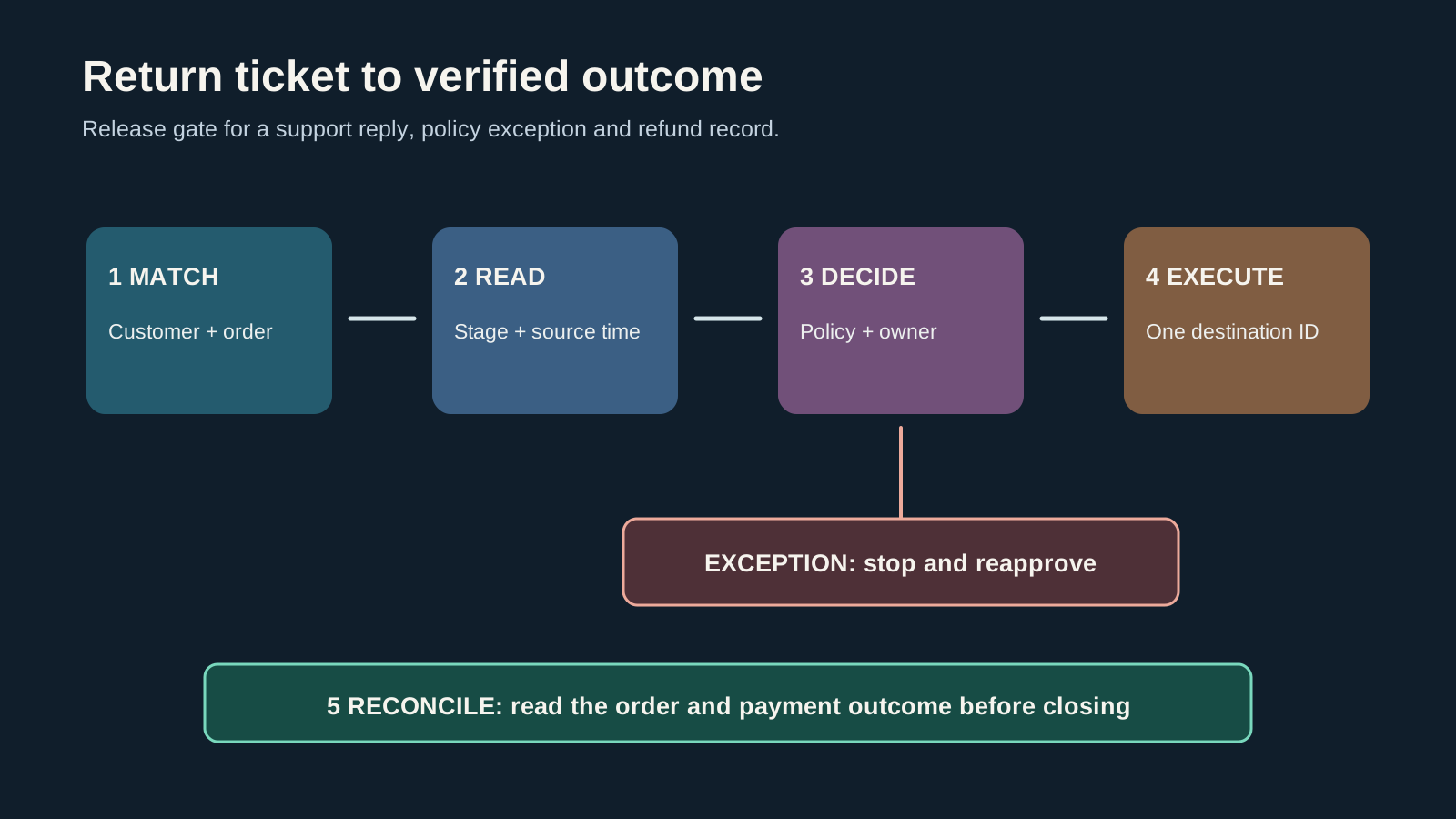
Name the unit of work as a return case linked to an order and a support ticket. Record whether the case covers one item, several items, a partial quantity, a replacement or a goodwill exception. Give the ticket a stable link to the return case and order IDs. If the same conversation concerns two orders, create two linked case units instead of forcing one status across both. Preserve the customer identifier used by each system and the evidence for the match.
Write a one-page authority map before the integration is promoted. The support workspace owns the conversation and perhaps the triage status. The order or returns system owns eligibility, item and inspection state. A named policy owner approves exceptions. A payment or commerce system owns a refund instruction and final financial state. The exact systems will vary by merchant. The point is to prevent an agent or sidebar from becoming the de facto owner of a state it only displays.
2. Test identity and state freshness
Start from the customer's claim but never match solely on a typed email or a familiar name. Check the authenticated customer record, order ID, item, purchase context and any alternative addresses or gift relationships. If two plausible orders remain, mark the case uncertain and request a distinguishing fact through the approved support process. Keep the unmatched state visible. A false match can expose another customer's information or lead to a promise against the wrong order.
In the ticket sidebar, identify the source and last refresh time of every return status. Read the source return record when the value is absent, stale or inconsistent with the customer's description. Distinguish requested, received, inspected, approved, refund instructed and settled stages. The official Zendesk announcement establishes that return context can be brought into the ticket; it does not define the merchant's refresh interval or policy. Test those in the actual tenant and record the result.
3. Separate routine replies from exceptions
For a routine case, the support agent can explain the verified current stage and next expected step using approved language. The reply should carry the case reference and avoid presenting an estimate as a completed outcome. A request that conflicts with standard eligibility, item condition, timing, amount, shipping evidence or payment destination enters an exception queue. Record the reason code, requested remedy, value at stake and the person authorized to decide.
Make approval attach to the exact case and proposed consequence. A supervisor's generic thumbs-up in a chat is hard to reconcile later. The decision record should include the order and return IDs, item and quantity, policy version, exception rationale, approved remedy, amount and currency if relevant, approver, timestamp and expiry. If the customer or order state changes before execution, send the case back for review. Support may communicate an approved decision, but it should not infer approval from a convenient UI state.
4. Execute once and read the destination
Before issuing a refund or replacement, recheck the authoritative order and payment state. Confirm that an equivalent action has not already been queued or completed. Use an idempotency key or equivalent merchant control tied to the case and remedy so a retry does not create a second adjustment. Record the execution ID, initiating actor, requested amount and destination. If the action fails, leave the case in a pending or failed state with an owner rather than marking it complete because the button was clicked.
Read the destination after execution. A return approval, refund instruction, processor acceptance and settled customer outcome may occur at different times. Reconcile the case with the order and payment record using stable IDs and the merchant's normal settlement window. If the amount, item or recipient differs, pause the closing message and escalate. A screenshot of the sidebar is not proof that money moved, just as a support note is not proof that an order was corrected.
5. Close with a truthful customer statement
Write the final reply from the verified state, not the intended outcome. State which action has completed and which stage is still pending. If a refund is authorized but not settled, say so in terms the customer can understand and avoid promising an exact arrival date that the system cannot support. If a replacement has shipped, use the actual fulfillment record. Include a clear route back to the case if the expected next step does not happen.
Closure should trigger a reconciliation check, not erase an exception. Save the source links, approval and destination evidence with the case. Keep an unresolved queue for pending money movement or fulfillment. When a later correction arrives, reopen or update the customer conversation according to policy. A case is operationally closed only when the team can find the terminal state and explain any variance from the original promise.
6. Exercise the failure paths before rollout
Run sample cases for a standard full return, partial return, two orders under one customer, changed email, gift recipient, disputed match, failed app load, stale status, policy exception, duplicate click, processor failure and changed payment destination. For each, record the expected visible state, permitted agent reply, escalation owner and action that must not occur. Test least-privilege access separately: who can view return details, approve an exception and execute a financial adjustment?
Roll out to a bounded queue with a named daily reviewer. Sample completed and unresolved cases. Compare sidebar data to the source record, inspect whether replies described the correct stage and verify that each commercial action has one destination record. Track unmatched cases, stale values, mistaken promises and duplicate attempts. These measures are local operating checks; the cited vendor pages do not supply a benchmark. Expand only after the team can contain and correct the first real exception.
Step-by-step workflow
- Identify the return case, order and customer with stable IDs.
- Read the source and refresh time of the sidebar status.
- Route policy exceptions to a named approver with the exact remedy.
- Recheck current order and payment state before execution.
- Execute once with a traceable ID and verify the terminal destination.
- Close with language that matches the verified stage.
CRM fields and signals needed
- Two plausible order matches
- Status without source time
- Partial item or quantity mismatch
- Refund already queued
- Customer promise ahead of processor state
- Repeated contact after supposed closure
Operating quality check
Use this check before adding more tooling. The goal is to prove that the workflow is owned, current, and inspectable inside the system of action.
| Area | Healthy pattern | Risk pattern |
|---|---|---|
| Identity | One supported customer-order-case match | Several plausible matches or missing case ID |
| Stage | Source, timestamp and precise return stage visible | Stale or ambiguous status |
| Authority | Named policy approver and scoped remedy | Sidebar or agent implies an unapproved exception |
| Outcome | One execution ID and final destination read | Ticket says complete without payment or order evidence |
Common mistakes
- Treating ticket visibility as refund authority
- Using email alone to match an order
- Calling an accepted return a settled refund
- Retrying a financial action without duplicate protection
- Closing the case before destination reconciliation
Example operating rhythm
- Daily: review pending, failed and unmatched cases with named owners.
- Weekly: sample routine and exception cases against source records and replies.
- Monthly: revisit policy versions, permissions and status definitions after process changes.
Tooling options
- Zendesk ticket and the Refundid sidebar for visible return context
- Authoritative order and returns system for item and eligibility state
- Policy decision register for exceptions
- Payment or commerce system for final financial outcome
Source notes
These sources support the workflow model and product concepts. They do not prove a specific business outcome, benchmark result, or vendor claim.
- Zendesk September integrations roundup: Official Zendesk roundup last updated September 30, 2026; describes the Refundid ticket sidebar.
- Refundid for Zendesk listing: Official Zendesk Marketplace listing describing the Refundid integration and its disclosed data access; confirm tenant configuration directly.
Last updated: 2026-10-02
FAQ
Can a support agent promise a refund when the return sidebar says approved?
Only if merchant policy defines that stage and the agent can verify the specific order, item and approved remedy. Approval and settlement should be described separately.
What if the integration is unavailable?
Use the documented authoritative returns lookup, mark the display unavailable, avoid guessing and keep an owner for the pending reply.
When is the case complete?
When the promised remedy has a verifiable final record in the authoritative destination and the customer message accurately reflects that state.