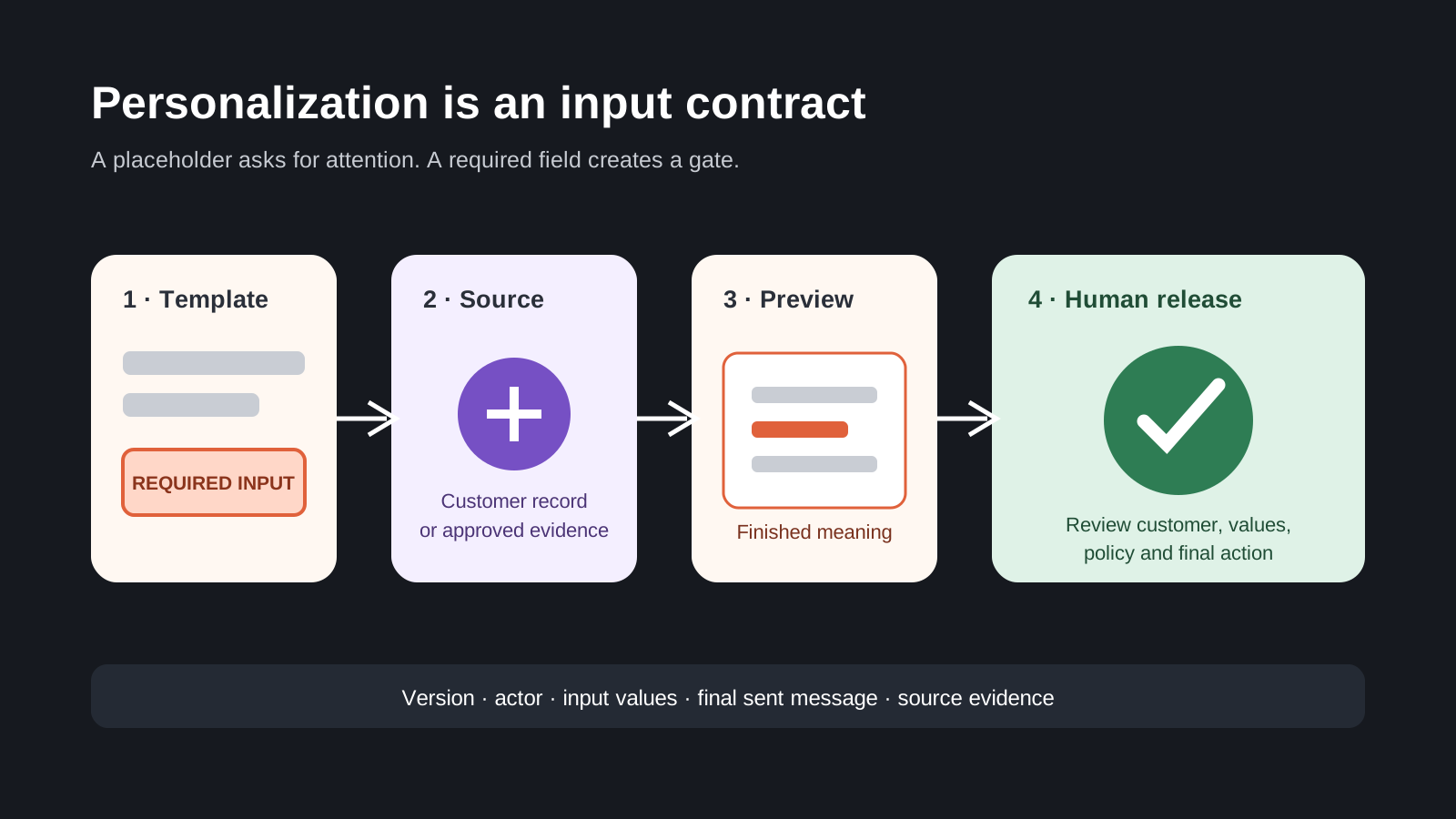
Support teams have long used brackets, highlighting or all-caps notes to mark the parts of a saved reply that must change. The control is visual and informal: someone has to notice the placeholder, know the source of the correct value, replace it, and reread the complete message before sending. Intercom's October 6 documentation introduces a better primitive. A macro can ask for text, long text or a defined choice, make a field required, and show a live preview before the finished reply is inserted into the composer.
This is a small product feature with a strong operating lesson. Customer-specific facts should be explicit inputs when they materially change the message. An order number, promised date, refund reason, carrier, contract term, renewal step or escalation owner should not be hidden inside editable prose. The system should identify what must be supplied, constrain the input where possible and keep the final message reviewable before release.
Required does not mean authoritative
I support required fields, but I would not treat completion as truth. A teammate can enter the wrong order number just as easily as the right one. The field label and type reduce omission; they do not validate identity or source authority. For high-consequence replies, the workflow should also show where the value came from and what record it belongs to. A customer identifier entered from memory is weaker evidence than one selected from the matched order or contract.
This is especially important because Intercom distinguishes fill-in fields from attributes. Attributes are populated automatically from customer data; fill-in fields are entered each time. The distinction should be visible in operating policy. Automated attributes need freshness, identity and field-authority controls. Manual inputs need source guidance, constrained choices and reviewer accountability. Teams should not choose between them on convenience alone.
Optional sections need an omission policy
Intercom also documents optional sections that a teammate can switch on or off. This is useful when a response has conditional guidance, but optional content can encode policy. If a section explains eligibility, data use, a limitation or an action the customer must take, omission should depend on a defined condition rather than individual taste. Name who owns the condition and include it in macro review.
A good template says what makes an input required, what makes a section applicable, and which sources may support the answer. A refund macro might require an order ID and outcome date, offer a constrained reason choice, and include a policy section only when the customer's case matches a named rule. The teammate still reviews tone and context; the macro carries the minimum operating contract.
Bulk use raises the stakes
The official guide says a macro with fields can be applied in bulk, with values entered once and reused across all selected conversations. That is efficient and risky. A value that is correct for one customer may be wrong for the rest. Bulk eligibility should therefore be defined before the macro is available for bulk action. Shared outage timing can be appropriate; an order number, balance, entitlement or account-specific promise usually is not.
RevOps and Support Operations should maintain a list of fields that may be shared across a batch and fields that must be resolved per conversation. Test mixed cohorts deliberately. Include different plans, regions, languages, account hierarchies and open cases. If the macro cannot safely describe the cohort with one set of values, the workflow should split the batch or force per-record resolution.
The composer is still a release gate
Intercom says the completed reply lands in the composer, remains editable and is not sent automatically. Preserve that boundary. The teammate should verify the matched customer, required values, optional sections and final meaning as a whole. An automated input can change grammar or create a contradiction elsewhere in the sentence. A preview is evidence for review, not evidence that review happened.
For material communications, capture macro version, completed fields, final sent text, actor and source links. You do not need a permanent copy of every draft keystroke. You do need enough evidence to explain the customer promise, especially when the message affects payment, service, renewal or access.
Version templates like workflow logic
Macros are code expressed as language and actions. Give shared macros an owner, version date, purpose, eligible channels and review rhythm. Intercom notes that an open inbox can take up to five minutes to receive field changes unless reloaded. That means a rollout can have a short version-overlap window. Avoid changing a high-consequence macro during a bulk operation, and confirm which version a sample used.
Retire duplicate macros instead of leaving nearly identical variants in search. Keep personal macros out of governed customer workflows unless policy allows them. Review titles, team availability, permissions and the actions attached to the content. A careful message can still cause the wrong assignment, tag, snooze or closure if the macro bundles actions that no longer match the process.
The broader rule is simple: if a fact changes the promise, make it an input. If a choice changes eligibility, constrain it. If a value comes from another system, show its source. If the action affects a customer, retain a human release check. Intercom's fill-in fields make that model easier to implement. RevOps should carry the same discipline into CRM tasks, lifecycle messages, renewal notices and billing communications rather than relying on someone to spot a pair of brackets.
Source notes
These official sources support the workflow model and product concepts. They do not prove a specific retention outcome, benchmark, or vendor claim.
- Intercom: Personalize macro replies with fill-in fields: Official documentation for text, long-text and choice fields, required inputs, optional sections, preview behavior and rollout limitations.
Last updated: 2026-10-07