Short verdict
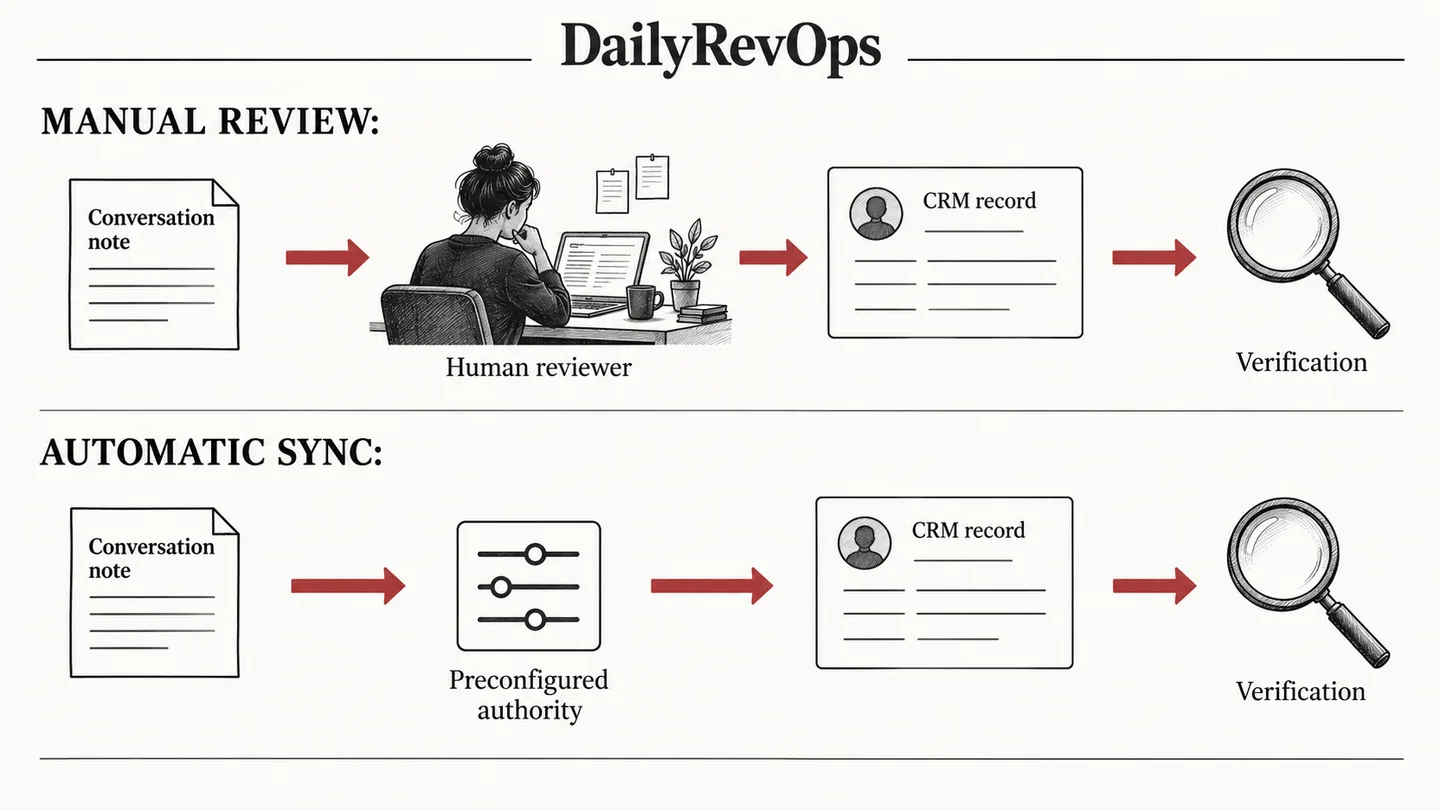
Use different modes for different fields when the implementation supports it. A low-consequence note and a forecast decision should not inherit identical authority merely because they came from the same conversation. Where the system cannot enforce the required boundary, narrow the automated scope or keep the workflow under review.
This comparison is written for RevOps, Sales Ops, GTM Operations, and Customer Success Ops teams that need a practical decision framework. It focuses on workflow ownership, CRM data quality, implementation effort, source-of-truth behavior, and the operating rhythm each option supports.
Who each option is best for
Manual review fits consequential or ambiguous changes. Automatic sync fits bounded, well-defined outputs with reliable identity, clear writer ownership and tested recovery.
The right answer depends on the job the team is trying to improve. A tool that is strong for one operating model can be a poor fit when the real problem is ownership, dirty CRM data, missing renewal dates, weak handoffs, or an unclear forecast process. Use this page to map the workflow before treating either option as the default.
Operating questions before choosing
- Which recurring meeting or workflow will change if the team chooses Manual review before sync or Automatic sync after the event?
- Which CRM records, fields, activities, or customer signals are required for the workflow to be trusted?
- Who owns the next action when the system surfaces a risk, alert, forecast change, or customer signal?
- Does the option write usable context back to the system of record, or does it create another place to inspect?
- What manual review work should decrease after implementation?
Side-by-side table
| Criterion | Manual review before sync | Automatic sync after the event | Editorial note |
|---|---|---|---|
| Decision point | A person inspects the proposal before committing it. | A defined trigger commits permitted values without per-event approval. | The trigger is an authority decision, not just a convenience setting. |
| Strong fit | Ambiguous source evidence, sensitive commercial fields or uncertain record identity. | Clear source evidence, stable mapping and cheap, observable correction. | Classify fields individually rather than approving the entire tool. |
| Typical failure | Review queues age or people accept suggestions without inspection. | An incorrect value spreads before anyone notices. | Both modes require sampling and accountable exception ownership. |
| Recovery | Reject or edit the proposal before the write, then confirm the result. | Pause the writer, identify affected records and repair authorized changes. | Restoring configuration is not the same as reversing data changes. |
Workflow comparison
- Begin with one recurring update and identify the business decision that consumes it. Map the source conversation, intended CRM object, field, allowed values and downstream readers. Decide what evidence makes the proposed value acceptable. If the team cannot agree on that definition, a different sync mode will not solve the underlying problem.
- Attention's field-mapping documentation provides a concrete example of both modes: Conversation finish triggers automatic updates, while User action → Update CRM lets a rep push the data manually. Its configuration also distinguishes single-conversation fields from deal-level synthesis. These are documented implementation options, not proof that any particular deployment is configured safely.
- For a manual pilot, make the reviewer inspect the source and intended record before accepting. Capture edits, rejections and unresolved cases. For an automatic pilot, restrict the field set and population, retain the event identity and inspect the written value after a normal downstream sync. Compare actual correction work rather than counting every removed click as time saved.
- Apply the comparison to a concrete Attio-to-Asana handoff: manual review is useful when the receiving owner or project scope is unresolved; automation is a candidate when the source identity, template choice and owner rule are stable. Test a repeated trigger and inspect the external task or project before treating the handoff as complete. The relevant unit is an accepted handoff, not a successful API request.
- For a Braze warehouse attribute sync, review and automation can operate at different layers. Data owners can approve a mapping or query before a recurring sync handles individual records. Keep missing identifiers, incompatible values and consequential schema changes observable. Do not require a person to inspect every routine row merely because the mapping needs review; equally, do not let an automated run certify the business meaning of an unreviewed field.
- Use Close event evidence or Workato run-and-destination evidence to investigate disputed outcomes in their respective workflows. A common review ledger can record the intended operation, destination identifier, reviewer and repair while preserving product-specific details. Choose the boundary from the cost of a wrong action, the stability of the rule and the quality of the recovery path. These examples do not establish a universal faster or cheaper option: measure the actual review and repair effort for the workflow being purchased.
A RevOps workflow should produce a visible action, not only a report. When comparing Manual review before sync and Automatic sync after the event, the team should look at the handoff from signal to owner to customer action. If the output does not change a task, meeting, field, renewal follow-up, forecast inspection, or manager review, the tool may become another dashboard rather than operating leverage.
Implementation complexity
Field-level design and exception handling. The real complexity depends on data quality, ownership clarity, and whether the team changes its operating rhythm.
Implementation should start with source fields, permissions, integration points, and the review process. The most common failure is buying a tool before defining the workflow. A narrow pilot is usually safer than a full rollout because it reveals bad CRM fields, unclear owners, duplicate definitions, and gaps between the tool and the team operating cadence.
Data and CRM requirements
Reliable RevOps decisions need clean CRM data. Before choosing between Manual review before sync and Automatic sync after the event, check owner fields, lifecycle stage, account and opportunity status, renewal or close dates, activity history, task ownership, and the fields that drive routing or reporting. If these fields are not trusted, the comparison should include a data cleanup step.
- Define the system of record for the workflow.
- List the fields that trigger action or reporting.
- Decide which fields can be written automatically and which need review.
- Document what evidence an operator should inspect before acting.
- Measure whether the workflow reduces missed follow-up or manual reconciliation.
Cost and maintenance considerations
The relevant cost includes source preparation, identity matching, field maintenance, review, exceptions and reconciliation. Manual review concentrates effort before a write and may delay useful information. Automatic sync moves more of the burden into controls, monitoring and repair. Estimate each using a declared local sample and include manager or administrator time. Do not turn a vendor's general productivity statement into a financial forecast for your team.
Cost should include licenses, setup time, admin maintenance, integration work, enablement, governance, and the opportunity cost of manual review. A cheaper workflow can become expensive if it requires weekly spreadsheet cleanup. A larger platform can become expensive if the team only uses a narrow part of it. RevOps should compare total operating cost, not only subscription price.
Risks and limitations
- Manual review can become a cosmetic approval step. A person under pressure may accept a polished suggestion without checking its source or target record. Keep the review interface focused on the consequential difference, sample accepted decisions and measure queue age. If reviewers cannot evaluate the field reliably, improve the rubric before increasing throughput.
- Automatic sync can compete with another legitimate writer. A CRM-native workflow, an enrichment system and a conversation tool may each have different evidence and timing. Assign one authority per field or a documented conflict policy. Test a delayed event after a newer customer decision so that historical context cannot silently overwrite current truth.
- Both approaches can confuse a valid format with a correct fact. Required-field checks, accepted picklist values and successful API responses do not establish that the customer made the statement or that it belongs on this deal. Keep source evidence and business validation in the evaluation.
The main risk in any RevOps tool comparison is overgeneralizing. No tool is universally best. The fit depends on company stage, CRM maturity, sales motion, renewal volume, customer success model, admin capacity, and how disciplined the team is about acting on signals.
Decision framework
- Choose manual review where a wrong value can materially affect customer treatment, ownership, a commercial commitment or management reporting, unless a stronger tested control justifies a narrower automatic path. Define who reviews, when they must respond and what happens when the evidence remains incomplete.
- Choose automatic sync for a bounded output only after proving record identity, permitted fields, repeat-event handling and a practical pause-and-repair path. Inspect both successful writes and exceptions. Widen scope one field or workflow at a time so that the cause of a failure remains discoverable.
- Retain a hybrid option: automatically prepare or append context while requiring explicit approval for consequential state changes. If the selected product cannot enforce that distinction, use separate workflows or reduce its authority. The right comparison is the quality of the final CRM state and the effort required to maintain it.
If the team cannot name the owner, source field, review cadence, and next action, pause the purchase and map the workflow first. Strong RevOps teams buy tools to close a defined operating gap. They do not use tools to discover the process after the contract is signed.
FAQ
Is manual review always safer?
No. It can fail through delay or superficial approval. Its value depends on a clear rubric, source access, correct identity and a reviewer who can act.
Does an automatic sync require no human work?
No. Someone still owns configuration, exception review, source quality and correction of affected records.
Can the same conversation use both approaches?
Potentially, where the implementation supports separate field or workflow authority. Verify the actual configuration rather than assuming every proposed field shares the same trigger.
Source notes
These official references support the product and workflow context. DailyRevOps uses them to bound the comparison, not to imply outcomes, rankings, or adoption claims.
- Attention Create & Map CRM Fields: Official manual/automatic trigger options and conversation-versus-deal field distinction.
- Attention CRM Auto Update: Documented review, sync and CRM confirmation steps.
- Attio workflow apps: Official capability reference; the operating test is DailyRevOps analysis.
- Braze visual mapper: Official capability reference; the operating test is DailyRevOps analysis.
- Close Event Log API: Official capability reference; the operating test is DailyRevOps analysis.
- Workato Event Streams: Official capability reference; the operating test is DailyRevOps analysis.
Last updated: 2026-09-10