Simplify Security Visibility with Security Center Essentials
Simplify Salesforce security with Security Center Essentials. Learn how to track Health Check scores, audit integrations, and monitor IP ranges in one place.
What the source signals
Salesforce Blog published this item on July 15, 2026. DailyRevOps treats it as a high-signal for crm operations and links to the original article below. The source is the factual starting point; the workflow interpretation on this page is DailyRevOps editorial analysis.
The source preview says: Simplify Salesforce security with Security Center Essentials. Learn how to track Health Check scores, audit integrations, and monitor IP ranges in one place.
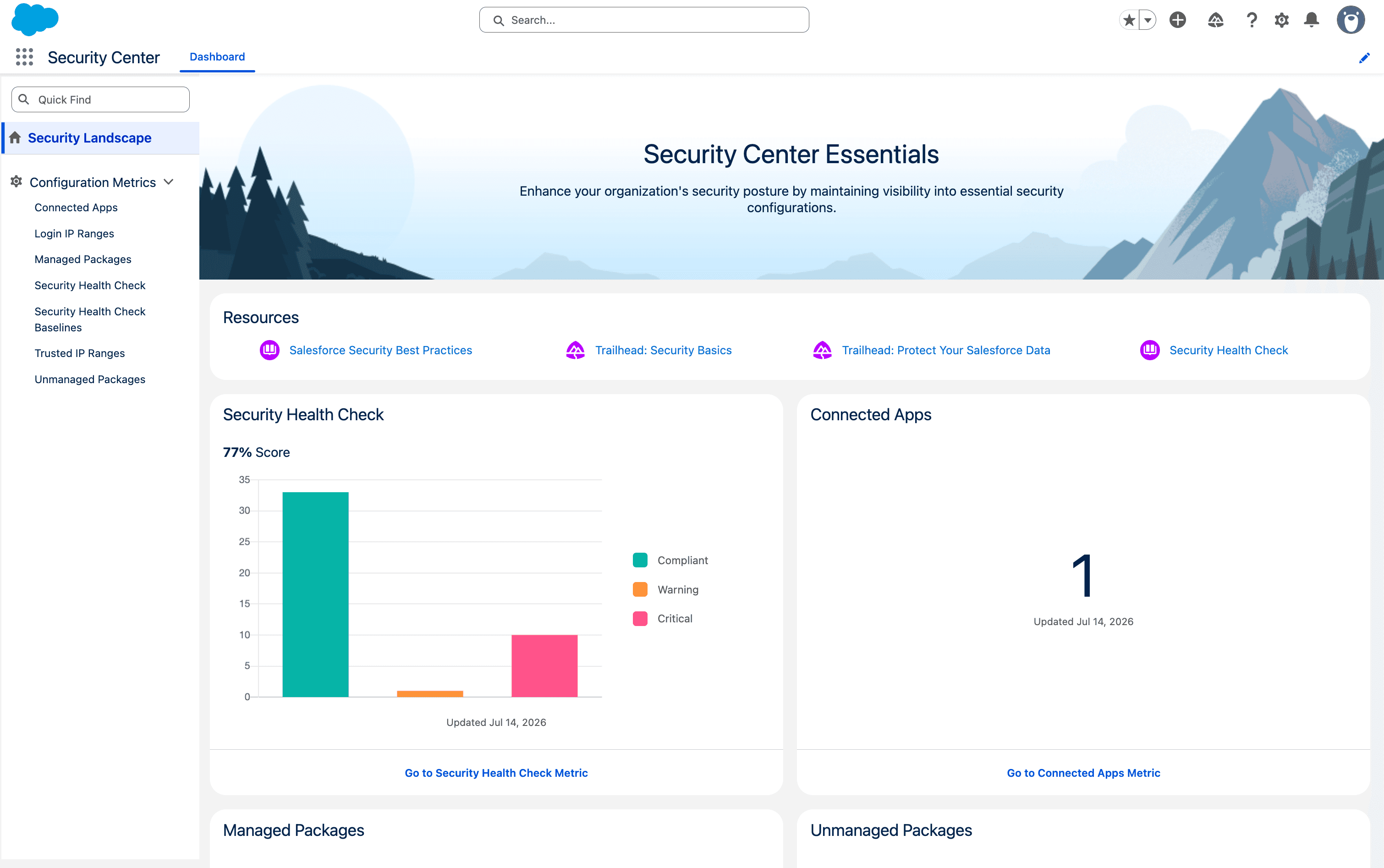
Salesforce says Security Center Essentials adds a centralized dashboard for seven configuration metrics: Health Check score, Health Check baselines, connected apps, managed packages, unmanaged packages, trusted IP ranges, and profile login IP ranges. The source says the dashboard keeps 30 days of metric history, updates automatically each week, and also supports on-demand updates.
The launch article says the feature is rolling out through the end of July 2026 and is included with Enterprise, Unlimited, and Performance Edition licenses. An administrator needs the View Security Center Pages system permission to open it from the App Launcher. Salesforce positions the full Security Center product, rather than Essentials, for advanced capabilities such as multi-org visibility and custom security policies. These are availability and capability statements from Salesforce, not an independent security assessment.
The first review question is whether the signal changes work in Salesforce security configuration review, Connected-app and package governance, CRM integration dependency inspection, Access-control change management. A headline can be relevant without being implementation-ready. Confirm the product scope, affected users, data requirements, and actual release or availability details in the original source.
Why this matters to RevOps
Security configuration is a RevOps concern when a connected app, package, profile, or network rule can read or change revenue records. CRM integrations may enrich accounts, route leads, create activities, update opportunities, sync customer data, or feed forecasts. A single dashboard does not replace security ownership, but it can give the CRM administrator and RevOps owner a shared place to notice configuration drift before investigating the affected workflow.
The useful signal is visibility, not a promise that the org is secure. A Health Check trend can show that configuration moved, while the connected-app and package inventory can show which third parties entered the environment. RevOps still needs to connect each finding to a business owner, integration identity, affected records, and actual write path before deciding whether anything should change.
CRM changes matter when they alter the record model, ownership, routing, automation, or reporting logic that revenue teams use every day. RevOps should translate the source signal into a concrete question about which object, field, workflow, or user action could change.
The useful test is not whether a feature sounds modern. It is whether the change reduces manual work or improves evidence without weakening the CRM as the system of record. Adoption, permissions, data history, and rollback should be considered before a production rollout.
Workflow impact
The affected workflow areas recorded for this item are Salesforce security configuration review, Connected-app and package governance, CRM integration dependency inspection, Access-control change management. Relevant source and operating terms include CRM, Product Updates, Salesforce. Use those labels to find the current owner, system, report, queue, or recurring meeting where the signal would create a decision.
Add the dashboard to an existing monthly CRM governance review rather than creating an unowned alert queue. The review should compare the current Health Check trend with recent releases, permission changes, installed packages, integration work, and login-policy changes. Any exception should become a named investigation with evidence and a due date; the dashboard itself should not silently trigger access or workflow changes.
For connected apps and packages, trace one item through its operational dependency: vendor or internal owner, installing user, integration account, business purpose, records touched, fields written, automations triggered, and reports that consume the result. This is especially important for lead routing, enrichment, opportunity updates, forecast feeds, support-to-CS handoffs, and customer-data syncs because removing or restricting an integration can break work that appears unrelated to security.
Map the signal to the current CRM flow from record creation through enrichment, assignment, stage movement, task creation, and reporting. A change in one step can create hidden effects in another, especially when several automations write to the same field or owner property.
Compare the proposed workflow with the manual path operators use today. If the new path cannot explain why a record changed, who owns the next action, and where the source evidence lives, the automation is not ready for broad use.
What to inspect in the system of record
Use the checklist below as an inspection sequence, not as an instruction to enable a feature immediately. Capture the current state before changing fields, automation, routing, scoring, alerts, or reporting.
For each exception, save the source record, evidence, owner, due date, and expected close condition. That makes the test reviewable and prevents a promising update from becoming an unowned experiment.
Inspect the Health Check score and baseline as a change signal, then open the underlying configuration before drawing a conclusion. For each connected app or package, record who installed it, when it appeared, who owns the business process, and whether the integration is still active. Review the integration user, permission sets, login history, API activity, and recent record changes in the normal Salesforce administration views available to the team.
For trusted and profile login IP ranges, confirm the intended access model with the security owner and document which users or integrations depend on each range. Then map affected CRM objects and automations. An access change can interrupt ingestion, routing, enrichment, customer-success syncs, or reporting even when the dashboard correctly identifies a configuration that deserves review.
- Name the affected CRM object before making a change: contact, company, deal, ticket, or a custom record.
- Check the current owner, lifecycle or stage, next step, and reporting field before changing a sync, workflow, or routing rule.
- Keep the CRM as the source of truth and assign a process owner plus a rollback path for any production change.
- Compare the current seven-metric baseline with the last approved CRM architecture and integration inventory; flag additions, removals, and unexplained changes rather than treating every difference as a vulnerability.
- For every connected app or package exception, name the business owner, technical owner, integration identity, records touched, fields written, and rollback route before changing access.
- Capture the dashboard refresh time and retain the investigation evidence outside the 30-day trend window when the team needs a longer audit history.
A 15-minute operator action
Choose five records or workflow examples from Salesforce security configuration review. Do not start with the cleanest examples. Include at least one stale record, one ownership or data exception, and one case where the current process required manual follow-up.
Open Security Center Essentials with an authorized administrator and take a read-only baseline of the seven metrics. Select one connected app or unmanaged package that the RevOps team cannot immediately explain. In 15 minutes, identify the installing user and date shown by the dashboard, find the current business owner, and list the CRM objects or workflows that may depend on it. Do not uninstall, revoke, or restrict it during this first pass.
Create one review record with the finding, source screenshot or link, current owner, integration identity, affected workflow, risk question, and a decision date. If ownership or dependency evidence is missing, assign investigation rather than removal. This converts the product update into a controlled CRM-governance step without turning a visibility tool into an automatic remediation system.
Write down the trigger, source evidence, current owner, next action, due date, and expected outcome for each example. Then ask whether the source signal would make one of those fields clearer, reduce a manual step, or surface an exception earlier.
If the answer is yes, define one bounded test with a process owner and rollback path. If the answer is unclear, keep the item on a monitored list and wait for stronger documentation, product access, or a more concrete operating problem.
Risks and limits
The main risks are silent overwrites, duplicate automation, changed permissions, broken routing, and reports that continue to look correct while the underlying definitions have shifted.
A vendor announcement or source article does not prove that the capability fits the current portal, edition, data model, or operating cadence. Confirm availability and test behavior in a controlled environment.
A centralized view can create false confidence. Seven configuration metrics do not cover every permission, data-sharing path, automation, credential, endpoint, or user behavior that affects CRM security. The source does not claim that a strong Health Check score proves an integration is appropriate or that an installed package is safe for the current revenue process.
The 30-day retention window and weekly automatic update cadence may be too short or too slow for some internal audit and incident-response needs. On-demand refresh can help an investigation, but RevOps should not represent the dashboard as a complete historical record. Keep longer-lived evidence according to the company's own security and change-management requirements.
Removing an unfamiliar app, package, trusted range, or profile range without dependency mapping can interrupt production. The safest response is evidence-first triage with the Salesforce administrator and security owner, followed by a tested, reversible change when one is justified.
DailyRevOps does not treat a source announcement as proof of revenue impact. Outcomes depend on process design, data quality, adoption, manager behavior, customer context, and the baseline used for comparison.
Decision and follow-up
A production change should have a named owner, a narrow scope, a documented current state, a success measure, and a way to reverse the change. The owner should also define when the team will review the result and which evidence will decide whether to keep, expand, change, or stop the test.
Adopt Security Center Essentials as an inspection input if the licensed org receives the rollout and an accountable administrator can review it. Start with a baseline and one unexplained integration; do not approve bulk cleanup from the dashboard alone. A useful first-cycle decision is whether the view finds configuration changes faster and produces clearer ownership without creating duplicate governance work.
After one monthly review, decide whether to keep the dashboard in the CRM governance rhythm, add a longer evidence archive, tighten the connected-app approval process, or evaluate the full Security Center for multi-org or custom-policy needs. Expansion should follow a documented gap. The source article does not provide evidence that every RevOps team needs the advanced product.
Track exception volume, manual corrections, ownership accuracy, time to next action, and the number of records that require rollback or cleanup.
Review the result after one operating cycle. Keep the change only if operators can explain the record history and the workflow produces clearer action with less rework.
Keep the original source attached to the decision record. If later documentation changes the product scope or operating assumption, the team should be able to trace why the test was started and which version of the source information informed it.
Original source
This DailyRevOps article is written in our own words from the source signal and adds RevOps context, workflow analysis, and operator interpretation.
- Original source: Salesforce Blog
- Original publication date:
- Source link: Read the original article