Real-Time Engagement with Time Spent Tracking in Data 360 with Web SDK
Almost every business accumulates massive amounts of behavioral data in their search for rich and actionable customer insight, yet they often miss the most critical signal: the duration of actual attention rather than
What the source signals
Salesforce Blog published this item on July 24, 2026. DailyRevOps treats it as a high-signal for data quality operations and links to the original article below. The source is the factual starting point; the workflow interpretation on this page is DailyRevOps editorial analysis.
The source preview says: Almost every business accumulates massive amounts of behavioral data in their search for rich and actionable customer insight, yet they often miss the most critical signal: the duration of actual attention rather than
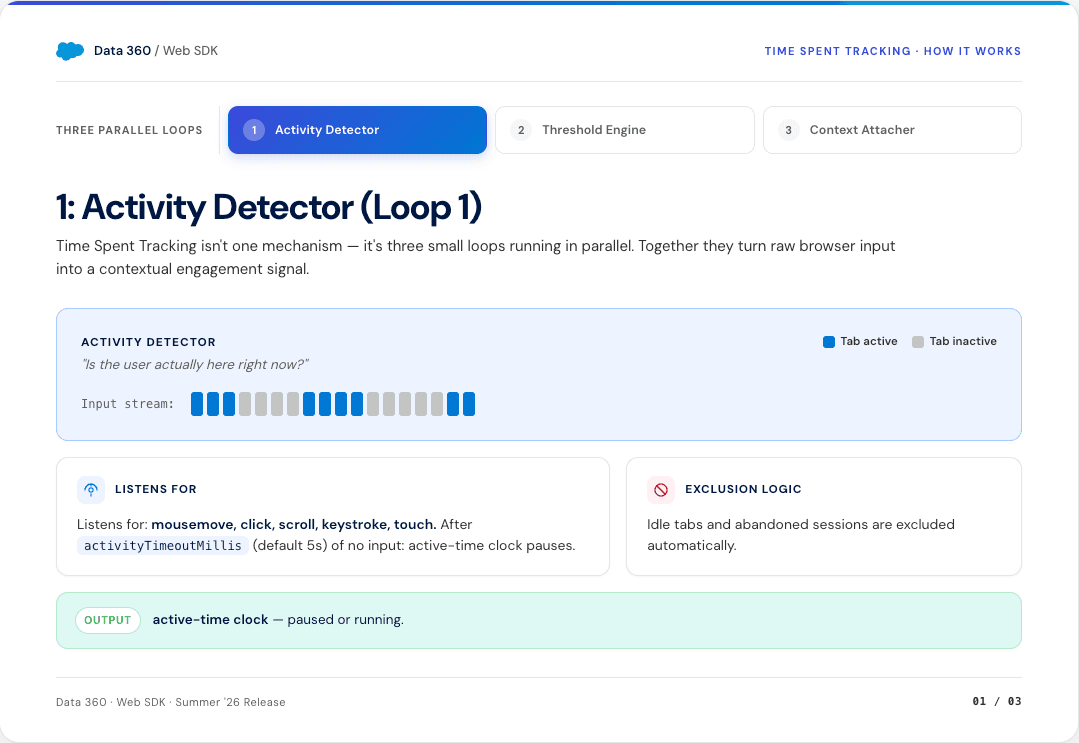
Salesforce says Time Spent Tracking is an opt-in capability in the Data 360 Web SDK. Instead of measuring the elapsed interval between page load and exit, the SDK advances an internal timer while it detects mouse movement, scrolling, keystrokes, or touch. When cumulative active time passes a configured threshold, it can emit an event with the page or catalog context already attached. The article presents this as a way to exclude idle tabs and make engagement available during the session rather than only in a later analytics report.
The source gives three example uses: trigger an offer after sustained activity on a product page, enrol a visitor in a journey after active time on a financial calculator, and aggregate active time by product category for merchandising analysis. It says the feature is configured in the existing SalesforceInteractions.init() call, is off by default, and does not require a separate endpoint, SDK, tag, streaming join, or lookback job. Those are Salesforce product claims; DailyRevOps has not independently tested installation effort, latency, event-credit use, identity matching, or downstream activation.
Salesforce documents event details that matter to operators: a pageViewId for joining, a pingSequence for ordering, the threshold label, cumulative totalActiveTime, page and activity timestamps, and copied context fields. It also says an event only fires after a context event has been captured, no event is sent before consent, stopping the tracker requires SDK reinitialisation before it can restart, and the per-session event limit needs room for every threshold plus page exit. Availability, editions, regional behavior, exact billing, retention, and contractual data use are not established in the article.
The first review question is whether the signal changes work in Behavioral-event collection and identity resolution, Real-time segmentation and journey activation, CRM intent scoring and sales follow-up, Consent, suppression, and customer-data governance. A headline can be relevant without being implementation-ready. Confirm the product scope, affected users, data requirements, and actual release or availability details in the original source.
Why this matters to RevOps
This is a direct RevOps signal because a real-time behavior event can move quickly from a website into segmentation, messaging, lead or account scoring, sales follow-up, campaign attribution, and customer-data reporting. If the event is poorly defined, the error becomes operational: a visitor may receive an unnecessary chat prompt, enter the wrong journey, gain an inflated intent score, or create a task that a revenue owner treats as customer evidence.
Active input is a better-defined observation than raw elapsed page time, but it is still not the same as attention, preference, buying authority, or purchase intent. Mouse movement can be incidental; a person can read without producing input; accessibility tools and mobile behavior may look different; and repeated thresholds can overrepresent long sessions. RevOps should preserve that distinction in field names, dashboards, training, and automation rules so a proxy does not become a fact through repetition.
The useful opportunity is to make behavior collection and activation one inspectable contract. The team should know which browser action starts the clock, how idle time ends, which threshold creates which event, how consent and identity are resolved, where the event is stored, which rule acts on it, and which customer outcome is later compared. Without that chain, real-time speed only shortens the time between a noisy signal and an automated response.
Data-quality signals matter because routing, reporting, segmentation, forecasting, and customer workflows inherit the definitions and errors in the underlying records. RevOps should translate the source update into a field-level ownership and control question.
More data is not automatically better data. The operating goal is a smaller set of trusted fields with clear sources, overwrite rules, review paths, and downstream uses.
Workflow impact
The affected workflow areas recorded for this item are Behavioral-event collection and identity resolution, Real-time segmentation and journey activation, CRM intent scoring and sales follow-up, Consent, suppression, and customer-data governance. Relevant source and operating terms include CRM, Data Quality, Automation, Customer Data, Salesforce. Use those labels to find the current owner, system, report, queue, or recurring meeting where the signal would create a decision.
Start with one bounded use case rather than enabling active-time events across the site. For example, test whether a threshold on a pricing or product page improves the timing of an existing chat offer. Write the current path first: page view, consent state, known or anonymous identity, existing eligibility and suppression logic, offer delivery, response, CRM record, owner action, and outcome. The new event should replace or sharpen one decision, not create a parallel journey and another score.
Define the event before defining the threshold. Use a name that describes the observation, such as active_input_seconds_on_pricing_page, rather than high_intent. Record pageViewId, sequence, threshold, cumulative active time, context item, consent state, anonymous or known identity, event time, SDK or schema version, and collection source. Deduplicate retries and out-of-order events before a downstream workflow evaluates eligibility.
Keep the first activation reversible. A low-risk test can show a message or place a record in a review segment. Creating a sales task, changing lifecycle stage, raising account intent, or sending a customer communication needs stronger evidence and suppression. If a known account already has an open opportunity, active time may be useful context for its current owner; it should not automatically create a duplicate lead, overwrite source attribution, or assign another rep.
Map where the field is created, enriched, transformed, synced, reviewed, and consumed. Identify every automation or integration that can write to it and the reports or workflows that assume the value is correct.
Test missing values, duplicates, stale values, conflicting sources, and rollback behavior on a representative sample. High-impact fields should have a clear confidence rule and a human review path.
What to inspect in the system of record
Use the checklist below as an inspection sequence, not as an instruction to enable a feature immediately. Capture the current state before changing fields, automation, routing, scoring, alerts, or reporting.
For each exception, save the source record, evidence, owner, due date, and expected close condition. That makes the test reviewable and prevents a promising update from becoming an unowned experiment.
Inspect the web event schema, consent record, anonymous identifier, known person identifier, account match, campaign or journey membership, lead or contact record, opportunity, task, and activity history. For each join, document the authoritative key, match method, timestamp and time zone, consent purpose, retention, and correction or deletion route. A stable pageViewId can order activity on one page view, but it does not by itself prove who the person is or which account should receive the signal.
Trace every writer and consumer. Identify the Web SDK configuration owner, tag or release process, Data 360 stream, identity rules, calculated insight or segment, activation target, CRM integration user, automation, scoring model, messaging tool, report, and warehouse table that uses the event. Record where thresholds and mappings are versioned. A configuration change should not silently alter the meaning of a historical dashboard or an active journey.
Check cost and volume controls alongside data quality. Estimate eligible sessions, thresholds per session, page-exit events, retries, test traffic, bots, and duplicate tabs. Compare that volume with event limits, data credits, downstream API limits, storage, and monitoring. Verify that consent denial, withdrawal, tracker stop, navigation, browser backgrounding, and SDK reinitialisation produce the expected record state before a production activation depends on them.
- Identify the field, record type, and system that own the affected data before changing an enrichment or sync rule.
- Check duplicate handling, overwrite rules, source confidence, and a review path for high-impact fields.
- Measure the result on a small sample before changing a production data workflow.
- Write the exact observed behavior in the event name and keep interpreted labels such as high intent in a separate derived field with an owner and version.
- Test foreground activity, passive reading, background tabs, rapid tab changes, mobile touch, keyboard-only use, consent granted late, consent denied, and tracker stop behavior.
- Reconcile five emitted events from browser action through pageViewId, sequence, threshold, identity join, segment, activation, CRM record, and final owner action.
- Verify deduplication, ordering, session limits, event-credit assumptions, retention, deletion, suppression, and rollback before enabling customer messaging or CRM writes.
- Keep source facts, observed behavior, inferred intent, and an operator's approved action as separate fields or statuses so reports can show how the conclusion was reached.
A 15-minute operator action
Choose five records or workflow examples from Behavioral-event collection and identity resolution. Do not start with the cleanest examples. Include at least one stale record, one ownership or data exception, and one case where the current process required manual follow-up.
Use 15 minutes to select one current journey, score, chat rule, or sales alert that relies on a page view or elapsed-time field. Open five recent examples: one known buyer, one anonymous visitor, one background or unusually long session, one record with unclear consent or identity, and one event that produced a downstream action. Write down the observed event, identity join, interpreted value, action, and recorded outcome for each.
Do not enable Time Spent Tracking during this review. Mark the first break in the chain: an ambiguous event name, an unowned threshold, an identity mismatch, missing suppression, no cost estimate, or a CRM action that cannot be traced back to the browser event. Assign that evidence gap to the data or journey owner and set a decision date for a sandbox test.
Write down the trigger, source evidence, current owner, next action, due date, and expected outcome for each example. Then ask whether the source signal would make one of those fields clearer, reduce a manual step, or surface an exception earlier.
If the answer is yes, define one bounded test with a process owner and rollback path. If the answer is unclear, keep the item on a monitored list and wait for stronger documentation, product access, or a more concrete operating problem.
Risks and limits
Bulk cleanup can replace visible errors with harder-to-detect source conflicts. Enrichment confidence, consent, permissions, regional requirements, and historical reporting all need review before a broad change.
Avoid measuring success only by field completion. A fully populated field can still be wrong, stale, or unusable for the decision it is meant to support.
The source is a Salesforce product article written to explain and promote Data 360 Web SDK. It does not provide an independent comparison, customer sample, controlled outcome study, false-positive rate, implementation time, pricing table, or measured lift. The stated examples illustrate possible workflows; they do not prove that active-time activation improves conversion, pipeline, customer experience, or revenue.
The phrase active attention is stronger than the observed input data supports. Interaction-based timers can reduce idle-tab inflation, yet they may undercount quiet reading and keyboard or assistive-technology patterns, and they may count movement unrelated to genuine interest. Device, browser, page design, content length, geography, and visitor type can change the distribution. One threshold should not be copied across pages or segments without evidence.
Real-time activation increases customer-experience and governance risk. An offer may be intrusive, a journey may conflict with consent or suppression, and a sales alert may encourage follow-up based on weak evidence. Sensitive pages can also reveal interests that require stricter purpose and access controls. Legal, privacy, security, marketing operations, and RevOps ownership still apply even when the SDK technically respects a consent signal.
Event volume and hidden dependencies can create operational cost. Multiple thresholds, page exits, retries, copied context, identity processing, segment updates, API calls, and retained history can consume credits or exceed limits. Stopping collection or changing a threshold can also break reports and journeys if schema versions and fallbacks are not explicit. Test failure and rollback paths before comparing business outcomes.
DailyRevOps does not treat a source announcement as proof of revenue impact. Outcomes depend on process design, data quality, adoption, manager behavior, customer context, and the baseline used for comparison.
Decision and follow-up
A production change should have a named owner, a narrow scope, a documented current state, a success measure, and a way to reverse the change. The owner should also define when the team will review the result and which evidence will decide whether to keep, expand, change, or stop the test.
Approve a limited pilot only when the team has a written event definition, consent purpose, identity and deduplication rule, threshold rationale, eligible audience, suppression logic, event-volume range, cost owner, downstream action, CRM trace, and rollback. Begin with observation or a low-risk experience. Keep lifecycle stage, routing, opportunity changes, sales outreach, and customer-facing automation behind review until the signal shows stable behavior in the current environment.
After one complete test cycle, compare event completeness, identity-match failures, duplicate or out-of-order events, consent exclusions, segment entry, suppression, action rate, customer response, operator corrections, and total event cost with the existing page-view path. Keep or expand the signal only if it improves a defined decision without creating unexplained CRM records or poorer customer treatment. Narrow or stop it when the proxy cannot be distinguished from noise or the team cannot trace the action back to source evidence.
Track accepted values, manual corrections, duplicate rate, stale-record rate, source conflicts, sync failures, and downstream exceptions caused by the field.
Keep the workflow only when operators spend less time repairing records and the affected routing, reporting, or review process becomes more reliable.
Keep the original source attached to the decision record. If later documentation changes the product scope or operating assumption, the team should be able to trace why the test was started and which version of the source information informed it.
Original source
This DailyRevOps article is written in our own words from the source signal and adds RevOps context, workflow analysis, and operator interpretation.
- Original source: Salesforce Blog
- Original publication date:
- Source link: Read the original article