HubSpot completes the Smart CRM index rollout across all portals
The September 4 completion notice turns an opt-in redesign into an everyday operating change. RevOps should review shared views, field authority and the work users may no longer see.
The rollout has moved from optional to general use
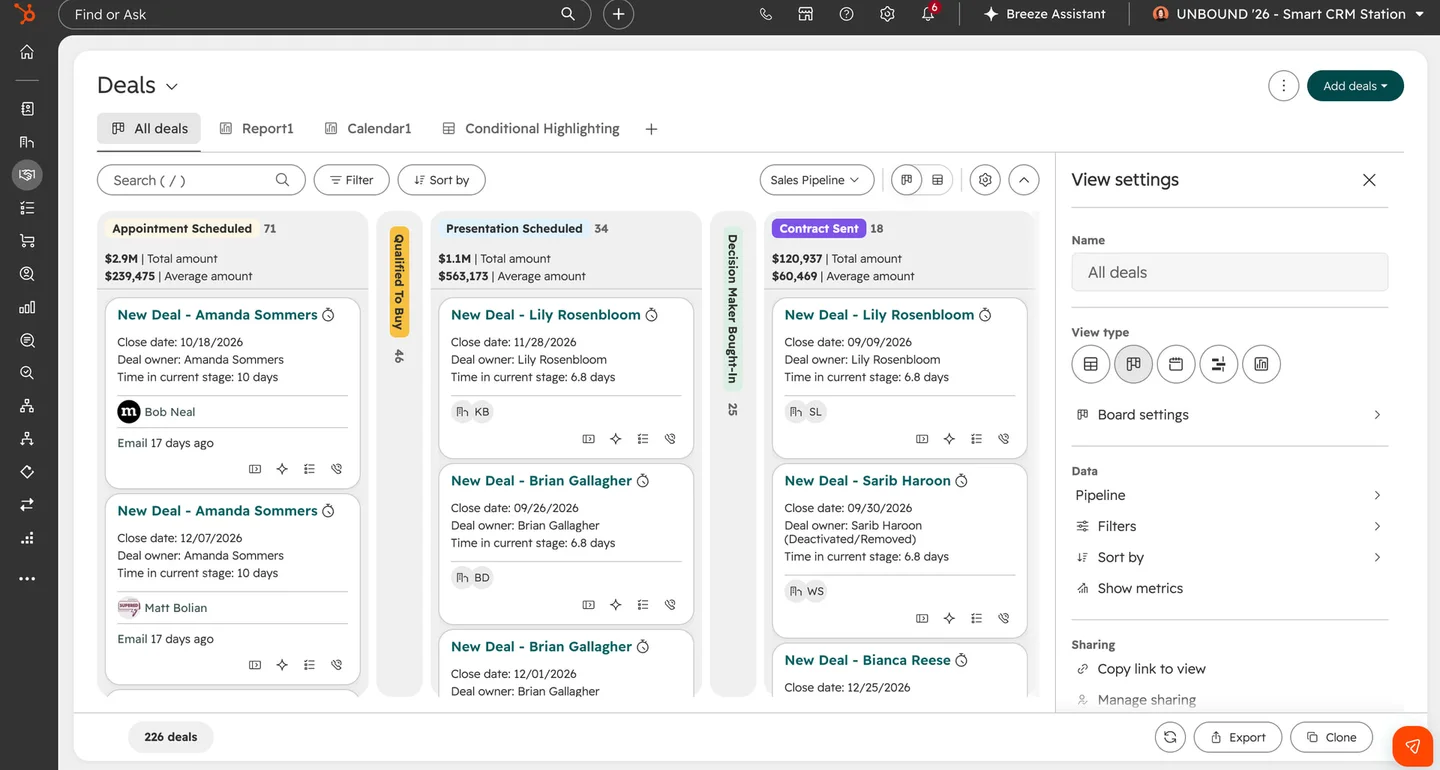
HubSpot said on September 4 that its redesigned Smart CRM index was live for all portals. The change covers the record lists for contacts, companies, deals, tickets, tasks and custom objects. This is a completion milestone following the earlier opt-in rollout covered by DailyRevOps, rather than a second announcement of the same launch.
The official notice describes more accessible view settings, collapsible filters and metrics, additional view formats, an embedded report view and column-level Breeze Assistant insights. It also describes creating properties and Data Agent smart properties from the index. Those are product descriptions, not independently measured productivity gains. Availability of the redesigned index should not be read as a promise that every associated AI capability is included in every subscription.
Start with the views that carry a business decision
DailyRevOps analysis: the practical unit of review is a saved operating view, not a screenshot of the new interface. A sales manager's late-stage review, a support lead's unassigned-ticket queue and a customer-success owner's upcoming-renewal list each carry different inclusion rules. A visually cleaner page can still be incomplete for the person using it to decide what to do next.
Choose the small set of views that actually drives a recurring meeting or customer action. For each, record its owner, intended audience, record type, filter conditions, visible columns and sort order. Ask the operator to explain the decision the view supports without opening a separate spreadsheet. If that explanation depends on an invisible assumption, capture the assumption before approving the view as a shared working standard.
Check hidden work, not just visible records
A useful acceptance test includes records that should appear and records that should not. Use a known overdue action, an unowned record, a record with a missing date and a completed item. These are test cases to prepare in an appropriate environment, not a reason to alter live customer records. Confirm that the intended inclusion and exclusion rules survive the team's actual navigation.
Collapsing a filter area may improve readability while making scope less obvious to a new user. Give important shared views names that identify the population and purpose. During training, demonstrate how to inspect the active filter before acting on a list. A manager should be able to distinguish a view of their team's open deals from a view of all open deals without relying on memory of the last click.
Keep convenient property creation inside the data model
When a new field seems useful, identify the decision it would support before adding it. Check whether an existing property already represents the same fact, who owns its definition and which systems write it. A convenient creation path does not settle those questions. Parallel fields with similar labels can split reporting and make apparently contradictory answers look equally official.
For a shared property, document its allowed values, source of truth, permitted writers and treatment of unknown information. Ask whether it belongs on the contact, company or commercial record. A note about one conversation should not silently become a permanent company-level fact. Review how the property will appear in exports and connected systems, especially where labels differ from stable internal identifiers.
Treat an insight as a review prompt
An operator receiving a generated explanation should first check which records and time window it describes. Then inspect a few of the underlying cases before changing a forecast, assigning customer outreach or recording a reason for a trend. This is an editorial recommendation for using summaries responsibly; it is not a claim that a particular generated insight is inaccurate.
Keep interpretation separate from action authority. A useful summary can help someone find a question faster while still being insufficient evidence for changing an amount, a stage or an account status. The reviewer should be able to state what additional evidence would justify the action and where that evidence will be retained. If the source population is unclear, resolve that uncertainty before distributing the explanation as a management conclusion.
A bounded first-week review
Ask one representative user from each affected operating group to complete a familiar task in the redesigned index. Observe whether they find the correct population, understand the current filters and reach the intended record. Record the point of confusion rather than merely asking whether they like the design. A short task-based check is more useful than an unrestricted redesign discussion.
At the next team review, inspect missed work, unexpected records, duplicate properties and unresolved access questions. Preserve the accepted view definitions and update the internal training reference once the behavior is understood. Do not attribute a change in conversion or revenue to the interface without a credible measurement design. The immediate outcome to verify is narrower: the right owner can find the right work and explain why it is in the queue.
Original source
This DailyRevOps article is written in our own words from the source signal and adds RevOps context, workflow analysis, and operator interpretation.
- Original source: HubSpot Community
- Original publication date:
- Source link: Read the original article