Short verdict
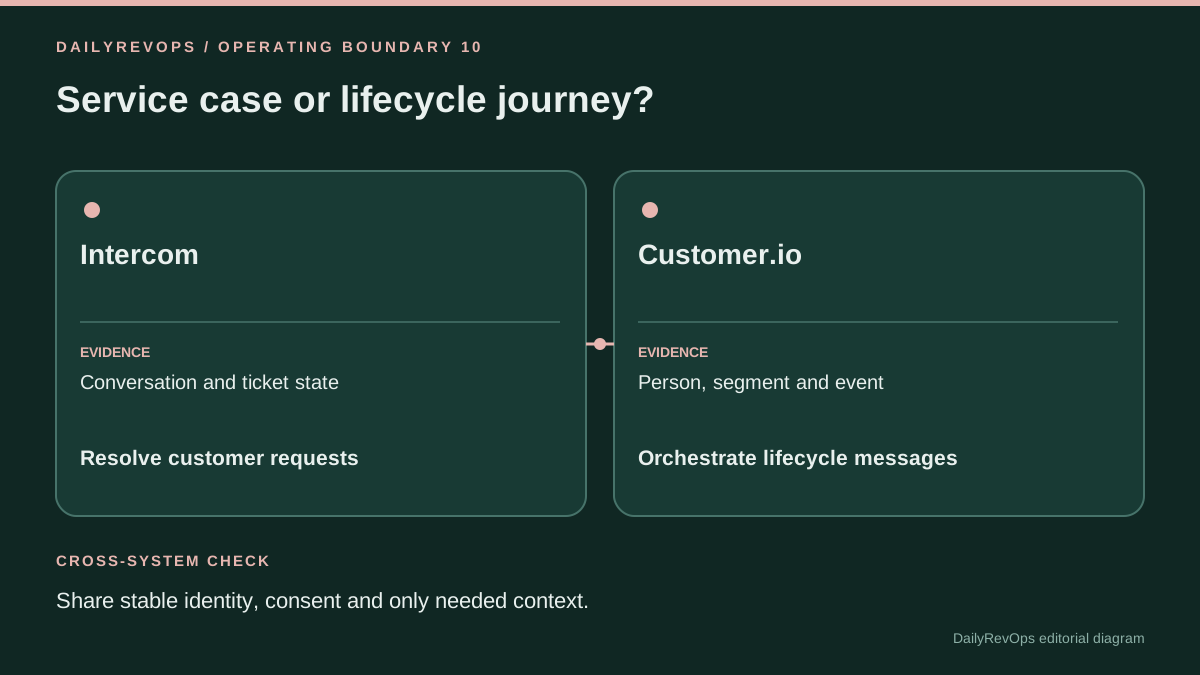
These products overlap in customer communication but are not interchangeable operating systems. Intercom is centered on support conversations, tickets and service workflows. Customer.io is centered on lifecycle audiences, journeys and messages. Use the platform that owns the business action, and pass only the customer context the other side needs with stable identity, consent and source attribution.
This comparison is written for RevOps, Sales Ops, GTM Operations, and Customer Success Ops teams that need a practical decision framework. It focuses on workflow ownership, CRM data quality, implementation effort, source-of-truth behavior, and the operating rhythm each option supports.
Who each option is best for
Intercom fits teams whose primary operating object is a live customer conversation, support case or ticket and who need service agents, routing, macros and support-state actions in the same workspace. Customer.io fits teams whose primary operating object is an audience, event-triggered journey or message and who need multi-channel lifecycle orchestration, segmentation and message design around profile and event data.
The right answer depends on the job the team is trying to improve. A tool that is strong for one operating model can be a poor fit when the real problem is ownership, dirty CRM data, missing renewal dates, weak handoffs, or an unclear forecast process. Use this page to map the workflow before treating either option as the default.
Operating questions before choosing
- Which recurring meeting or workflow will change if the team chooses Intercom or Customer.io?
- Which CRM records, fields, activities, or customer signals are required for the workflow to be trusted?
- Who owns the next action when the system surfaces a risk, alert, forecast change, or customer signal?
- Does the option write usable context back to the system of record, or does it create another place to inspect?
- What manual review work should decrease after implementation?
Side-by-side table
| Criterion | Intercom | Customer.io | Editorial note |
|---|---|---|---|
| Primary operating object | Conversation or support ticket | Person, segment, journey or message | The object should match the decision the team is trying to operate. |
| Typical trigger | Customer request, ticket event or support workflow | Profile change, event, segment entry, schedule or API call | Trigger design determines which current state must be rechecked. |
| Message context | Case history and live support conversation | Profile, event, segment and journey context | Neither context automatically owns commercial or consent truth. |
| Execution controls | Permissions, macros, assignment, ticket state and agent actions | Audience rules, message design, channel settings, workflow branches and send controls | Review the controls at the moment they commit customer action. |
| Current release signal | Macros can be staged during ticket creation | Design Studio can generate real-client email screenshots | Both changes move a preflight closer to execution in different workflows. |
| Identity risk | Wrong contact, organization or ticket association | Wrong profile, duplicate identity or incorrect event-to-person join | Stable IDs matter more than display labels. |
| Consent boundary | Support communication may rely on case context but still needs channel policy | Lifecycle sends require explicit subscription, suppression and channel eligibility rules | Do not infer consent from recent activity in another system. |
| Audit evidence | Conversation timeline, ticket state and action history | Journey, campaign, message and profile/event records | Keep cross-system execution IDs when an action spans both platforms. |
| Best complement | CRM, customer success, billing and product data | CRM, warehouse/CDP, product events and destination channels | Use integrations to provide evidence, not to erase source authority. |
| Release test | Customer selection, macro content, assignment and ticket-state result | Audience eligibility, personalization, rendering, send settings and downstream tracking | Test the actual customer-visible or record-changing boundary. |
Workflow comparison
- Write the customer job first: resolve a live service request, coordinate a support case, nurture a lifecycle cohort, send a transactional message or run another named workflow.
- Choose the platform that owns that action and keep its business state authoritative there. A lifecycle journey should not become the canonical support case, and a support ticket should not become the binding audience-consent record.
- Map stable customer IDs across Intercom, Customer.io and the CRM or warehouse. Record how merged, anonymous, duplicate and organization-level identities are handled before sharing context.
- Pass only the context required for the action. A support agent may need subscription or product context; a lifecycle message may need an open-case suppression flag. Avoid copying entire customer histories without a defined use.
- Test changed state between proposal and execution. If a ticket becomes critical or a person unsubscribes, the final action should use the new state rather than the state captured when the workflow started.
- Store a cross-system execution or correlation ID when one platform triggers work in the other so operators can reconstruct the source event, customer record, resulting message or ticket and any retry.
A RevOps workflow should produce a visible action, not only a report. When comparing Intercom and Customer.io, the team should look at the handoff from signal to owner to customer action. If the output does not change a task, meeting, field, renewal follow-up, forecast inspection, or manager review, the tool may become another dashboard rather than operating leverage.
Implementation complexity
Medium for either platform once customer identity, permissions, integrations and downstream actions matter. Complexity comes from different boundaries: service case state in Intercom, and audience, event, consent and message state in Customer.io.. The real complexity depends on data quality, ownership clarity, and whether the team changes its operating rhythm.
Implementation should start with source fields, permissions, integration points, and the review process. The most common failure is buying a tool before defining the workflow. A narrow pilot is usually safer than a full rollout because it reveals bad CRM fields, unclear owners, duplicate definitions, and gaps between the tool and the team operating cadence.
Data and CRM requirements
Reliable RevOps decisions need clean CRM data. Before choosing between Intercom and Customer.io, check owner fields, lifecycle stage, account and opportunity status, renewal or close dates, activity history, task ownership, and the fields that drive routing or reporting. If these fields are not trusted, the comparison should include a data cleanup step.
- Define the system of record for the workflow.
- List the fields that trigger action or reporting.
- Decide which fields can be written automatically and which need review.
- Document what evidence an operator should inspect before acting.
- Measure whether the workflow reduces missed follow-up or manual reconciliation.
Data model impact
- Maintain one stable customer or account key that can be resolved to Intercom contacts or organizations and Customer.io people or objects.
- Keep consent, subscription preferences and suppression reasons in the system chosen as authority and synchronize only the fields required to enforce them elsewhere.
- Keep ticket severity, assignment and case state traceable to Intercom; keep lifecycle journey and message state traceable to Customer.io.
- Store source system, source record ID, fetched-at time, destination action ID and correlation ID for cross-system actions.
- Separate customer-support sentiment or conversation signals from contractual, billing and renewal truth unless a governed rule explicitly combines them.
CRM fields and signals to check
- CRM account/contact ID, Intercom contact/organization ID, Customer.io person or object ID, merge status and association confidence
- Consent state, subscription topic, suppression reason, preferred channel and last verified timestamp
- Open ticket severity, assignment, customer reply, lifecycle journey, campaign membership and scheduled message state
- Source system, source field, fetched-at time, workflow version, action target, execution ID and retry count
Cost and maintenance considerations
Both products use commercial packaging that changes by plan, capabilities, seats or usage. DailyRevOps does not publish a universal price winner because the cited product sources do not provide a like-for-like current package for the same operating job. Compare the required Intercom support and AI capabilities with the required Customer.io messaging, data and channel capabilities, then add implementation, identity, integration, message volume, support and governance work from the actual quotes.
Cost should include licenses, setup time, admin maintenance, integration work, enablement, governance, and the opportunity cost of manual review. A cheaper workflow can become expensive if it requires weekly spreadsheet cleanup. A larger platform can become expensive if the team only uses a narrow part of it. RevOps should compare total operating cost, not only subscription price.
Risks and limitations
- Copying customer state between both platforms without a named source can create conflicting lifecycle, support or account status.
- A recent support conversation is useful context but should not automatically override consent, billing or commercial authority.
- A lifecycle segment can be analytically correct while a customer is temporarily ineligible for communication because of support, consent or destination policy.
- Broad write permissions across both systems make retries and incident reconstruction harder when one side commits and the other side fails.
- Vendor AI and automation capabilities should be evaluated as product functions, not as independent evidence of retention, resolution or revenue outcomes.
The main risk in any RevOps tool comparison is overgeneralizing. No tool is universally best. The fit depends on company stage, CRM maturity, sales motion, renewal volume, customer success model, admin capacity, and how disciplined the team is about acting on signals.
Implementation risk
- Test duplicate and merged identities before enabling cross-system triggers.
- Verify direction and freshness for every synchronized field rather than assuming integration health means semantic correctness.
- Test an unsubscribe, an open critical ticket, a changed account owner, an unavailable destination and a retry after uncertain completion.
- Keep support and lifecycle sandboxes or bounded test populations where possible, then verify the final customer-visible output in production-safe conditions.
- Document how an operator pauses one system when the other becomes unavailable so queued messages or support actions do not continue on stale context.
Governance risk
- Limit each platform and integration identity to the records and actions required for the named workflow.
- Preserve source attribution when customer context crosses systems so a summary does not become a new unsupported fact.
- Keep consent and sensitive support content subject to separate access rules; availability in an integration does not establish permission to reuse it.
- Review shared macros, templates, destination rules and agent instructions as production configuration with owners and change history.
- Keep a manual exception path for ambiguous identity, conflicting state and customer-impacting actions that cannot be resolved safely by policy.
Alternatives and complements
- A CRM can remain the shared account and commercial action surface while Intercom and Customer.io own service and lifecycle execution respectively.
- A warehouse or CDP can provide governed customer attributes and identity mapping without making it the execution surface for support or lifecycle messaging.
- A customer success platform can complement both when the team needs portfolio health, success plans and retention workflows beyond individual support cases or campaigns.
- A dedicated consent or preference service can complement both platforms when channel eligibility spans many customer-facing systems.
Weekly operating rhythm
- Monday: review identity and integration exceptions plus any customer records with conflicting support and lifecycle state.
- Midweek: sample cross-system triggers for correct customer identity, source attribution, suppression and final action state.
- Before major campaigns: reconcile open critical support cases and lifecycle eligibility according to the documented policy rather than ad hoc judgment.
- Friday: review retries, failed destinations, unexpected macro or message corrections and unresolved exceptions.
- Monthly: review permissions, shared templates or macros, stale synchronized fields and cross-system data that can be removed or narrowed.
Decision framework
- Use Intercom as the primary operating surface when the work begins with a customer conversation, support case, ticket state or service handoff.
- Use Customer.io as the primary operating surface when the work begins with profile or event data and needs an audience, journey, campaign, transactional message or multi-channel lifecycle action.
- Use both when support and lifecycle teams each retain authority for their domain and exchange a narrow set of customer context with stable IDs and explicit freshness.
- Create suppression or exception rules where activity in one system should temporarily stop action in the other, and keep the reason visible to operators.
- Expand automation only after a sample proves correct identity, current state, permission scope, customer-visible output, duplicate prevention and a reconstructable audit chain.
If the team cannot name the owner, source field, review cadence, and next action, pause the purchase and map the workflow first. Strong RevOps teams buy tools to close a defined operating gap. They do not use tools to discover the process after the contract is signed.
FAQ
Are Intercom and Customer.io direct substitutes?
Usually not. They overlap in customer communication, but Intercom is primarily organized around support conversations and service workflows while Customer.io is organized around lifecycle audiences, events, journeys and messaging.
Can an open support ticket suppress a lifecycle message?
Yes when the business defines that policy and the ticket identity, severity, freshness and suppression scope are reliable. Do not suppress every lifecycle message merely because any ticket exists.
Where should consent live?
In the governed system chosen by the business as the authority for that channel or subscription topic. Both execution platforms should consume the current decision rather than independently inventing consent state.
Which platform should write back to the CRM?
Only the platform or integration explicitly authorized for the target field and workflow. Keep field authority, prior value, evidence, execution ID and rollback ownership clear before enabling cross-system writes.
Source notes
These official references support the product and workflow context. DailyRevOps uses them to bound the comparison, not to imply outcomes, rankings, or adoption claims.
- Intercom macro ticket creation: Official September 16, 2026 release for applying a macro while creating a ticket.
- Intercom macro documentation: Official help documentation for macro permissions, messages and actions.
- Customer.io release notes: Official September 15, 2026 release for real-client screenshots in Design Studio.
- Customer.io documentation: Official documentation describing profile, event, messaging and integration workflows.
Last updated: 2026-09-17